
Concept
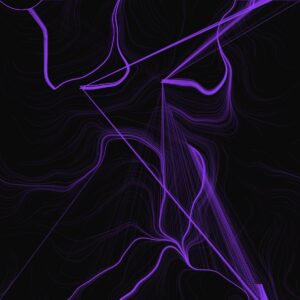
In class, we mostly looked at one object following one attractor. For this assignment, I wanted to see what happens when multiple attractors and repulsors fight for control over thousands of tiny particles.
-
The Magnets: I placed 3 invisible “charges” on the screen. Some pull (Attractors) and some push (Repulsors).
-
The “Weavers”: These are hundreds of tiny particles that spawn, trace the invisible lines of force for a short time, and then vanish.
-
The Turbulence: To stop the pattern from looking too perfect and mathematical, I added wind using Perlin Noise. This adds a slight wobble to the particles, making the final drawing look like organic flow—like muscle fibersl
-
Interaction: Clicking the mouse adds a massive “Disruptor” force (Repulsion) that pushes the flow away from your cursor, carving a hole in the pattern.
Code Highlight
I am particularly proud of the applyBehaviors function. This is the engine that drives the movement. It calculates the “Net Force” for every particle by summing up three different influences: the structural pull of the magnets using vector subtraction, the organic flow of the Perlin noise, and the interactive push of the mouse.
applyBehaviors(magnets) {
    let netForce = createVector(0, 0);

    // A. FORCES FROM MAGNETS
    for (let i = 0; i < magnets.length; i++) {
      let m = magnets[i];
      let force = p5.Vector.sub(m.pos, this.pos);
      let dist = force.mag();

      // Avoid extreme forces when very close
      dist = constrain(dist, 10, 100);

      // Physics: Force = Strength / Distance
      force.setMag(m.strength / dist);
      netForce.add(force);
    }

    // B. MOUSE REPULSION (Interaction)
    if (mouseIsPressed) {
      let mousePos = createVector(mouseX, mouseY);
      let mouseForce = p5.Vector.sub(this.pos, mousePos); // Points AWAY
      let dist = mouseForce.mag();

      if (dist < 150) {
         mouseForce.setMag(5); // Strong push
         netForce.add(mouseForce);
      }
    }

    // C. TURBULENCE (Perlin Noise)
    // Makes the lines look like wood grain or flowing water
    let n = noise(this.pos.x * 0.005, this.pos.y * 0.005);
    let angle = map(n, 0, 1, 0, TWO_PI);
    let wind = p5.Vector.fromAngle(angle);
    wind.mult(0.5); // Add just a little bit of organic chaos
    netForce.add(wind);

    this.applyForce(netForce);
  }
Milestones & Challenges
I first started experimenting with how to make a magnetic field in p5, so I made a sketch with a bunch of rods that follow the mouse which acts as a magnet. They rods created a nice magnetic field pattern which inspired the final piece.
I learned how to do this from this sketch.
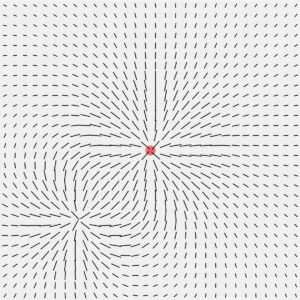
After that, I began playing around with different colors and ended up deciding on this neon purple one with a dark background. Here, the mouse was the magnet, but I noticed that after some time following the mouse, the particles would all be on top of each other and show as one. Because of this, I decided to put multiple attractors, which made no two particles follow the same path.
Reflection & Future Work
This project felt like a significant step up because I was simulating a system of forces rather than just a single interaction. The result looks less like a computer simulation and more like a generative painting.
Future Ideas:
-
Color Mapping: Map the color of the line to the stress (force magnitude) at that point. High-stress areas (near magnets) could be red; low-stress areas could be blue.
-
Moving Magnets: Have the magnets slowly drift around the screen using sine waves, causing the pattern to shift and morph over time.