
Swinging Shadows: Simulating Harmonic Motion and Light
Concept & Inspiration
The initial idea for this sketch was born out of an interest in exploring simple harmonic motion and dynamic lighting. I wanted to create a scene that felt alive, where pendulums swing back and forth, casting real-time, infinite shadows over a central object.
While a pure top-down 2D view was the starting point, I quickly realized that squashing the arc of a pendulum into a straight line kills the illusion of gravity and momentum. To fix this, I shifted the frame of reference to a 2.5D isometric perspective. By pitching the camera down slightly, the vertical arc (the Z-axis height) of the pendulum becomes visible, allowing for suspension wires and a much more realistic sense of depth and physics.
The Sketch
Interact with the canvas below! Use the + and − buttons to add or remove swinging lamps.
Code Highlight: The Shadow Engine
Creating realistic lighting and shadows in the canvas without relying on heavy, resource-intensive raycasting is a fun challenge. Instead of standard lighting engines, I am particularly proud of the custom reverse-masking trick used here.
To keep the shadows perfectly sharp while maintaining the angled 2.5D perspective, the math temporarily stretches the angled coordinate space back into a perfect 2D circle, calculates the exact light tangents of the cylinder relative to the light source, and then squashes the coordinates back down to match the camera tilt. It then draws a polygon matching the background color to act as a stencil, creating perfect, infinite shadows.
// 3. Draw shadows cast by the lamps on the cylinder
  fill(bgColor); // Shadows act as a mask matching the background
  noStroke();

  for (let pos of currentPositions) {
    // Stretch the position mathematically to compensate for the 2.5D tilt
    let stretchY = cy + (pos.y - cy) / tilt;
    let stretchX = pos.x;

    let d = dist(cx, cy, stretchX, stretchY);

    if (d > cylinderRadius) {
      // Calculate exact tangent points on the stretched perfect circle
      let angleToCenter = atan2(stretchY - cy, stretchX - cx);
      let theta = asin(cylinderRadius / d);

      let angle1 = angleToCenter + PI - theta;
      let angle2 = angleToCenter + PI + theta;

      let p1x = cx + cylinderRadius * cos(angle1);
      let p1y_circle = cy + cylinderRadius * sin(angle1);
      let p2x = cx + cylinderRadius * cos(angle2);
      let p2y_circle = cy + cylinderRadius * sin(angle2);

      // Squash the Y coordinates back down to match our tilted screen perspective
      let p1y = cy + (p1y_circle - cy) * tilt;
      let p2y = cy + (p2y_circle - cy) * tilt;

      // Project the shadow polygon far off the canvas
      let rayLength = max(width, height) * 2;
      let p3x = p1x + (p1x - pos.x) * rayLength;
      let p3y = p1y + (p1y - pos.y) * rayLength;
      let p4x = p2x + (p2x - pos.x) * rayLength;
      let p4y = p2y + (p2y - pos.y) * rayLength;

      // Draw the masking quad
      beginShape();
      vertex(p1x, p1y);
      vertex(p2x, p2y);
      vertex(p4x, p4y);
      vertex(p3x, p3y);
      endShape(CLOSE);
    }
  }
Milestones and Challenges
Milestone 1: Basic Pendulum Motion with Light Glow
The first major milestone was getting the pendulum physics working with a simple light effect. I started by implementing the basic sine wave motion for a single lamp and added a glowing effect using radial gradients. This helped me understand the core animation loop before adding complexity.
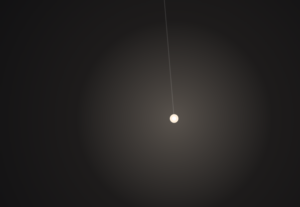
One challenge here was getting the light to look realistic. I had to experiment with diffrent opacity values and multiple gradient layers to achieve the soft glow effect.
Milestone 2: Adding the Cylinder and Shadow Projection
The biggest chalenge was implementing the shadow geometry. I needed to calculate the tangent lines from the lamp position to the cylinder edge, then project those shadows outward. This required understanding some trigonometry with atan2() and asin() to find the exact tangent points.
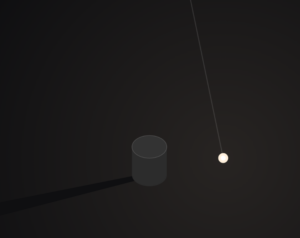
Getting the shadow to look correct from the tilted perspective was tricky. I had to “stretch” the lamp position back to a top-down view, calculate the tangents, then apply the tilt transform to the shadow vertices. After alot of trial and error with the math, it finaly worked!
Reflection & Future Work
Exploring how mathematical rules govern natural movement has been a recurring theme in my coding practice. Just as manipulating acceleration can simulate organic flocking behaviors, manipulating phase offsets and trigonometric tangents here brings mechanical pendulums to life. Shifting from a flat plane to a 2.5D environment was the biggest hurdle, but it completely transformed the visual weight of the project.
For future iterations, I would love to push the visual polish even further. Adding a subtle, fading particle trail behind the glowing bulbs could give the motion more visual history. Additionally, mapping the user’s mouse coordinates to the tilt variable would allow for dynamic camera control, letting users seamlessly fly the camera from a pure top-down view to a low, ground-level angle in real-time. Finally, integrating these canvas controls into a more robust, styled UI overlay would align it nicely with modern web design standards.