
The Digital Milky Way
Concept
When thinking about the midterm project I was trying to come up with a design that would be both enjoyable to build and beautiful for the viewers to experience. Something that has always fascinated me with both intrigue and beauty is the space, endless galaxies, start, planets… So my goal was to recrate some of that in p5 and try to make an artwork out of it.
I had also worked on space design for my previous assignments and found that those were the assignments I enjoyed working on the most and the ones that in my opinion turned out the most beautiful so the decision was obvious and quickly made.
Like many other projects of mine I didn’t want the user to be just a viewer. I wanted everyone to be able to experience the artwork by interacting with it. So besides adding the 3 modes that can be accessed with pressing numbers 1,2 and 3 on the keyboard I also implemented a click function which pushed away the particles creating interactive art.
The three modes
The project is divided into 3 different states all showing another beautiful part of space.
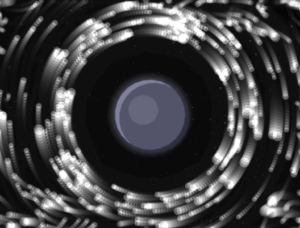
1. Planet with a ring
The first mode is inspired by Saturn which is known for its beautiful ring that circles it. It is also inspired by my previous work where all my planets had rings. I think this brings depth to the planets and makes them more than just colored circles on the screen. For the ring I decided to integrate a particle system that we have been using in class which did make the project look way better, but also did give my laptop some troubles which I will talk more about later.
2. Black hole
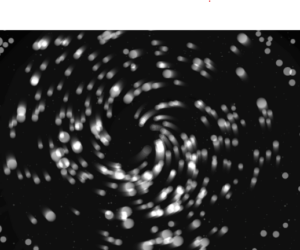
The second mode of the project takes us into the fascinating world of black holes. To be more precise, the second mode gives the user the ability of the black hole at their fingertips, or should I say, mouse pointer. The particles are now start being dragged into the black hole as the planet disappears outside of the users view.
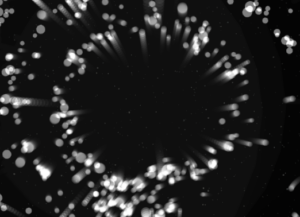
2.1 Black hole “sub-mode” (It’s not a bug its a feature!)
When testing and implementing all the different modes I discovered something very interesting. If, during the 2nd mode, the user puts their mouse in the middle and lets the particles come together and then quickly removes the mouse it makes the particles explode in different directions creating a beautiful scene. I decided to leave the bug and use it as a feature in the design.
3. Galaxy
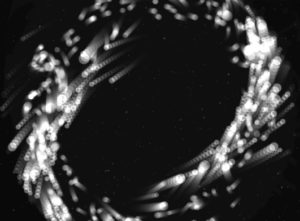
The third and final mode is the galaxy mode. Inspired by our galaxy, The Milky Way, it is supposed to represent the beautiful formation of galaxies in and outside of our observable universe. Particles are the main theme of this mode as they create a loop like shape that simulates galaxies. But since I felt that this mode could have some extra interactivity I implemented the click mechanic that pushes particles away.
I believe all the modes turned out how I wanted them to be and one of my favorite things to do is switch between modes and watch how the particles react to the different states they are given and I hope the users will enjoy them too.
Milestones
The road from the blank canvas to the finished product was a fun one but it did bring some challenges along the way. In the following passage I will try to explain some of the systems implemented in the project and how they work as well as walk you through some challenges I faced and what I did to overcome them.
From the start of the project I knew I was going to work with the particle system and guided by previous experience from class where my laptop kind of struggled to run the basic particle system I knew I was in for a ride. But to make my life easier, before implementing the particle system using textures and WEBGL I decided to create them with simple dots that my laptop would be able to run and which I could later replace for particles.
This turned out to be a great idea as it helped me develop the logic without making my laptop work too hard so I could focus on the logic more than worrying about performance.
Orbit mode
The orbit mode was used as a base for the whole project. Essentially, I wanted to simulate a static planetary system where all objects moved in a predetermined circular pattern. Instead of coding circular motion, I wanted to implement a combination of forces to simulate such a system.
Each particle is assigned a target radius, which determines the ring it belongs to. These radii are grouped into bands to create multiple layers of rings:
let targetR =
  band < 0.60 ? random(115, 170) :
  band < 0.90 ? random(185, 245) :
                random(265, 335);
There are also multiple forces that act on the particles to create the orbit effect.
Gravity like attraction:
let grav = toCenter.copy().mult(0.14 * planet.massScale / (1 + d * 0.006));
Tangential force:
let tangential = createVector(-toCenter.y, toCenter.x);
tangential.mult(0.22 * planet.spin);
Spring force:
let err = d - p.targetR;
let spring = toCenter.copy().mult(err * 0.008);
Together all of these help create the ring like structure we see on the screen.
Galaxy mode
One of the most important design decisions was to re-seed particle positions when switching to galaxy mode:
initGalaxy();
Instead of placing particles in discrete rings, they are distributed in a dense radial disk, with higher concentration near the center:
let diskR = 18 + (-log(1 - u)) * 60;
Also a characteristic of galaxies is the fact that particles closer to the center rotate faster than those further away. I implemented this using:
let orbit = 1.0 / sqrt(r * 0.85)
Thankfully I didn’t have any major challenges other than my laptops performance and the rest of the project went smoothly. I had to increase the pixel density when I was saving the photos but since my laptop struggles so much to run it I returned it to 1 so I could actually watch my project.
Video documentation
Video showcasing the interaction withing the project:
Final sketch
Reflection and Future Improvements
Working on this project was very fun and scary at the same time. It was fun to get to implement things that we have worked on in previous classes and to bring everything together into one project, but it was scary to think about everything that could go wrong on such big project and to have to worry about laptop performance holding me back. But overall I am very happy with how the project turned out and am excited for others to experience it also.
As for the future improvements I would definitely love to play with colors and add more planets and different galaxies to the project. I would also maybe explore implementation of sound in some way but am not sure what kind at this moment.