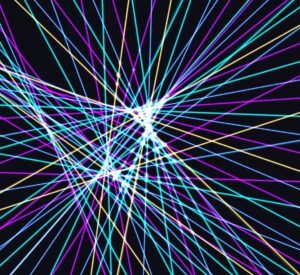
This sketch is laggy on p5 web editor so I included a video on VS Code.
This sketch is inspired by teamLab Phenomena’s Light Vortex.
This sketch creates a generative laser show where beams of light emerge from the screen edges and converge to form shifting geometric patterns. The visual experience centers on the idea of a “central attractor” shape. Every beam starts at a fixed position on the edge of the canvas. The end of each beam connects to a point on a central shape. These shapes cycle through circles, squares, triangles, spirals, waves, and stars. As the user triggers a transition using the button Space, the endpoints of the beams slide smoothly from one shape’s perimeter to the next.
I began with a prototype and then improved my sketch.
The logic requires several fixed values to maintain performance and visual density. I chose 144 beams total. This provides 36 beams per side of the screen.
const NUM_BEAMS         = 144;
const BEAMS_PER_EDGE    = 36;
const TRANSITION_FRAMES = 120;
const MODES             = ['circle', 'square', 'triangle', 'spiral', 'wave', 'star'];
The state variables manage the current shape and the animation progress. transitionT tracks the normalized time (0 to 1) of the current morph.
Each laser is an instance of a Beam class. This class stores the origin point on the screen edge and handles the color logic. The recalcOrigin method assigns each beam to one of the four sides of the rectangle.
recalcOrigin() {
    const e = this.edge;
    const k = this.index % BEAMS_PER_EDGE;
    if (e === 0)      { this.ox = W * (k + 0.5) / BEAMS_PER_EDGE; this.oy = 0; }
    else if (e === 1) { this.ox = W; this.oy = H * (k + 0.5) / BEAMS_PER_EDGE; }
    // ... logic for other two edges
}
To create a “glow” effect, I draw the same line three times with different weights and transparencies. The bottom layer is wide and faint. The top layer is thin and bright white. Basically drawing from the gradiant concept professor Jack showed us when he created a gradient on a circle.
The most technical part of the code involves the getShapePoint function. Every shape needs to map a value t (from 0 to 1) to a coordinate (x, y).
The circle uses basic trigonometry. The square divides $t$ into four segments.
function squarePoint(t, r) {
  const seg  = t * 4;
  const side = Math.floor(seg) % 4;
  const frac = seg - Math.floor(seg);
  switch (side) {
    case 0: return { x: -r + frac * 2 * r, y: -r };
  }
}
For polygons, the code treats each side as a separate linear path. For the square, the path is divided into four equal segments. If normT is between 0 and 0.25, the point is on the top edge. If it is between 0.25 and 0.50, it moves to the right edge.
function calcSquareVert(normT, maxRadius) {
  const totalSegs = normT * 4;
  const activeEdge = Math.floor(totalSegs) % 4;
  const edgeLerpFrac = totalSegs - Math.floor(totalSegs);
  // map sub-coords based on current active edge
}
function intersectionAlpha(ix, iy) {
  const threshold = min(W, H) * 0.12;
  let minD = Infinity;
  for (let k = 0; k < SHAPE_SAMPLE_N; k++) {
    const d = Math.sqrt((ix - shapeSamples[k].x) ** 2 + (iy - shapeSamples[k].y) ** 2);
    if (d < minD) minD = d;
  }
  return constrain(Math.exp(-3.5 * minD / threshold), 0.03, 1.0);
}
The atmosphere relies on blendMode(ADD). This mode makes colors brighten as they overlap.
Then I wanted to add my special touch for the glow. As a video editor and motion designer, I use this special overlay effect a lot called Light Leaks. Here’s an example if you do not know what light leaks are.
Here’s a video of how it looked like before the light leaks. It was so flat so the light leaks were defintely a good addition.
I added a drawLightLeaks function. It uses p5’s noise() to move large, soft radial gradients around the background. These gradients use a low opacity to simulate lens flare or atmospheric haze.
function renderLightLeaks() {
  blendMode(ADD);
  const activeLeaks = 2;

  const leakColors = [
    'rgba(40, 120, 255, 0.25)', // elec blue
    'rgba(120, 40, 255, 0.20)', // deep violet
    'rgba(255, 175, 45, 0.15)'  // warm gold
  ];

  // iter to gen noise-driven radial gradients
  for (let iterIdx = 0; iterIdx < activeLeaks; iterIdx++) {
    let noiseX = noise(iterIdx * 10, frameCount * 0.002) * canvasWidth;
    let noiseY = noise(iterIdx * 20 + 100, frameCount * 0.002) * canvasHeight;
    let radiusVal = (0.5 + noise(iterIdx * 30 + 200, frameCount * 0.0015)) * max(canvasWidth, canvasHeight) * 0.8;

    let radGrad = drawingContext.createRadialGradient(noiseX, noiseY, 0, noiseX, noiseY, radiusVal);

    // bind colors and fade out alpha
    radGrad.addColorStop(0, leakColors[iterIdx % leakColors.length]);
    radGrad.addColorStop(1, 'rgba(0, 0, 0, 0)');

    drawingContext.fillStyle = radGrad;
    drawingContext.fillRect(noiseX - radiusVal, noiseY - radiusVal, radiusVal * 2, radiusVal * 2);
  }
  blendMode(BLEND);
}
As always with all of my sketches, I faced a performance issue. Thankfully after running into preformance issues a billion times in my life I managed to get better with knowing how to resolve them. Calculating 144 origins and 150 shape samples every frame is cheap. Calculating thousands of potential intersections is expensive. Drawing every intersection would create too much visual noise. The calcIntersectAlpha function calculates the distance between an intersection point and the nearest point on the central shape. Nodes far away from the core are transparent. Nodes near the core glow brightly.
-
updateCachedEnds: This function runs once at the start of thedraw()loop. It stores the end position of every beam. This prevents the intersection loop from recalculating the morphing math thousands of times. -
updateShapeCache: This pre-calculates the geometry of the central shape. The intersection alpha function uses this cache to quickly check distances without running the shape math again. -
Collision Cap: I set
MAX_LINE_INTERSECTSto 800. This ensures the computer never tries to render too many glowing dots at once.
For future improvements, I tried making the light beams draw an illusion of a 3d shape while still in a 2d canvas. This kind of worked but kind of didn’t because I think I would need to implement dynamic scaling because the canvas looked overwhelming even thou you can still see the object. I decided to scrap this idea and remove it from the code. here’s how it looked like.