
My main inspiration came from this video: Instagram
For this project, I chased the feeling of something between a pulsar and a deep-sea creature. The working title became Melancholic Bioluminescence, which sounds like a Spotify playlist but the fun thing about creating projects is having full authority and ownership over everything and its my sketch so I’ll name it that.
The core interaction is simple and satisfying to say out loud: hold your mouse down, energy accumulates, release it to detonate. Hold longer, bigger explosion. That’s the entire loop. What makes it interesting is the texture of the accumulation. Particles spiral inward like a black hole, and the glow resembles energy accumulating within that blackhole.
Before writing a single line, I sketched the architecture on paper. The system has three major layers of responsibility: the global state (are we holding? are we exploding? what’s the charge level?), the particle population (a pool of objects that each manage their own physics), and the vfx (trails, embers, glow pulses, which are short-lived visual elements that don’t need the full particle class). I accumulated my notes and compiled them into a beautiful psuedocode that I can follow, this is me abusing what I learned taking Data Structures and honestly desgining the system beforehand works for me really well
please check the pdf for the psuedcode because there’s this ANNOYING issue that no matter whats the scale of the screenshot I am uploading its always so blurry and small.
I also want to disclose that AI helped me with many mathematical sections within this sketch, I wouldn’t be able to understand the math or get around it on my own I think. But I promise my usage is not excessive or dependent and I actually use it to learn haha
Anyway, I started writing attributes for the particle class and oh boy they added up QUICKLY. Here’s a snippet. I tried assigning random values manually but it was very very hard to find the sweet spot for everything so I used some help from AI to assign the proper values to those attributes and I tweaked them a little bit and got really good results.
class Particle {
  constructor(x, y) {
    this.x = x;
    this.y = y;
    this.vx = 0; this.vy = 0;
    this.nox = random(10000);
    this.noy = random(10000);
    this.ns  = random(0.0015, 0.004);
    this.driftSpd = random(0.5, 1.2);

    this.baseSize = random(1.8, 4);
    this.size     = this.baseSize;

    this.baseHue = random(228, 288);
    this.hue     = this.baseHue;
    this.sat     = random(55, 85);
    this.bri     = random(75, 100);
    this.alpha   = random(40, 70);
    this.maxAlpha = this.alpha;

    this.life    = 1;
    this.dead    = false;
    this.wobAmp  = random(0.3, 0.9);
    this.wobFreq = random(2, 4.5);
    this.orbSpd  = random(0.015, 0.04) * (random() > 0.5 ? 1 : -1);
    this.drag    = random(0.93, 0.97);
    this.explSpd = random(0.6, 1.4);
    this.rotDrift = random(-0.35, 0.35);
    this.absorbed = false;
    this.trailTimer       = 0;
    this.suctionTrailTimer = 0;

    this.behavior     = BEHAVE_RADIAL;
    this.spiralDir    = random() > 0.5 ? 1 : -1;
    this.spiralTight  = random(0.03, 0.09);
    this.boomerangTimer = 0;
    this.boomerangPeak  = random(0.3, 0.5);
    this.flutterFreqX = random(5, 12);
    this.flutterFreqY = random(5, 12);
    this.flutterAmp   = random(2, 6);
    this.cometTrailRate = 0;
    this.explodeOriginX = 0;
    this.explodeOriginY = 0;
  }
A useful frame for interactive generative art is the state machine. This sketch has three primary states that produce visually distinct experiences, and the transitions between them are where most of the design work happened.
Idle state: No mouse interaction. 80 particles drift across the canvas on Perlin noise. Each particle has its own noise offset, frequency, and speed. The result is slow, organic, slightly hypnotic. The palette sits in the 228-288 HSB hue range (blue through violet) and particles breathe gently at a rate of 2 cycles per second. This is the sketch’s resting face, and it needs to be beautiful enough to watch on its own.
Charging state: Mouse held. New particles spawn at the edge of the screen and get pulled toward the cursor which acts as an attractor. Spawn rate accelerates from 1/frame to 18/frame as charge approaches maximum. The vortex arms appear past 8% charge: three logarithmic spirals that rotate faster as charge builds, drawn with beginShape()/vertex() and per-vertex stroke colors that fade toward the outer edge. The glow orb grows around the cursor. Screen rumble starts at 60% charge. Particles near the cursor compress and brighten. The hue of nearby particles shifts toward 305, a hot magenta-violet. Every visual element does the same narrative work: energy is accumulating.
Explosion state: Mouse released. This is tiered across four discrete levels (0 through 3) based on charge thresholds at 0.25, 0.55, and 0.85. Tier 0 is a gentle push. Tier 3 is a white-flash, screen-shake, 800-pixel-radius detonation that spawns up to 70 child particles from split candidates nearest the blast origin. Each particle in blast range gets a force vector calculated from distance falloff (pow(1 - d/blastRadius, 2)), a random rotation drift, and a behavior assignment weighted by proximity to center and charge level. The explosion duration scales with charge, from 1.4 seconds to 4 seconds. The slowdown at high charge gives full-tier explosions a cinematic quality: the cloud expands, holds, then dissipates.
The variation space this produces is wide. A quick series of light taps creates a dotted constellation. Holding in one place while moving slightly creates smeared, comet-like trails. A patient full charge, held long enough to feel the rumble, produces a different kind of satisfaction.
the scariest things about this project were two things braided together: performance under additive blending with 700+ particles, and making the multi-behavior explosion feel coherent rather than random.
Additive blending (blendMode(ADD)) is visually spectacular. Overlapping particles bloom into white rather than muddy brown. The cost is real though: each ellipse composites against everything underneath it. With three ellipses per particle (the outer glow halo, the mid-glow body, and the bright core), plus trail objects, plus embers, a naive implementation at 700 particles hits framerate problems fast. The risk was a beautiful system running at 20fps. I ran many optimization processes but then I migrated to VS code which was MUCH smoother but I don’t know how smart that is going to be because in the end I’m gonna have to embed the sketch in p5.js web editor so it wouldn’t make sense or a difference that it runs smoothy on my device but its laggy on the website.
The mitigation strategy relies on hard caps with graceful degradation. Particles cap at 600 during charging and 700 overall. Trails cap at 1200 objects. Embers die slowly at life -= 0.003 per frame, about 333 frames of life. The three-ellipse draw call per particle uses deliberately low-resolution sizes: the outer halo is s*4, the body s*2, the core s*0.6, where s is typically 1.8-4 pixels. The glow effect comes from accumulation of tiny translucent shapes. The drawGlow() function uses 50 layered ellipses for the cursor glow, each with an alpha under 4, nearly invisible on their own.
For the behavior system, the risk was that five different particle behaviors during explosion would read as a mess of conflicting physics. To test this, I implemented behaviors one at a time and ran the explosion at full charge with only that behavior active, watching whether each produced a readable visual signature. BEHAVE_COMET needed the highest speed and the lowest drag (0.99 vs the standard 0.93-0.97) to produce visible streaks. BEHAVE_BOOMERANG needed the timer offset: if the return force kicked in immediately, particles just wobbled. They needed to actually leave the origin first. BEHAVE_FLUTTER was the most unpredictable and required the dampening multiplier (vx *= 0.985) to prevent runaway acceleration from the oscillating force.
The assignBehavior() method’s probability table weights behavior by charge level and proximity to blast center. Close-in particles at high charge get COMET and SPIRAL; far particles get RADIAL and FLUTTER. This creates a natural visual structure: a dense bright core of fast-moving comets surrounded by a slowly oscillating outer cloud. The explosion has a center and a periphery, which reads as physically plausible even though the physics are entirely invented.
The remaining uncertainty heading into the midterm is whether the vortex spiral arm rendering, which uses nested beginShape()/endShape() with per-vertex stroke calls, holds up on lower-end hardware. The core mechanic, the charge-and-release loop, and the explosion tier system all feel solid. The scary part is mostly tamed.
But there comes another problem. I don’t like the black background so I decided to create a galaxy background. I had a rough idea how to make it but I had to do some research.
Guess what, all of those links were useless. I found nothing of help but I didn’t want to give up. so I found this reddit post and I found this page and I follwed the principles and methods in the article to create something cool.
I tried to upload the gif of the animated image but I got this error so I will just upload a screenshot unfortunately.
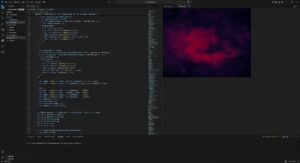
I really dont know why the resolution is so low my monitor is 4k resolution and honestly it’s too late for me to worry about this. Anyway, I would love to go with the galaxy design but unfortunately it lags like HELL even on VS code, maybe I’ll book office hours and see how I can troubleshoot this.
my next steps for this is to figure out the background and also try to replicate the main inspiration video because right now everything feels flat and I am starting to hate it.