Afra Binjerais – Assignment 3

Concept

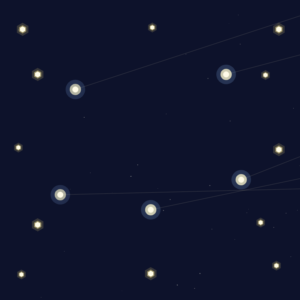
For this assignment, I built a night-sky inspired sketch using attractors and movers. In class, we used the attractor/mover system to show motion and forces, and I kept thinking: if attractors “pull” and movers “orbit,” that feels a lot like stars/planets. So my concept became a stylized sky at night, with glowing star bodies and drifting trails.

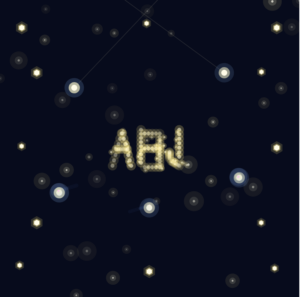
To add a personal twist, I placed my initials (ABJ) in the center as a constellation-like pattern made from many tiny attractor/mover pairs. The initials stay readable, but still wobble and respond to the mouse so they feel “alive.” Also to be honest this assignment wasn’t the easiest for me and isn’t my favorite, but it’s the best I can do so far with attractors and movers and I learned a lot through iteration 🙂

Inspiration

My main inspiration is simply the sky at night: glowing points, soft halos, and a sense of motion even when things are calm. I didn’t copy a specific image but I had the starry night in mind by Van Gogh. 

Sketch

How the code is organized

The code is organized  sections so the behavior stays understandable even as the sketch becomes more complex. I use two main classes: Attractor and Moverwhere attractors apply a gravitational-style force and movers respond with velocity and acceleration. Several helper functions control additional forces: repelFromMouse() pushes movers away from the cursor to add interactivity, applyTurbulence() introduces Perlin-noise-based motion so the movement feels organic instead of mechanical, and springTo() pulls movers back toward a target position. Scene-building functions like addMainOrbitPairs(), addEdgeOrbitPairs(), and addInitialsABJ() handle different visual systems in the sketch, separating setup from animation logic.

Code highlight I’m proud of

The part I’m most proud of is how I built the ABJ initials using point generators + tiny attractor/mover pairs. Each point of each letter becomes a mini “star” that’s pulled into place, wiggles with turbulence, repels from the mouse, and springs back to stay readable:

// Build ABJ using many tiny attractor+mover pairs.
// Each letter point is a fixed attractor with a mover that wiggles around it.
function addInitialsABJ() {
  let cx = 200, cy = 200;
  let letterW = 32, letterH = 48, spacing = 38;

  let oxA = cx - spacing - letterW / 2;
  let oxB = cx - letterW / 2;
  let oxJ = cx + spacing - letterW / 2;
  let oy = cy - letterH / 2;

  let aPts = letterAPoints(0, 0);
  let bPts = letterBPoints(0, 0);
  let jPts = letterJPoints(0, 0);

  for (let [lx, ly] of aPts) {
    let ax = oxA + lx;
    let ay = oy + (letterH - ly); // A is flipped vertically
    initialsPairs.push({
      attractor: new Attractor(ax, ay, 40),
      mover: new Mover(ax + random(-4, 4), ay + random(-4, 4), 1.2, 2, 0.05, 0.05),
    });
  }

  for (let [lx, ly] of bPts) {
    let ax = oxB + lx;
    let ay = oy + ly;
    initialsPairs.push({
      attractor: new Attractor(ax, ay, 40),
      mover: new Mover(ax + random(-4, 4), ay + random(-4, 4), 1.2, 2, 0.05, 0.05),
    });
  }

  for (let [lx, ly] of jPts) {
    let ax = oxJ + lx;
    let ay = oy + ly;
    initialsPairs.push({
      attractor: new Attractor(ax, ay, 40),
      mover: new Mover(ax + random(-4, 4), ay + random(-4, 4), 1.2, 2, 0.05, 0.05),
    });
  }
}

// In draw(): update ABJ using multiple forces so it moves but stays readable.
for (let p of initialsPairs) {
  p.attractor.attract(p.mover);          // pulls toward letter point
  p.mover.applyTurbulence(t * 0.3);      // gentle wiggle
  repelFromMouse(p.mover, 0.6);          // weaker mouse repulsion
  springTo(p.mover, p.attractor.pos, 0.018); // snaps back to letter shape
  p.mover.update();
}

Milestones + challenges

  • My first idea was using an image background (like a starry-night painting) and layering moving stars on top of it. I got it working, but visually it felt more like “decorating an image” than building a system, so I scrapped that direction. 
  • I switched to a fully generated background with glows and stars, and started focusing on the attractor/mover motion as the main design elements

  • Adding the ABJ initials was the biggest step: it made the sketch feel personal and gave me a focal point.

  • Challenge: The hardest part was balancing turbulence. Too little and everything looked static; too much and the motion became chaotic and the initials stopped reading as letters. I had to iterate on turbulence strength and also add a spring force so the ABJ points could move while still returning to a clean letter structure.

Reflection + future improvements

If I continued this project, I would improve the “sky” depth by adding multiple layers of stars that move at different speeds (parallax). I’d also experiment with making the attractors slowly drift so the whole constellation system evolves over time. Also, in this assignment you get the nature of the sky, but it doesn’t feel natural, so that’s something that I need to keep in mind.

Afra Binjerais – Assignment 2

Concept

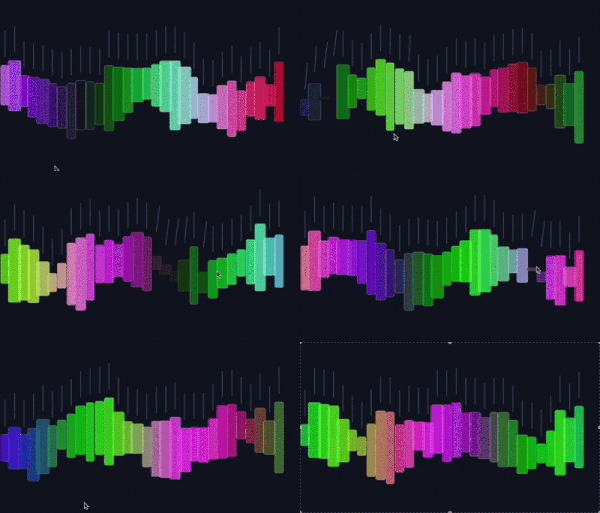
This sketch explores the movement of trees responding to wind. The main inspiration comes from observing how trees do not move rigidly or instantly, but instead sway, and slowly settle after a gust passes. I was particularly inspired by a reference video showing the collective motion of trees, where the movement feels alive and unpredictable rather than mechanically precise:

@heart_echo_creates

I love watching the trees sway in the wind and the sound it makes…soothing…#fyp #nature #trees #relaxing #naturelover #windy

♬ original sound – Heart_Echo_Creates


Instead of directly animating tree shapes, I focused on simulating the forces that cause the movement, allowing the motion to emerge naturally. The mouse represents wind: when the mouse is pressed, wind is applied, and when it is released, the environment returns to a calmer state.

Sketch

Highlight of some code

This sketch simulates tree movement by using a force-based system built around position (pos), velocity (vel), and acceleration (acc). Wind is applied through the applyWind() function, where a force vector is calculated toward a target and scaled using setMag() to control acceleration strength. Instead of directly controlling position, acceleration influences velocity, which is then damped using vel.mult(0.97) to simulate resistance and prevent abrupt motion. Wind strength is smoothly transitioned using lerp, avoiding sudden changes in force, while Perlin noise (noise()) continuously offsets the field position to create subtle movement even when no wind is applied.

// Acceleration-driven “wind” (force → acc → vel → pos)
applyWind(tx, ty, strength, maxSpeed) {
let target = createVector(tx, ty);
let force = target.sub(this.pos); // direction toward wind target

this.acc = force.setMag(strength); // ACCELERATION is the control
this.vel.limit(maxSpeed); // cap speed so it stays natural
}

update() {
this.vel.mult(0.97); // keeps it tree-like
this.vel.add(this.acc);
this.pos.add(this.vel);
}

Milestones and challenges

Initially, my plan was to have the wind continuously follow the mouse position. However, during testing, I encountered a major issue: when the mouse moved too quickly, the motion became glitchy. I experimented with changing acceleration values to smooth it out, but doing so removed the feeling that made the movement feel like trees.
So I decided to switch from mouse-movement interaction to mouse-press interaction. The wind becomes a controlled event rather than a constantly fluctuating input. This solved the glitching problem and preserved the idea of gust-based movement, which better communicates the behavior of wind moving through trees. Here is a video of when it was following the mouse.

Reflection & future work

With more time I would like to revisit the idea of having the system follow the mouse position more directly, but with improved smoothing techniques that preserve the tree-like behavior. I’m also interested in expanding the project beyond the screen.
One future direction would be integrating a projected camera and Arduino input, where physical movement in space such as camera motion controls the wind force. This would further emphasize the connection between real-world motion and the simulated environment, strengthening the metaphor of wind and trees.

Afra Binjerais – Assignment 1a

Reading on Computational Beauty of Nature

Reductionism is a concept that is new to me and the more I think about it the more true and relevant it feels. In everyday life, I often try to understand problems by breaking them down into smaller parts. Whether that is understanding my own emotions, solving schoolwork etc. it’s just part of human nature. This approach makes things feel more manageable which makes reductionism very important. However, this reading helped me realize that while breaking things down is useful, it does not always tell the whole story. 

In the reading, the author mentions the example of ants, and how a single ant is simple and limited, but an ant colony can build complex structures, organize labor, and survive in ways that no individual ant ever could. An ant cannot live alone, just as humans cannot truly function in isolation. Even though we often think of ourselves as independent individuals, much of who we are and how we behave comes from our interactions with others, and this is truly something I started to believe mostly after the COVID pandemic. 

Prior to reading this, I actually was very fascinated by the ant colonies as I stumbled across a video that shows what ant colonies look like and I feel it is relevant to share. It is so fascinating how a tiny species can create such structures as a collective:

@smartspeakenglish_

How a Billion Ants Built a City 🤯 #history #historyfacts #storytelling #story

♬ original sound – Smart Speak English

Code Production 

Concept

My concept is inspired by the assigned reading for the week and by observing natural systems, specifically the behavior of ants. The random walkers resemble how ants wander, react, and respond to their environment. Ants often appear to move unpredictably, yet their behavior changes instantly when they sense danger.

In this sketch, the walkers behave similarly. When the mouse approaches, they move away, mimicking how ants scatter when something comes too close. The mouse acts as a source of disturbance or threat. When the walkers enter the mouse’s radius, their color shifts to signal “danger.” This color shift, combined with their movement away from the cursor, represents a moment of survival instinct and reaction.

(I chose “Create a random walker with dynamic probabilities” from list 1, and combined it with the walkers shift through a small region of HSB space based on proximity to the mouse from list 2)

Code Highlight

A part of the code I’m particularly proud of is the color shifting behavior that happens when a walker enters the mouse radius. I wanted to keep the code relatively simple since this is my first assignment and I’m still re-familiarizing myself with p5.js after not using it for a long time. I intentionally focused on techniques I remembered from Intro to IM.

// color shifts only inside mouse radius
let r = mouseRadius();
let d = dist(this.x, this.y, mouseX, mouseY);

if (d < r) {
  
  let energy = map(d, 0, r, 1.0, 0.0);

  this.h = BASE_H + 35 * energy;           

  this.s = BASE_S;                       
  this.b = constrain(BASE_B + 25 * energy, 0, 100); 
} else {
  // return smoothly to base
  this.h = lerp(this.h, BASE_H, 0.08);
  this.s = lerp(this.s, BASE_S, 0.08);
  this.b = lerp(this.b, BASE_B, 0.08);
}

Sketch

Reflection & Future Work

Overall, I think this sketch successfully communicates the basic idea, but it is still visually very simple. In the future, I would like to make the piece more aesthetically refined. This could include adding more walkers, adjusting visual textures. Also the walker shift left when the mouse leave the canvas. 

I am also interested in researching ways to make the walkers look more like ants. Right now, the behavior suggests ants, but the visuals do not fully match that idea. Exploring more natural shapes, trails, or even segmented bodies could help strengthen the connection between the concept and the visuals.