
Concept
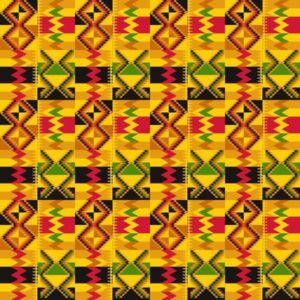
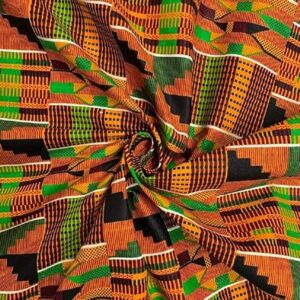
ConceptFor my midterm project, I’m creating “Digital Kente,” a generative art system inspired by Ghana’s traditional Kente cloth. Kente originates from the Ashanti Kingdom and is deeply symbolic – each color represents something (gold for royalty, green for growth, red for passion) and the geometric patterns tell stories. Instead of creating organic, flowing generative art, I’m constraining the system to produce structured, geometric patterns that echo the woven textile tradition. The challenge is translating the craft of weaving into code while maintaining cultural authenticity.My system uses horizontal bands with different geometric motifs – zigzag diamonds, checkerboard patterns, diamond shapes, and horizontal stripes – all arranged like traditional Kente strips. Each band uses specific color combinations from authentic Kente palettes extracted from reference images. The patterns are grid-based and angular, mimicking how warp and weft threads create precise geometric designs through repetition and intersection.Cultural Context:
Kente isn’t just decorative – it carries meaning. The geometric patterns I’m implementing (zigzag diamonds, checkerboards) are traditional motifs with cultural significance. By bringing Kente into generative code, I’m exploring how traditional craft techniques can inform computational creativity while respecting the cultural heritage. Inspiration:
-Traditional Ghanaian Kente weaving patterns
-The geometric precision and bold color blocking of woven textiles
-How simple thread intersections create complex visual patterns
-Memo Akten’s approach to mathematical constraints creating variety
Some Kente Samples
Current Sketch
Milestones and Challenges
Milestones
-Researched traditional Kente patterns and extracted authentic color palettes
-Implemented grid-based system for geometric precision (20px cells)
-Created 4 distinct pattern types: zigzag diamonds, checkerboard, diamond motifs, and horizontal stripes
-Developed band system where each horizontal strip uses different patterns
-Added palette switching between Ashanti (warm) and Ewe (bold) color schemes
-Implemented texture lines to simulate woven thread appearance
Challenge 1: Maintaining Cultural Authenticity While Being Generative
My biggest struggle has been balancing algorithmic freedom with cultural respect. Early versions used smooth Perlin noise and organic curves – it looked generative but didn’t feel like Kente at all. Real Kente is precise, geometric, and structured. The breakthrough was realizing I needed to constrain the generative system rather than make it more random. By limiting patterns to grid-aligned shapes, sharp angles, and bold color blocks, the output finally started resembling actual woven cloth. The lesson: sometimes creative constraints (cultural traditions) produce better results than total freedom.
Challenge 2: Color Distribution Balance
Kente cloth doesn’t use colors randomly – certain colors dominate while others accent. My first attempts assigned random colors to each cell, which created visual noise rather than the bold color blocking you see in real Kente. I solved this by creating “band colors” – each horizontal band gets a curated subset of 2-3 colors from the full palette, not all 5. This mirrors how traditional weavers select specific thread colors for each strip. Now band 1 might use gold/orange/black, while band 2 uses green/red. This creates visual rhythm and hierarchy instead of chaos.
Current System Architecture
The system is organized into layers:
1. Color Palettes:
Extracted from actual Kente cloth samples
Two palettes: Warm Ashanti and Bold Ewe
Each band selects a 2-3 color subset for cohesion
2. Band System:
Canvas divided into horizontal bands (8 cells high)
Each band assigned one of 4 pattern types
Patterns cycle predictably: zigzag → checker → diamond → stripes → repeat
3. Pattern Functions:
drawZigzagBand() – Creates diagonal zigzag forming diamonds
drawCheckerBand() – 2×2 checkerboard with alternating colors
drawDiamondBand() – Concentric diamond shapes
drawStripeBand() – Horizontal color stripes with vertical texture
4. Animation:
Subtle time-based offsets in pattern calculations
Creates gentle “breathing” effect without losing structure
Can pause/resume with mouse click
Next Steps
Moving forward, I plan to:
-Implement multiple operational modes (particle weaving, harmonic oscillation, flow field variants)
-Add resolution scaling for A3 print size (2480 × 3508 px)
-Integrate traditional Ghanaian sounds (weaving sounds, drumming) for cultural immersion
Reflection So Far
The most valuable lesson from this project is understanding that constraint breeds creativity. By limiting myself to geometric shapes, grid alignment, and traditional color combinations, I’m forced to be more thoughtful about every design decision. This is similar to how real Kente weavers work within the constraints of their looms and thread colors yet produce infinite variety.
Working with cultural source material has changed my approach to generative art. Every design choice now asks: “Does this honor the tradition?” rather than “Does this look computationally interesting?” The planned audio integration will take this further – transforming the project from a purely visual experience into something that engages multiple senses with traditional weaving sounds and Ghanaian drumming.
The system already produces distinct looks depending on which patterns align, how colors distribute, and where the animation phase is captured. Once I add the additional modes and layer in traditional sounds, the generative space will expand while maintaining Kente’s visual and cultural language.