Recreating the Void: teamLab Phenomena
Concept & Inspiration
We were tasked with selecting an installation that resonated with us and recreating its core aesthetic and interactive mechanics using p5.js.
I was immediately drawn to a specific room featuring a massive, heavy-looking dark sphere suspended in an intensely illuminated, blood-red space. Drawing on my background in film, I was captivated by the cinematic tension of the lighting. The stark contrast between the vibrant red environment and the pitch-black, light-absorbing object created a deeply imposing atmosphere. My goal was to translate that physical, heavy presence into a digital WebGL space, making the object feel tangible and reactive.
P5.js Sketch
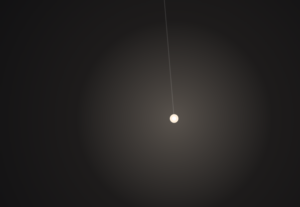
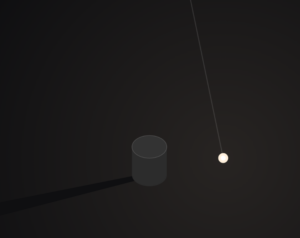
The final sketch places the user inside a contained 3D room. At the center is a thick, glossy black cylinder rotating on its edge, constantly drifting via Perlin noise. Rather than a static environment, the sketch utilizes dynamic lighting, a highly reflective “dark mirror” floor, and physics-based raycasting to allow the user to push the shape away from their specific point of view.
Code Highlight
One of the most interesting parts of the code to write was the 3D mouse interaction. Instead of just moving the object on a flat X/Y axis, I wanted the object to be pushed away from the camera’s exact perspective.
By subtracting the camera’s current 3D position from the shape’s position, we get a normalized vector. Depending on whether the user is just hovering or actively clicking, a different level of force is applied along that specific path to shove the object back into the 3D depth of the room.
// --- MOUSE HOVER AND CLICK INTERACTION ---
  // Convert mouse coords to WEBGL space
  let mx = mouseX - width / 2;
  let my = mouseY - height / 2;

  let d = dist(mx, my, shapePos.x, shapePos.y);

  if (d < radius + 20 && mouseX !== 0 && mouseY !== 0) {
    cursor('pointer'); // Hints to the user that this thing is clickable

    // Figure out which direction to push the shape (away from camera)
    let camPos = createVector(cam.eyeX, cam.eyeY, cam.eyeZ);
    let pushDirection = p5.Vector.sub(shapePos, camPos).normalize();

    // If clicking push it harder, otherwise just a gentle nudge on hover
    let pushForce = 0;
    if (mouseIsPressed) {
      pushForce = 250; // clicking = big push
    } else {
      pushForce = 80;  // just hovering = small push
    }

    baseTarget.add(p5.Vector.mult(pushDirection, pushForce));
  }
Milestones and Challenges
Milestone 1: Establishing the 3D Perspective and the “Dark Mirror” Illusion The very first major hurdle was moving from a flat 2D illusion to a true 3D space. Initially, looking straight at a red background with a split line felt too flat. I had to explicitly construct a “stage” with actual mathematical walls, a floor, and a ceiling using WebGL planes.
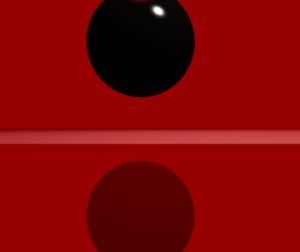
The biggest technical challenge within this milestone was faking the floor’s reflection. WebGL in vanilla p5.js doesn’t natively handle raytraced reflections. To solve this, I had to think about drawing order: I first drew a pure black version of the shape upside down underneath the floor coordinates. Then, I drew the floor on top of it using a slightly transparent, highly specular dark red material (fill(5, 0, 0, 220)). This allowed the inverted shape to bleed through, perfectly mimicking the glossy, dark mirror effect from the physical teamLab installation.
Reflection & Future Work
To make the digital installation feel as immersive as the physical one, I realized that visuals alone weren’t enough. I introduced a cinematic, low-frequency drone track (BGMUSIC.mp3) that begins looping the moment the user first interacts with the canvas. This heavy audio grounds the piece and gives the digital void a sense of physical scale.
I also focused heavily on non-verbal UI cues. To teach the user how to interact without writing instructions on the screen, I programmed the mouse cursor to dynamically change: a pointing finger when hovering over the object, an open hand when looking around, and a closed grabbing hand when dragging the camera. Furthermore, the sketch auto-pans upon loading, proving the space is 3D before handing control over to the user.
For future work, I would love to tie the p5.Amplitude() of the background audio to the thickness of the shape, allowing the object to pulse and “breathe” in time with the low frequencies of the drone music.