
The Concept
I wanted to make something that felt alive. Not a simulation of something external like weather or traffic, something that felt emotionally alive. I’ve played Celeste probably four or five times at this point and I love it way more than a normal person should. There’s this moment early in the game where you first get the dash ability and suddenly this tiny pixel character feels like she can do anything. I kept thinking: how much of that is physics? How much of it is just particles and forces?
So I decided to find out.
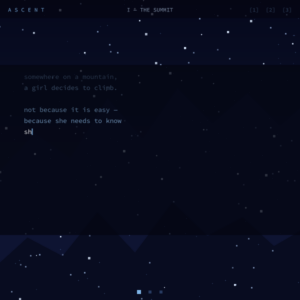
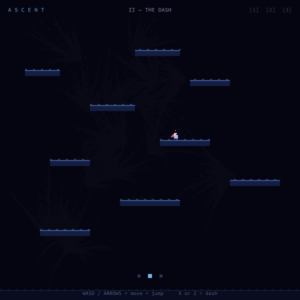
ASCENT is a three-scene generative art piece built in p5.js. Each scene is a different visual mood and a different physics experiment, but they follow the same emotional arc as Celeste: the intro, the climb, and the heart at the summit.
The core idea was to see how much of Celeste’s feel I could reverse-engineer using particle systems and real-time physics. Not copy the game but rather understand the underlying forces that make it feel the way it does. It was more of a learning experience for me.
The Physics Behind It
The whole piece runs on a few simple systems stacked on top of each other.
Scene I uses three independent arrays of snowflake particles: background, midground, foreground; each with different speed, opacity, and size. No 3D, no perspective maths, just layering. The depth emerges from the difference in speed. Each flake also has a wobble offset that drives a sin() drift, so they move like actual snow rather than falling straight down:
this.wobble += this.wobbleSpeed;
this.x += this.drift + sin(this.wobble) * 0.35;
this.y += this.speed;
Scene II is the physics-heavy one. The player character has proper velocity, gravity, platform collision, and an 8-directional dash. I tried to match how Celeste movement actually feels snappy stops, responsive direction changes, a dash that suppresses gravity mid-flight so diagonal dashes arc instead of dropping.
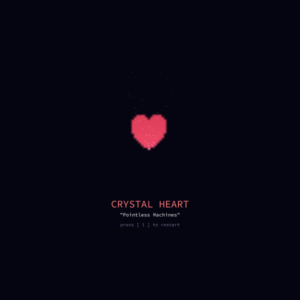
Scene III is where everything comes together. The Crystal Heart puzzle: six birds orbit above the platforms, each flying back and forth in a specific direction. The player has to dash in the correct sequence (just like the Chapter 1 bird mechanic in Celeste) and when they get it right, a cinematic kicks off that ends with a large glowing 3D heart rotating at screen centre.
Building It Up: Milestones & Challenges
Milestone 1: Getting the Player to Actually Stop Moving
This was my first real “it’s 1am and I have no idea what’s wrong” moment.
I had a keys2 = {} object and was updating it with keyPressed and keyReleased:
function keyPressed()  { keys2[key] = true;  }
function keyReleased() { keys2[key] = false; }
Seemed completely fine. But the character would just… get stuck. Once she started moving left she would never stop, no matter what I pressed. I tried everything clearing the object on scene change, logging the state every frame, adding explicit false-sets for every possible key string.
It took me way longer than I want to admit to figure out the actual problem. In p5.js, key is a single global string that gets overwritten on every single key event. So if you’re holding A and press D at the same time, then release A, by the time keyReleased fires, key is already 'D'. You just cleared D from your map instead of A. The character is now permanently stuck going left with no way to tell her to stop.
The fix was to throw the whole system out and use keyIsDown() instead. It queries the actual hardware key state in real time directly inside update(), so it’s always accurate, never stale, and you don’t need keyReleased for movement at all:
const L = keyIsDown(37) || keyIsDown(65);   // ← or A
const R = keyIsDown(39) || keyIsDown(68);   // → or D

if      (L && !R) { this.vx = -MOVE_SPD; this.facing = -1; }
else if (R && !L) { this.vx =  MOVE_SPD; this.facing =  1; }
else              { this.vx = 0; }
The else { this.vx = 0; } line is what actually makes it feel like Celeste. No momentum, no friction just instant stop when you let go. Turned out the snappiness was a feature, not a bug I was trying to add.
Milestone 2: The Dash Edge Case
Once movement worked I ran into the dash problem. I wanted the dash to fire exactly once per button press, but keyIsDown(88) is true for every frame you hold X. First attempt it would fire 12 dashes in a row the moment you pressed the key.
The fix was a one-line edge detector. You store whether the button was down last frame, and only trigger when it transitions from up to down:
const pressed = X && !this.dashWasDown;
this.dashWasDown = X;

if (pressed && this.dashReady && !this.dashing) {
  // fire dash exactly once
}
Also had to normalise the diagonal directions so a ↗ dash moves at the same speed as a → dash. If you don’t do this, diagonal dashes are 1.4× faster because the vector (1,1) has length √2. Multiplying both components by 0.7071 (which is 1/√2) brings it back to unit length.
Milestone 3: Particle Architecture
I spent a while figuring out the best way to organise the particles. I ended up giving each Player instance its own particles array so each scene manages its own effects independently. Every particle is a proper Particle class with update() and draw() methods.
The life system is what makes everything feel cohesive. Every particle starts at life = 1 and loses a random decayamount each frame. The colour, size, and opacity all interpolate from their start values down to zero:
let c  = lerpColor(color(...this.c2), color(...this.c1), this.life);
let sz = max(map(this.life, 0, 1, 0, this.sz) * PX, 1);
fill(red(c), green(c), blue(c), map(this.life, 0, 1, 0, this.maxA));
The motion blur effect on the dash is done with an offscreen createGraphics() buffer. Each frame I paint a semi-transparent dark rectangle over it before drawing the new particles, so older ones fade out gradually. It took me a few tries to find the right fade alpha too high and there’s no trail, too low and it persists forever. I landed on alpha = 30 which gives about a half-second trail at 60fps.
Milestone 4: The Bird Puzzle and Cinematic
The puzzle mechanic is the part I’m most proud of. Six birds orbit the Crystal Heart, each flying back and forth in their assigned direction using a sine wave:
b.x = b.bx + b.dx * sin(b.t) * b.range;
b.y = b.by + b.dy * sin(b.t) * b.range;
The next bird in the sequence is highlighted with a pulsing ring and shows its arrow label. When the player dashes in the right direction, that bird is collected and the next one lights up. Wrong direction and everything resets with a red screen flash.
When all six birds are collected, a cinematic state machine kicks in. This was genuinely the most fun thing to build because I got to reverse-engineer Celeste’s heart collection sequence by watching it on YouTube frame by frame and then figuring out how I would implement each part:
- Phase 1: Birds lerp toward the heart centre using smoothstep easing
(p*p*(3-2*p))so they accelerate then decelerate naturally, then dissolve into a white screen flash - Phase 2: A trio of shockwave rings expands outward from screen centre as the heart begins to ease in
- Phase 3: The heart is fully revealed rotating, glowing, filling the screen with a name card fading in beneath it
Milestone 5: The 3D Heart — Getting It Actually Right
This is the part that took the longest to get right and the part I learned the most from, so it deserves its own section.
At first I had a HeartEmitter3D class that spawned lots of small heart-shaped particles. They were there, technically, but you couldn’t really read them as a heart just a cloud of scattered red specks. It wasn’t what I wanted. I wanted one clear, large, unmistakable heart rotating at screen centre.
I kept coming back to a reference sketch we worked with in class a fire emitter that used a plane() with a texture mapped onto it and the rotating trick to make it always face the camera. The trick is this: you rotate the whole 3D world with rotateY(angle), and then inside each particle you undo that rotation with rotateY(-angle). The world tilts, but the plane stays flat toward you, a billboard. Combined with blendMode(ADD), overlapping planes accumulate light instead of occlding each other, which is what gives the glow.
Getting from “I understand the concept” to “it actually works in my sketch” took several iterations. The first few attempts I tried to fake the world rotation with spawn-position offsets, which did nothing visible because the planes still all faced the same direction regardless. The actual fix was much simpler — just wrap the emitter call in a push/rotateY/pop block exactly as the reference does:
blendMode(ADD);
push();
  rotateY(heartAngle3D);          // tilt the world
  heartEmitter.run(rate, heartAngle3D);
pop();
blendMode(BLEND);
And inside each particle’s display():
translate(this.pos.x, this.pos.y, this.pos.z);
rotateY(-heartAngle3D);   // undo the tilt → always face the camera
plane(this.d);
heartAngle3D increments by 0.02 every frame at the top of draw() exactly the same as angle += 0.02 in the reference. One angle, one variable, driving everything.
Once the rotation was actually working, the next problem was that the heart texture was upside down. This is a WEBGL thing when p5 maps a createGraphics() buffer onto a plane(), it flips the Y axis. The cleanest fix turned out to be in the texture builder itself: instead of writing each pixel to row py, write it to row sz - 1 - py its vertically mirrored position. That way the texture is pre-flipped and arrives on screen the right way up. No extra rotation, no matrix math. Fixed in one line:
pg.rect(px2, sz - 1 - py, 1, 1); // write to mirrored row
The final heart is a single plane(1200) one big textured quad filling most of the canvas, spinning slowly, tinted (255, 80, 100). Then a ShimmerEmitter spawns one small particle per frame from the heart’s surface: tiny planes with the same texture, size 12–28px, drifting upward and fading. The overall effect is minimal just the heart and a soft shimmer coming off it. No beams, no sparkle rings, no 2D overlay.
The texture is built procedurally using the implicit heart curve:
let val = pow(hx*hx + hy*hy - 1, 3) - hx*hx * hy*hy*hy;
if (val <= 0) { /* inside the heart */ }
It goes from a bright white core to a deep red at the edge, which is exactly what you want for blendMode(ADD) the bright centre blooms outward.
Code Structure
Everything is in proper classes. Each thing that has its own state and behaviour owns it internally:
Particle— a single particle with position, velocity, gravity, colour interpolation and a life cycleSnowflake— a snow particle that knows its layer, resets itself when it falls off screenPlayer— owns its ownparticles[]andhair[]arrays, handles all physics and input internally, exposesupdate(platforms)anddraw()Bird— a puzzle bird with its own sine-wave flight path,update(), anddraw(isNext, pulse)Shockwave— an expanding ring that handles its own easing and fadeShimmerParticle/ShimmerEmitter— the 3D billboard particles that drift off the heart surface
The scene functions (drawScene1, drawScene2, drawScene3) orchestrate these objects without knowing their internal details.
The Final Result
- Press
1— intro snowstorm scene - Press
2— playable character, WASD/arrows to move, X or Z to dash - Press
3— Crystal Heart puzzle, dash in the order the highlighted bird is showing - Press
S— save the current frame
Reflection
The thing that surprised me most is how much of Celeste’s feel comes from things that are easy to implement once you know about them. The hair colour changing with dash availability. The instant stop when you let go of movement. Gravity suppression during the dash. None of these are technically difficult they’re just specific values and conditions that communicate state through motion rather than UI.
The heart took the longest and taught me the most. I went into it thinking the hard part would be making it look good. It turned out the hard part was understanding what was actually happening in 3D space: why the rotation works, why the billboard trick works, why writing pixels to mirrored rows fixes a texture flip. Once I understood each piece properly the code got simpler, not more complicated. The final version of the heart emitter is shorter than any of the broken attempts that preceded it.
The keyIsDown() bug cost me about three hours. I’m documenting it here because I know I would have found a blog post about it incredibly useful when I was stuck.
What I want to add next:
- Coyote time — a short window where you can still jump after walking off a platform edge. Celeste does this and it’s the difference between a jump feeling fair and feeling wrong
- Audio — the typewriter scene specifically needs it. Each character click, wind ambience in the snow
- Scene transitions — a fade or wipe instead of the hard cut when pressing 1/2/3
- Randomised puzzle sequence — right now the bird order is fixed. I want to shuffle it on each run
References
Inspiration
- Celeste (Maddy Thorson & Noel Berry, 2018) Crystal Heart collection sequence, layered snow, hair-as-dash-indicator, Chapter 1 bird puzzle
- Our in-class sketches: particle and fire emitter sketches shared in class, was beneficial in both the 2D particle architecture and the 3D billboard approach for the heart
Technical
- p5.js —
keyIsDown()— the actual fix for the stuck-movement bug - p5.js —
createGraphics()— offscreen buffer for motion blur, persistent glow, and procedural texture generation - p5.js —
lerpColor()— fire-to-crystal particle colour transition - p5.js — WEBGL /
plane()— 3D billboard technique for the heart emitter - Smoothstep — Wikipedia —
p*p*(3-2*p)used for bird convergence easing and heart scale-in animation - The Nature of Code — Daniel Shiffman, particle systems and forces chapters
- Implicit heart curve:
(x² + y² - 1)³ - x²y³ ≤ 0— used to generate the procedural heart texture pixel-by-pixel
Three snapshots from the sketch:
AI Disclosure Claude (Anthropic) was used as a coding assistant to polish and refactor some parts of the code whenever I felt it’s getting too messy. I also used it in debugging the billboard trick and the texture Y-flip when I ran into problems with WEBGL and when I was debugging the KeyPressed issue.