
What Is This Project?
I built a desert that builds itself.
It is not a painting or an image I drew. It is a program that creates a new desert landscape every time you run it. The dunes grow, move, shake, get rained on, and then settle into a final peaceful scene, all on their own, with no human drawing anything.
The system moves through four stages, like a story:
- Wind — pushes the sand around and builds up the dunes
- Tremor — the ground shakes, and the dunes collapse and spread out
- Rain — water smooths everything down and darkens the sand
- Stillness — everything stops. The desert rests
Every time you press “New Seed,” you get a completely different desert. Same rules, different result. That is what makes it generative art: the system creates the art, not me.
Why a Desert?
I am from the UAE. I grew up around the desert. Most people think sand dunes just sit there, but they actually move and change shape constantly. Wind pushes sand from one side to another. After a storm, the dunes look completely different. When it rains (which is rare), the sand turns dark and the surface becomes smooth.
I wanted to recreate that in code. Not a realistic photograph, but the feeling of how a desert changes over time.
How It Works — The Big Idea
Layers Create Depth
The desert you see on screen is made of seven layers stacked on top of each other, like layers of paper. The layers in the back are pale and barely move. The layers in the front are golden, tall, and move faster. This creates a feeling of distance and depth, even though everything is flat.
Each layer has its own terrain, a line of hills and valleys that represents the top of the sand. This terrain is stored as a list of numbers. Each number says, “how tall is the sand at this spot?” When the program draws the layer, it connects all those heights with smooth curves, fills everything below with color, and that is your dune.
The Sky Changes With Each Phase
The sky is not just a static background. It changes color depending on which phase is active:
- Wind has a warm golden sunset sky
- Tremor has a dark, heavy, ominous sky
- Rain has a cool grey-blue sky
- Stillness has a peaceful, warm dawn
The sky smoothly fades from one palette to the next when the phase changes. This makes the transitions feel natural instead of sudden.
The Four Phases — What Each One Does
Wind — Building the Dunes
This is the first and most important phase. The wind is what gives the dunes their shape.
Here is how it works in simple terms: the program looks at each point on the terrain and asks, “how strong is the wind here?” The wind strength is not random; it uses something called Perlin noise, which creates smooth, flowing patterns (think of it like a weather map where nearby areas have similar wind). Where the wind is strong, it picks up sand from that spot and drops it a little further along. Over many frames, this creates realistic dune shapes, ridges, valleys, and peaks.
But there is a problem: if sand just piles up forever, you get impossibly steep spikes. That does not happen in real life because sand slides when it gets too steep. So the program checks every point: “is the slope here steeper than sand can actually hold?” If yes, the excess sand slides down to the neighbors. This rule is called the angle of repose and it is from real physics.
There is also a safety check: the total amount of sand never changes. Sand is not created or destroyed, only moved from one place to another. This keeps the terrain looking realistic.
// Wind force from Perlin noise
let windNoise = noise(i * 0.05, t + layer.seedOffset * 0.001);
let windForce = map(windNoise, 0, 1, -0.4, 0.4 + WIND_BIAS) * spd;

let amount = windForce * windStrength;

// Move sand in wind direction
let target = windForce > 0 ? i + 1 : i - 1;
target = constrain(target, 1, NUM_POINTS - 2);

h[i] -= amount;
h[target] += amount;
Tremor — Shaking Things Up
After the wind has built up nice, tall dunes, the ground shakes.
The tremor does not just wobble the screen. It actually changes the terrain. Here is what happens:
- Tall dunes collapse. The program finds every point that is above average height and pulls it downward. The sand that falls off the top gets spread to nearby points. So tall, sharp dunes become wider and flatter, just like real sand behaves during a sandstorm.
- The layers shake. Each layer moves up and down by a small random amount every frame. The front layers shake a lot, the back layers barely move. This creates a convincing sandstorm effect.
- Dust rises. Small brown particles spawn from the tops of the front dunes and float upward, like dust being kicked up by the vibration.
The tremor starts gently and builds up over time (a “cold start”), which makes it feel like a real sandstorm building in intensity.
let diff = h[i] - avg;

if (diff > 0.01) {
  let fall = diff * TREMOR_EROSION * spd * (0.2 + power);
  h[i] -= fall;

  // Sand spreads to 3 neighbors on each side
  h[i - 1] += fall * 0.22;
  h[i - 2] += fall * 0.15;
  h[i - 3] += fall * 0.08;
  h[i + 1] += fall * 0.22;
  h[i + 2] += fall * 0.15;
  h[i + 3] += fall * 0.08;
}
Rain — Smoothing Everything
Rain does two things to the terrain:
- Splash erosion. When rain hits sand, it smooths it out. In the code, each point’s height gets averaged with its two neighbors. High points go down a little, low points come up a little. Over time, this erases sharp edges and makes everything gentler.
- Water flows downhill. Wherever one point is higher than the next, some sand flows from the high side to the low side, like water carrying sediment. This flattens the terrain even further.
You can see raindrops falling on the screen as small white streaks. When a drop hits the front dune, it kicks up 2-3 tiny sand splash particles that fly upward, a small detail that makes it feel alive.
The coolest visual effect in this phase is the wet sand. When it rains, the sand slowly darkens. Each layer has two colors: a dry color (warm golden) and a wet color (dark brown). As rain continues, the colors blend toward the wet version. The back layers get very dark grey-brown, and the front layers get rich brown. This creates a strong sense of depth when everything is wet; you can clearly see each layer separated by color.
// Blend between dry and wet color based on wetness
let r = lerp(this.dryColor[0], this.wetColor[0], this.wetness);
let g = lerp(this.dryColor[1], this.wetColor[1], this.wetness);
let b = lerp(this.dryColor[2], this.wetColor[2], this.wetness);
fill(r, g, b);
Stillness — The Quiet Ending
Nothing moves. The terrain is frozen exactly as the rain left it. The sand slowly dries back to its original golden color. Any remaining shake from the tremor settles to zero. The sky fades to a warm, peaceful dawn.
This is the “take a photo” moment. The desert has been through wind, tremor, and rain, and now it rests.
The Auto Timeline
The sketch runs all four phases automatically in sequence. You just press play and watch:
- Wind runs for 10 seconds
- Tremor runs for 8 seconds
- Rain runs for 9 seconds
- Stillness stays forever
Press Space to start over with a brand new landscape.
The Controls
There is a thin bar at the top of the screen with simple controls:
- Wind / Tremor / Rain / Still — click any phase to jump to it manually
- When you select a phase, a slider appears that lets you adjust that phase’s strength (how strong the wind blows, how powerful the tremor is, how fast the rain erodes)
- Auto — toggles the automatic timeline on/off
- New Seed — generates a completely new desert
The UI was designed to be minimal and not distract from the artwork. It uses warm gold text on a dark transparent bar, matching the desert color palette.
Techniques From Class
This project uses several techniques we learned in class:
Perlin Noise — I use noise in two ways. First, to generate the initial terrain shape for each dune layer (the hills and valleys). Second, to create the wind field, noise gives me smooth, flowing wind patterns where nearby points have similar wind strength, just like real weather.
Forces — Wind pushes sand along the terrain. Gravity pulls raindrops and dust particles downward. The angle of repose redistributes sand when slopes are too steep. These are all force-based systems.
Classes — I built three classes to organize the code:
DuneLayerhandles everything about one layer of dunes (its height, color, position, drawing)Skymanages the gradient background and phase transitionsParticleSystemhandles all the floating particles (dust, rain, splashes)
Arrays — Each dune layer stores its terrain as an array of 150 height values. All the physics (wind, tremor, rain) works by reading and modifying these arrays every frame.
Oscillation — During the tremor phase, each layer shakes up and down in a jittery motion. Front layers shake more, back layers shake less, creating a convincing depth effect.
Color Lerping — The lerp() function blends between two values smoothly. I use it everywhere: blending sky colors between phases, blending sand between dry and wet colors, fading particle transparency, and fading the phase label text.
The Three Prints
I captured three high-resolution images from the system, one from each active phase. Together, they tell the story of one desert going through three stages of change.
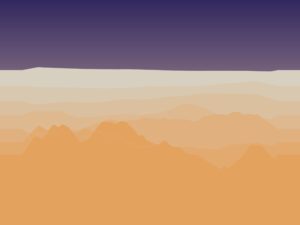
Print 1 — Wind
Warm golden sky. Sharp dune ridges carved by wind. The sand is dry and bright. This is the desert being actively shaped, the most dynamic moment.
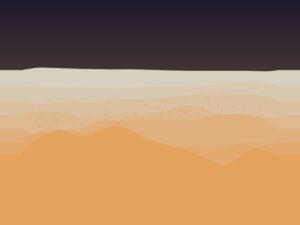
Print 2 — Tremor
Dark, heavy sky. The tall dunes from the wind phase have collapsed and spread out. Dust particles hang in the air. The landscape has been shaken apart.
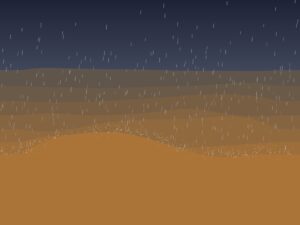
Print 3 — Rain
Cool grey-blue sky. White rain streaks fall across the scene. The sand has turned dark brown from moisture. The terrain is smoother, peaks are lower, and sharp edges are gone. A quiet, moody moment.
Video
A walkthrough of the full system: the auto timeline playing through all four phases, followed by manual switching between modes and adjusting the strength sliders.
How I Built It — The Process
I did not build everything at once. The project was developed in six phases, each one adding a new feature on top of the last. I tested each phase and made sure it worked before moving on:
Phase 1 — Foundation. I built the seven-layer dune system, the sky gradients, and the smooth curve rendering. No physics yet, just the visual base. The big decision here was making each layer auto-calculate all its properties (color, height, position, speed) from just its index number. This meant I could change the number of layers without rewriting anything.
Phase 2 — Wind. Added wind transport and slope stability. This was the hardest part of the whole project. If the wind is too strong, everything flattens instantly. If the slope rules are too strict, nothing interesting happens. Finding the right balance took a lot of trial and error. I also tried adding floating wind particles at first, but they looked messy and disconnected from the terrain. I removed them; the dune movement itself shows the wind better than any particle could.
Phase 3 — Tremor. Added the tremor effect with peak erosion, per-layer shaking, and dust particles. To activate tremor mode, press “T.” The sky transition was tricky; my first wind and tremor palettes looked too similar, so the change was not noticeable. I made the palettes more distinct and sped up the transition. I also experimented with a dust haze overlay, but it looked like a flat layer on top of the terrain, so I removed it.
What I Learned and What I Would Change
What works well:
- The seven layers create a real feeling of depth and distance
- The phase transitions feel smooth and natural, sky and terrain change together
- The wet sand darkening during rain is subtle but makes a big difference
- The auto timeline tells a complete story without any user input
What I would do differently next time:
- Add a 3D perspective view instead of the flat side view, this would make the prints more dramatic
- Add sound, wind howling, rain pattering, ground rumbling during tremor
- Make the timeline longer with slower, more gradual transitions
- Add mouse interaction, drag to create wind, click to trigger tremors
- Try different environments, snow, ocean waves, volcanic landscapes using the same system
References
- R.A. Bagnold — The Physics of Blown Sand and Desert Dunes (1941). The classic science book about how wind moves sand and shapes dunes. This is where I learned about saltation (how wind picks up and drops sand grains).
- Angle of Repose — A concept from granular mechanics (the science of how piles of material behave). It is the steepest angle a pile of sand can have before it slides. This rule is what keeps my dunes looking realistic.
- Ken Perlin — Perlin Noise (1983). The algorithm I use to generate smooth, natural-looking randomness for both terrain and wind patterns.
- Soil Liquefaction — A real phenomenon where vibration makes sand temporarily act like liquid. This is the idea behind my tremor phase.
- Daniel Shiffman — The Nature of Code. The textbook for this course. Used as a general reference for forces, noise, and particle systems in p5.js.