
Concept
For this assignment I was thinking of different ways I could implement the physics engine into some real world examples. One of the first things that came to mind was the pinball game. I remember when I was a kid and my dad bought me a small pinball machine I spent hours playing on it. Since the game is basically pushing a ball and letting it interact with paddles and bumpers it was perfect for this project and the use of Matter.js library.
The concept is similar to the normal pinball game, there is a ball on the far right and in the beginning you have to hit space to push it out of the starting position and then your goal is to control the paddles with the left and right arrows to score as many points as possible by hitting the bumpers until the ball inevitably hits the ground. Since I was working off of personal reference my game had 3 balls per round so I decided to add 3 lives to the game so the user can try to get the highest score.
Since the game elements take a lot of room of the canvas I had to make the canvas pretty big so I would recommend opening the sketch in the new window.
Process
I started the project by first creating an open canvas and just adding the bumpers and the spinner. The bumpers are the key component of the game so I believe the “world” should be created around them and not force them to fit into the “world”.
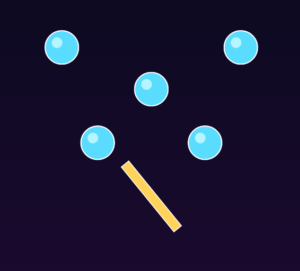
Once the spinner was working it was time to add the walls and the ball.
function updateSpinner() {
  Body.setAngle(spinner, spinner.angle + 0.04);
}
Making the spinner spin was quite simple and didn’t give me any issues. But then it was time to add the paddles and the collision with the ball.
For this I decided to use the Collision Events:
Events.on(engine, "collisionStart", function (event) {
  for (let pair of event.pairs) {
    let a = pair.bodyA;
    let b = pair.bodyB;

    // Ball + bumper
    if (
      (a.label === "ball" && b.label === "bumper") ||
      (a.label === "bumper" && b.label === "ball")
    ) {
      score += 10;
      collisionFlash = 10;
      shake = 10;

      let bumper = a.label === "bumper" ? a : b;
      bumper.hitTimer = 12;

      let currentBall = a.label === "ball" ? a : b;
      Body.applyForce(currentBall, currentBall.position, {
        x: random(-0.01, 0.01),
        y: -0.015,
      });
    }
After that was done it was time to move to the walls.
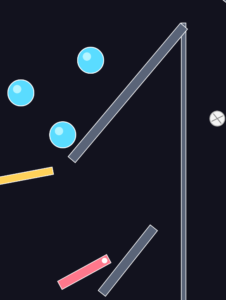
This was my original idea. In reference to what I remember my old pinball machine looking like I wanted to create a small opening where the ball would slide out of. But there was one huge issue with this that I overlooked at the time. If you notice 2 of the walls are overlapping which I didn’t think would be an issue but it proved to be a major one. The bug that kept happening is that because of the overlap the ball kept hitting an invisible wall and kept just bouncing back straight to the beginning. This is obviously a game breaking bug so it needed to be fixed. I tried lowering and raising the angled wall but nothing seemed to fix it because overlapping was the only way of keeping the ball from getting stuck between the 2 walls so I came up with an alternate position for the angled wall so it wouldn’t have to overlap.
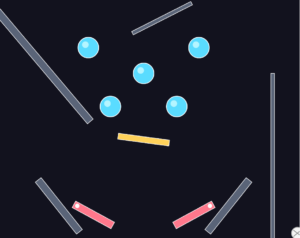
By placing it in the top it didn’t overlap with anything and it also added some diversity to the game as the ball could bounce off of it and create different plays each game.
Another challenge that occurred was that the ball would move too fast and would thus phase through the walls and the paddles which would make the user lose points for doing nothing wrong. So I decided to limit the ball speed.
function limitBallSpeed() {
  let maxSpeed = 16;

  let vx = ball.velocity.x;
  let vy = ball.velocity.y;
  let speed = sqrt(vx * vx + vy * vy);

  if (speed > maxSpeed) {
    let scale = maxSpeed / speed;
    Body.setVelocity(ball, {
      x: vx * scale,
      y: vy * scale,
    });
  }
}
This fixed the issue and made the game much more enjotable.
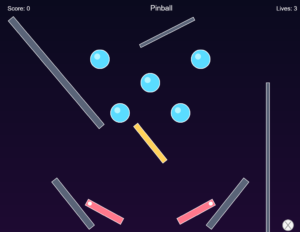
After that it was time for some style changes and just adding the score and lives and game over screen which were quite simple and I also decided to add a screen shake feature when the bumpers are hit for some extra depth. And thus we have the final product.
Code Highlight
One of the most interesting parts of the project is how the paddles are implemented using constraints and controlled rotation, rather than simple position changes.
paddleLeftPivot = Constraint.create({
  bodyA: paddleLeft,
  pointB: { x: 270, y: 610 },
  pointA: { x: -50, y: 0 },
  stiffness: 1,
  length: 0,
});

paddleRightPivot = Constraint.create({
  bodyA: paddleRight,
  pointB: { x: 630, y: 610 },
  pointA: { x: 50, y: 0 },
  stiffness: 1,
  length: 0,
});
This code creates a pivot system, anchoring each paddle to a fixed point in the world. Instead of freely moving, the paddles rotate around these anchor points, similar to real pinball machines.
To control the paddles, I use angular velocity:
// Left paddle
if (keyCode === LEFT_ARROW) {
  Body.setAngularVelocity(paddleLeft, -0.35);
}

// Right paddle
if (keyCode === RIGHT_ARROW) {
  Body.setAngularVelocity(paddleRight, 0.35);
}
And then limit their rotation:
let leftAngle = constrain(paddleLeft.angle, -0.9, 0.25);
let rightAngle = constrain(paddleRight.angle, -0.25, 0.9);
Future Improvements
Overall I am really happy with how the project turned out. I have learned so much about the Matter.js physics system and I am eager to learn more and explore using it in my future projects. As for the improvements and future features I would really like to maybe add music and sound effects to the game as I believe that is a one of the core parts of the original arcade pinball machines. I would also like to maybe add some background images instead of just a gradient background. My pinball machine was green with some cartoon characters on it and many online I have seen have some cartoonish design so maybe exploring that would be the next step, but I don’t want to make it hard to focus on the game so it will need some testing.
Hey Haris, great job tackling this! Recreating a pinball machine is an awesome way to push Matter.js, and using constraints for the paddles was definitely the right call. I totally relate to the struggle of objects phasing through walls at high velocities.
Maybe using simple, organic, slightly imperfect lines for the bumpers and walls could give it a really cool, experimental arcade vibe without making it hard to track the fast-paced ball. Also, mapping some slight screen shake to the paddle hits, in addition to the bumpers, could make the physical interaction feel even more tactile.
Awesome assignment!
Hi Haris! Good job on this assigment! it has a creative and strong concept, making the gameplay fun and interactive. The personal connection to your childhood pinball machine also makes the idea feel more genuine and interesting. One way to improve the concept even more would be to make it more unique by adding a custom theme, special levels. This would help your game stand out while keeping the same fun mechanics.