Midterm Project Overview
This project is a generative art system built in p5.js, centered on three Adinkra symbols from Ghana. Adinkra are visual symbols created by the Akan people. Each one encodes a philosophical proverb, a value, or a worldview that has been passed down through cloth, pottery, and architecture for centuries. Growing up Ghanaian, these symbols have always been part of my visual landscape. For this project, I wanted to bring them into a computational one.
The core idea is this: the symbols are invisible. There are no outlines drawn on screen. Instead, each symbol exists as a mathematical force field — a set of curves that attract particles toward them. Particles are born on the symbol’s edges, drift away through Perlin noise turbulence, and are pulled back by physics-based forces. What you see is not a drawing of the symbol. It is the symbol’s behavior, made visible through collective motion.
The system has four modes, switchable by pressing 1, 2, 3, or 4. Each mode corresponds to a different symbol or combination of symbols, with a distinct color palette drawn from the Ghanaian national flag: red, gold, and green on a black field.
Initially, the system had four modes built on particle-maze navigation — goal attraction, wall repulsion, and turbulence fields. The final version takes a completely different direction: instead of walls shaping particle paths from the outside, the symbol’s own geometry becomes the invisible attractor. The maze is gone. The symbol is the maze.
The Three Symbols
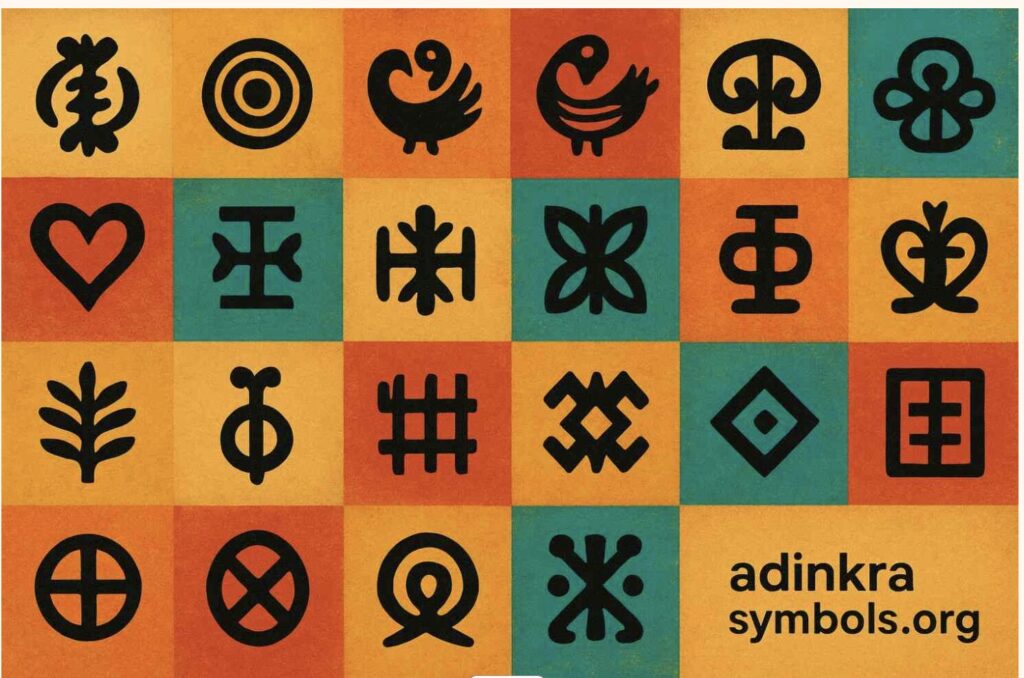
Choosing which Adinkra symbols to use was not a technical decision — it was a personal one. I needed symbols I could relate to and explain with honesty, not just describe. These three are the ones I keep returning to.
Mode 1 — Sankofa
“Se wo were fi na wosankofa a yenkyi” — It is not wrong to go back and retrieve what you forgot.
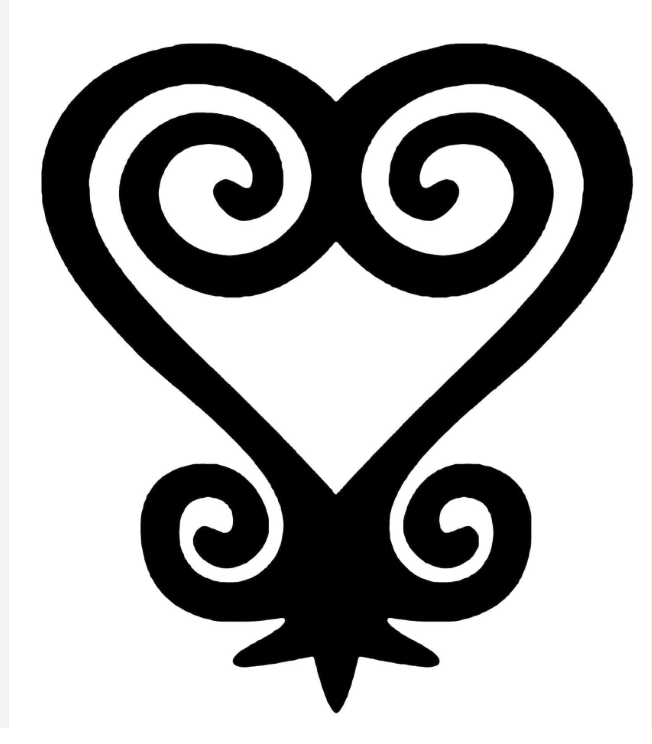
Sankofa exists in two visual forms. The one used in this project is the abstract heart form — the version stamped on cloth, carved into gold weights, and worn on ceremonial fabric across Ghana. The symbol is a heart body — two lobes that sweep down and meet at a pointed base — but what distinguishes it from a plain heart are the spirals. At the very top, where the two lobe lines meet in a V, each side continues past that meeting point and curls inward into the heart’s own interior. The left line curls down-right in a clockwise spiral, the right line curls down-left counter-clockwise. These inner spirals nestle inside the heart. At the bottom of the heart, flanking the pointed tip, two smaller spirals curl outward — away from the body, like feet planted on the ground. The whole symbol is bilaterally symmetric and deliberate in every curve.
As a Ghanaian studying abroad, this symbol means something specific to me. The further I move from home — geographically, culturally, academically — the more I feel the pull of that backward glance. Sankofa is not about being stuck in the past. It is about knowing what to carry with you.
In the system, Sankofa is rendered in red and gold — blood and heritage. Particles spawn across the full outline: both heart lobes, the two inner V-extension spirals, and the two outward bottom spirals. Perlin noise pushes particles away from the outline. A physics force pulls every particle back toward its travelling target point on the symbol. That constant tension between leaving and returning enacts the proverb directly in the particle physics.
Mode 2 — Gye Nyame
“Gye Nyame” — Except God. A declaration of the supremacy and omnipotence of God.
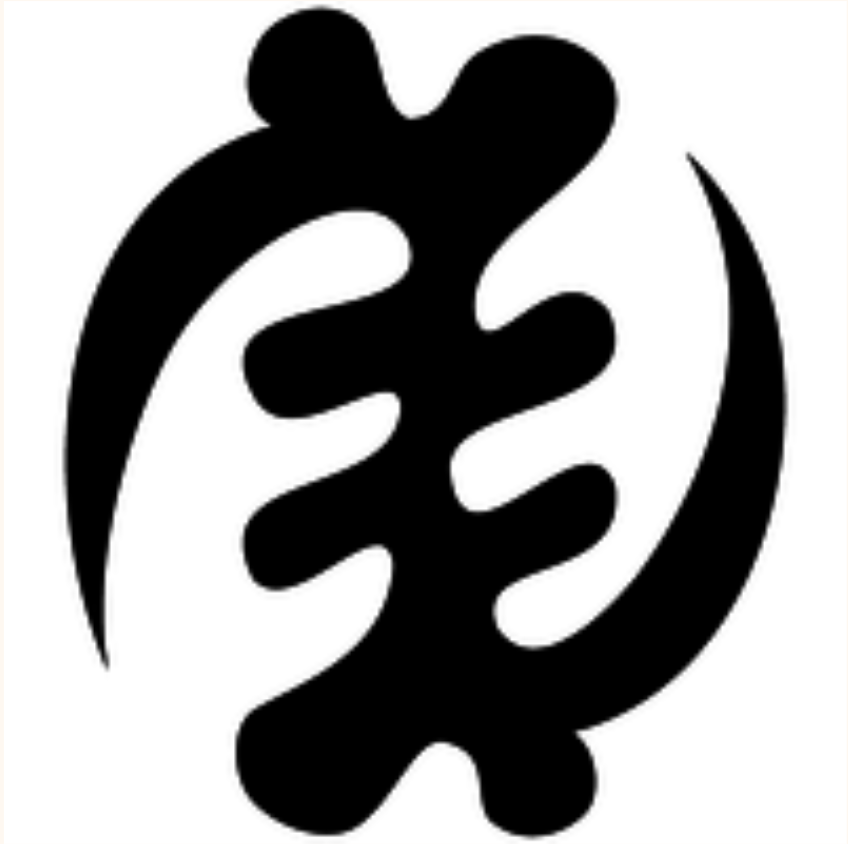
Gye Nyame is the most widely used Adinkra symbol in Ghana. You see it on walls, on fabric, on the backs of tro-tros, carved into doorframes, and on the Ghanaian 200 cedi(currency) note. It is not affiliated with any single religion — it expresses a universal acknowledgment that there is a force greater than human understanding. In Akan culture, Nyame is the origin and sustainer of all things.
The structure of Gye Nyame is unlike any other symbol. Running down the center is a chain of four alternating C-scroll knobs — bulging left, then right slightly lower, then left again, then right again — like the knuckles of a clenched fist stacked vertically. These give the symbol its distinctive textured spine. From the top of this spine, one large arm sweeps out to the upper-left in a wide arc, and its tip hooks back downward. From the bottom of the spine, a matching arm sweeps out to the lower-right and its tip hooks back upward. These two diagonal arms are not mirror images of each other across a horizontal axis — they are a 180-degree rotation of each other, which is why the symbol is described as chiral: it looks different from its own reflection. That diagonal asymmetry is the most identifiable thing about Gye Nyame.
In the system, particles spawn across all features — the four alternating spine knobs and both fishhook arms. Each particle travels along the outline continuously, with a sinusoidal oscillation displacing its target perpendicularly so the arms appear to breathe. The palette is gold and green — divine and natural, sun and land.
Mode 3 — Adinkrahene
“Chief of Adinkra” — greatness, charisma, and leadership.
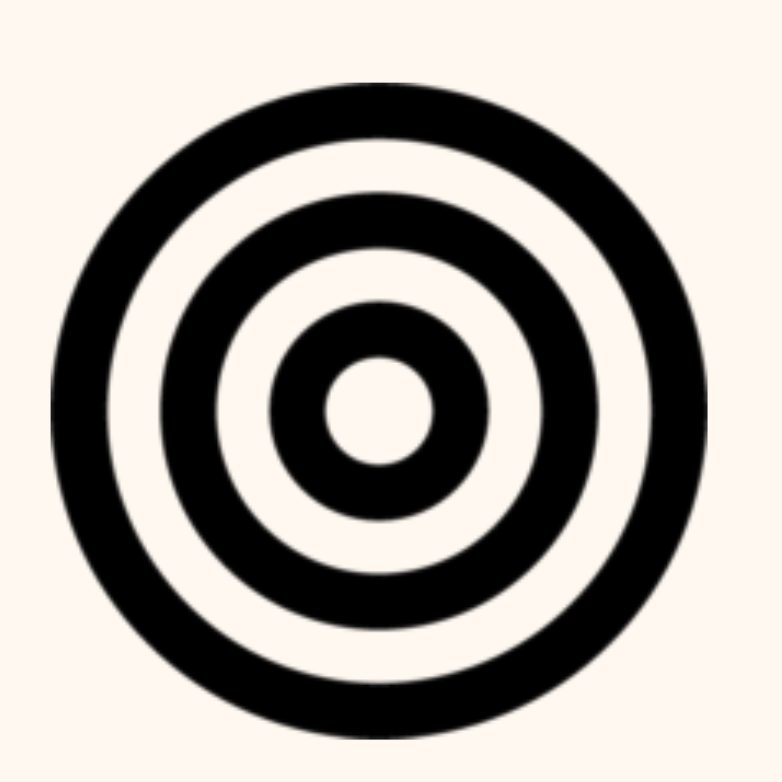
Adinkrahene — the chief of all Adinkra symbols — is structurally the simplest: three concentric circles. Its power is architectural. It is said to have inspired the design of many other Adinkra symbols, which is why it sits at the head of the entire system. Simplicity as authority.
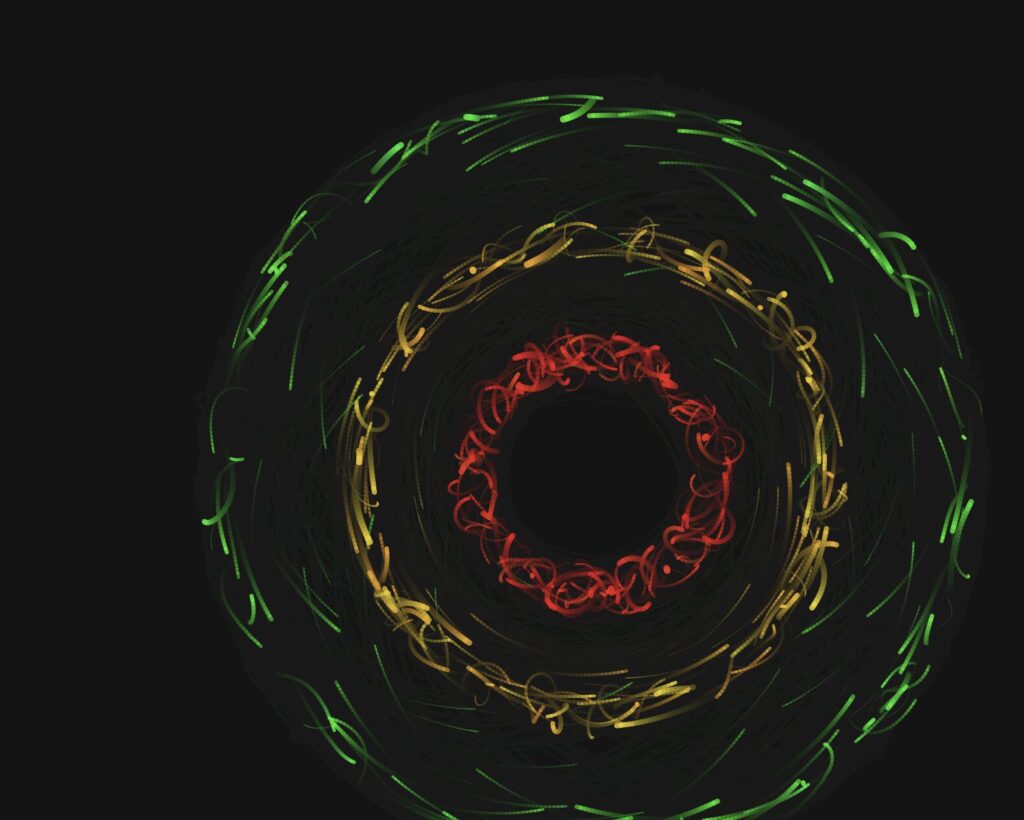
In the system, each of the three rings carries a different flag color: the inner ring is red, the middle ring is gold, and the outer ring is green. This mirrors the horizontal bands of the Ghanaian flag radiating outward from a center, the same way leadership radiates outward from a source. About 18% of particles are radiators — born at the center and travelling outward through all three rings before fading. They represent authority emanating from a single point.
Mode 4 — Composite
The fourth mode draws all three symbols at the same time using separate particle sub-systems. I wanted to experiment around it and see the outcome. The three force fields overlap and interact. Where Sankofa’s heart body overlaps with Adinkrahene’s inner ring, red particles from both systems cluster into unplanned concentrations. The symbols coexist the way traditions coexist, distinct but not isolated.
Implementation Details
The system is a single p5.js sketch organized into four layers: a mode system that handles keyboard input and configuration, a geometry layer that defines the mathematical outlines of each symbol, a physics layer that computes forces, and three particle classes — one per symbol — each managing its own movement, behavior, and rendering.
From the Progress Version to the Final Version
The progress version was a functional system built on maze navigation — particles moved through walls using goal attraction, wall repulsion, and Perlin noise turbulence. The technical foundation was solid. What it lacked was a conceptual anchor: the modes were mechanically distinct but did not say anything together.
The pivot to Adinkra symbols changed the project completely. Instead of walls shaping particle paths from the outside, the symbol’s own geometry became the invisible attractor. The maze walls were removed. The physics stayed. The symbols became the maze.
Particle System
All four modes are built on a particle system. Each mode maintains a pool of 900 to 1,100 particles (2,400 in composite mode). Rather than destroying and recreating particles, the system calls reset() on a particle when it dies, recycling it with a new spawn position, velocity, color, and lifespan. This keeps memory usage flat and the frame rate stable throughout the session.
Every particle stores its previous position alongside its current one. Each frame, it draws a line segment from prev to pos before updating prev. This is what creates the motion trail. The trail length is controlled by fadeAlpha — the transparency of the dark wash applied over the entire canvas each frame. A lower value means longer, slower-fading trails.
// In draw() — dark wash creates motion trails
noStroke();
fill(0, 0, 7, fadeAlpha);
rect(0, 0, width, height);
// Inside any particle's show() method
show() {
  let a = (this.life / this.maxLife) * this.alp;
  stroke(this.hue, this.sat, this.bri, a);
  strokeWeight(max(this.r * (this.life / this.maxLife), 0.4));
  line(this.prev.x, this.prev.y, this.pos.x, this.pos.y);
  this.prev = this.pos.copy();
}
Forces and Newton’s Second Law
Particle motion is governed by F = ma. Each particle has a mass property. When a force is applied, it is divided by the particle’s mass before being added to acceleration. Heavier particles respond more slowly to the same force, which gives the system organic weight variation across the particle pool.
applyForce(f) {
  // F = ma  →  a = F / m
  this.acc.add(p5.Vector.div(f, this.mass));
}
In all three symbol modes, two forces act on every particle simultaneously. The first is a force toward a travelling target point on the symbol’s outline — this keeps the particle anchored to the geometry. The second is Perlin noise drift — this gives the particle organic, independent energy so it does not look mechanical. The balance between these two forces is what determines how tightly the symbol reads versus how alive the system feels.
update(sm) {
  // Advance t along the outline
  this.travelT += this.travelSpd * sm;
  if (this.travelT > 1) this.travelT -= 1;
  if (this.travelT < 0) this.travelT += 1;

  // Force 1: pull toward travelling target on outline
  let idx = floor(this.travelT * sankofaLUT.length) % sankofaLUT.length;
  let tgt = sankofaLUT[idx].copy();
  let toTarget = p5.Vector.sub(tgt, this.pos);
  let d = toTarget.mag();
  toTarget.normalize();
  toTarget.mult(constrain(d * 0.043, 0, 2.2));
  this.applyForce(toTarget);

  // Force 2: Perlin noise drift
  let na = noise(this.pos.x * 0.006, this.pos.y * 0.006,
                 frameCount * 0.003 + this.noiseOff) * TWO_PI * 2;
  let dr = p5.Vector.fromAngle(na);
  dr.setMag(0.11 * sm);
  this.applyForce(dr);

  this.vel.add(this.acc);
  this.vel.limit(3.2 * sm);
  this.pos.add(this.vel);
  this.acc.mult(0);
  this.life--;
}
Travelling Along the Outline (Orbital Motion)
The most important motion decision in the final version was the introduction of travelT — a normalized parameter (0 to 1) that advances along the precomputed outline look-up table every frame, at a random speed and random direction (some particles travel clockwise, some counter-clockwise). This is directly equivalent to how Adinkrahene’s ring particles advance their theta angle around the circle every frame.
Before this change, Sankofa and Gye Nyame particles only moved by being attracted toward a static nearest point on the outline. They jittered in place rather than flowing. Adding travelT gave them continuous directional motion along the symbol — the same quality that made Adinkrahene feel fluid.
// travelT advances along the LUT each frame — equivalent to
// theta advancing around Adinkrahene's ring.
// Random speed + random direction gives each particle
// independent orbital motion along the symbol outline.
this.travelT += this.travelSpd * sm;
if (this.travelT > 1) this.travelT -= 1;
if (this.travelT < 0) this.travelT += 1;

let idx = floor(this.travelT * sankofaLUT.length) % sankofaLUT.length;
let tgt = sankofaLUT[idx].copy();
Oscillation
Each particle has its own independent oscillation parameters: oscAmp (amplitude), oscFreq (frequency), and oscPhase (starting phase offset). Every frame, the particle’s target point is displaced sinusoidally perpendicular to the outline — so the symbol appears to breathe in and out rather than holding a rigid fixed shape. Because every particle has a different phase, the breathing is organic and asynchronous across the full outline.
// Compute perpendicular direction to the outline at target point
let toTgt = p5.Vector.sub(tgt, this.pos);
let perp  = createVector(-toTgt.y, toTgt.x);
if (perp.mag() > 0.01) perp.normalize();

// Displace target sinusoidally — symbol breathes in and out
let osc = this.oscAmp * sin(frameCount * this.oscFreq * sm + this.oscPhase);
tgt.add(p5.Vector.mult(perp, osc));
Perlin Noise
Perlin noise is used across all four modes to add organic drift to particle motion. Unlike random(), which produces sharp, uncorrelated values, noise() produces smooth continuous fields that evolve over time. The noise is sampled in three dimensions: x and y from the particle’s position, and a time dimension from frameCount multiplied by a small constant. The third dimension makes the field evolve slowly so the drift changes character over time rather than holding a fixed direction.
Each particle has a unique noiseOff value assigned at spawn. This offsets its position in the noise field so no two particles ever follow the same trajectory, even if they start from the same point. Without this, all particles drift in the same direction at the same time, which looks mechanical rather than alive.
// 3D noise: x/y position + time + unique per-particle offset.
// noiseOff ensures no two particles share the same noise trajectory.
let na = noise(
  this.pos.x * 0.006,
  this.pos.y * 0.006,
  frameCount * 0.003 + this.noiseOff
) * TWO_PI * 2;

let dr = p5.Vector.fromAngle(na);
dr.setMag(0.11 * sm);
this.applyForce(dr);
Warmup and Speed Ramp
A warmup system was added to solve a practical problem: the particles move quickly at full speed, making it difficult to capture clean screenshots for the three required export images. When a mode starts (or resets), modeFrame is set to zero. Each draw call, speedMult is computed by mapping modeFrame from the range 0 to 600 (about ten seconds at 60fps) to the range 0.18 to 1.0. This multiplier is applied to every dynamic value in all three particle classes — travel speed, noise magnitude, oscillation frequency, and the velocity cap. The system starts at 18% of full energy and smoothly accelerates to full speed over ten seconds.
During warmup, the HUD shows a pulsing “BUILDING — press S to save now” message so the optimal screenshot window is always clearly signposted. Pressing R resets the warmup ramp at any time.
// In draw() — ramps from WARMUP_MIN (0.18) to 1.0
// over WARMUP_FRAMES (600) frames, then holds at full speed
modeFrame++;
let speedMult = map(modeFrame, 0, WARMUP_FRAMES, WARMUP_MIN, 1.0);
speedMult = constrain(speedMult, WARMUP_MIN, 1.0);
// Inside every particle's update(sm) — sm scales all motion
this.vel.limit(3.2 * sm);
Geometry: Precomputed Look-Up Tables
Each symbol’s outline is defined as a series of cubic Bézier curves, sampled once at startup into a flat array of p5.Vector points called a look-up table (LUT). Sankofa has five segments (two heart lobes, two inner V-spirals, two bottom outward spirals) sampled into 800 points. Gye Nyame has seven segments (four knob scrolls, two arm segments each built from three chained cubics) also sampled into 800 points.
Rather than recomputing Bézier geometry inside the draw loop every frame, particles simply index into these arrays. This is what makes the system performant enough to run 1,100 particles per mode at 60fps. The LUTs are rebuilt whenever the canvas size changes (on R or mode switch) so the geometry always scales correctly to the canvas dimensions.
// Evaluate a cubic Bézier at t, push result into arr (canvas coords)
function sampleCubic(arr, ax, ay, bx, by, cx_, cy_, dx, dy, n) {
  for (let i = 0; i <= n; i++) {
    let t  = i / n;
    let m  = 1 - t;
    let x  = m*m*m*ax + 3*m*m*t*bx + 3*m*t*t*cx_ + t*t*t*dx;
    let y  = m*m*m*ay + 3*m*m*t*by + 3*m*t*t*cy_ + t*t*t*dy;
    arr.push(createVector(cx() + x, cy() + y));
  }
}
// Example: building the Sankofa LUT at startup
// Each call samples one Bézier segment into sankofaLUT.
// All five segments (heart lobes, inner spirals, bottom spirals)
// are sampled once and never recomputed during the draw loop.
function buildSankofaLUT() {
  sankofaLUT = [];
  let k = K();             // scale factor = min(w,h) * 0.0031
  let nH = floor(LUT_SIZE * 0.30);  // points per lobe segment
  let nS = floor(LUT_SIZE * 0.08);  // points per spiral arc

  // Left heart lobe: bottom point → V at top center
  sampleCubic(sankofaLUT,
    0, 95*k,  -40*k, 70*k,  -82*k, 28*k,  -82*k, -20*k,  nH);

  // Left inner spiral: from V, curls down-right
  sampleCubic(sankofaLUT,
    0, -28*k,  12*k, -42*k,  36*k, -40*k,  38*k, -22*k,  nS);

  // ... (right lobe, right spiral, bottom spirals follow same pattern)
}
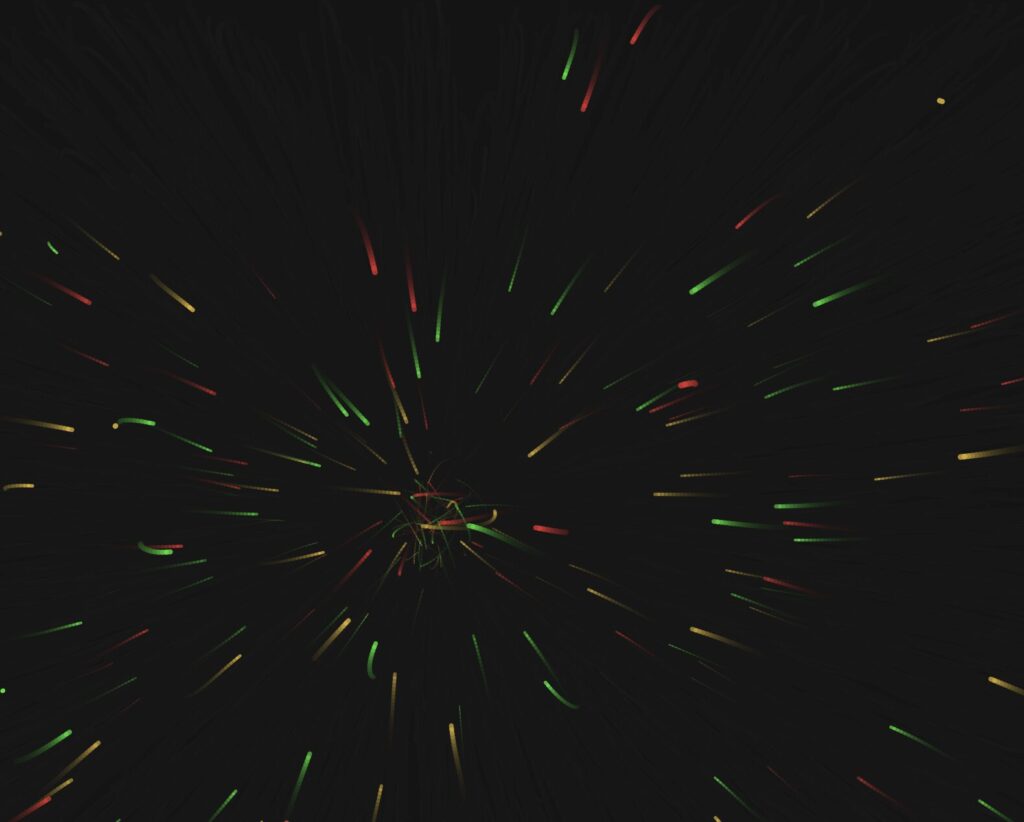
The screenshots below were captured during developmental stages. They show how the system evolved from a basic noise-driven particle experiment with no symbol geometry, to a single-symbol prototype, to the full multi-mode system with all three Adinkra symbols, their individual color palettes, and the orbital travelT motion system in place. Each stage informed the decisions that shaped the final version.
The Three Outputs
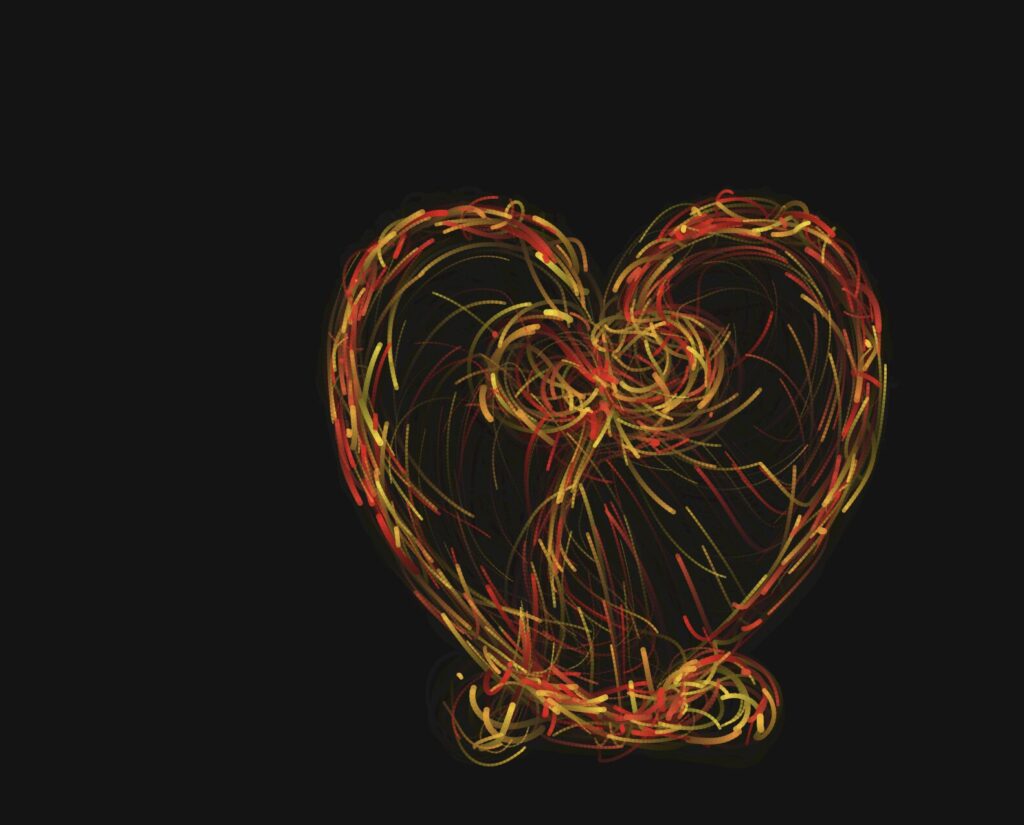
The three exported images below were captured during the warmup phase of each mode — when the particles are moving slowly enough for the symbol to read clearly, but with enough energy that the trails and motion feel alive rather than static. Each image was saved using the S key at the moment the composition felt most balanced.
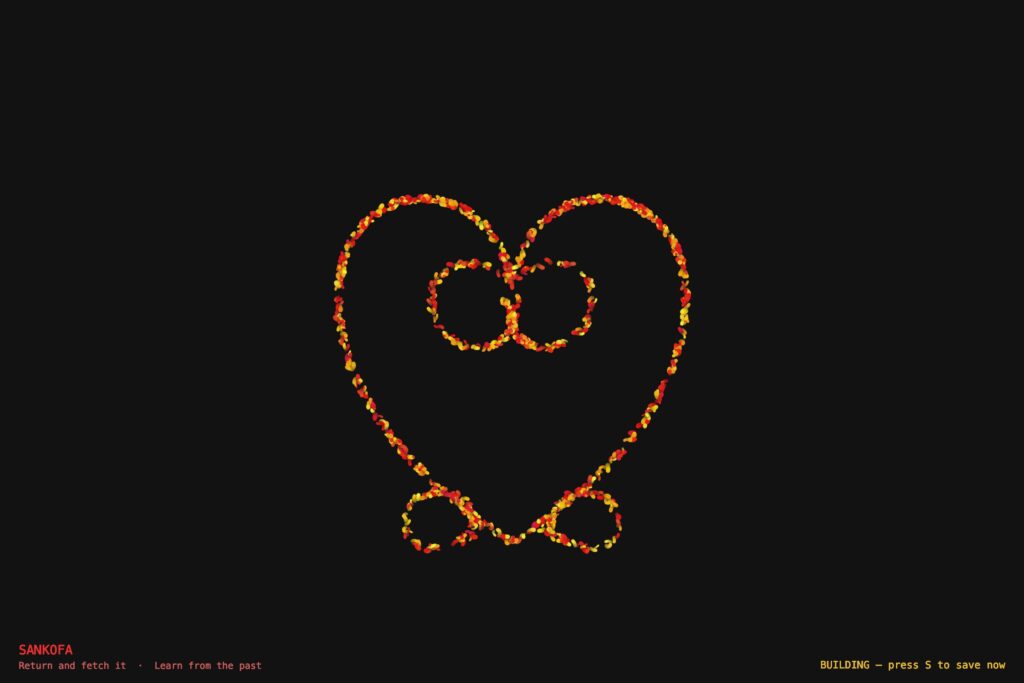
Output 1 — Sankofa. Red and gold particles tracing the abstract heart body with the V-extension inner spirals nestled at the top and the two outward bottom spirals flanking the pointed tip.
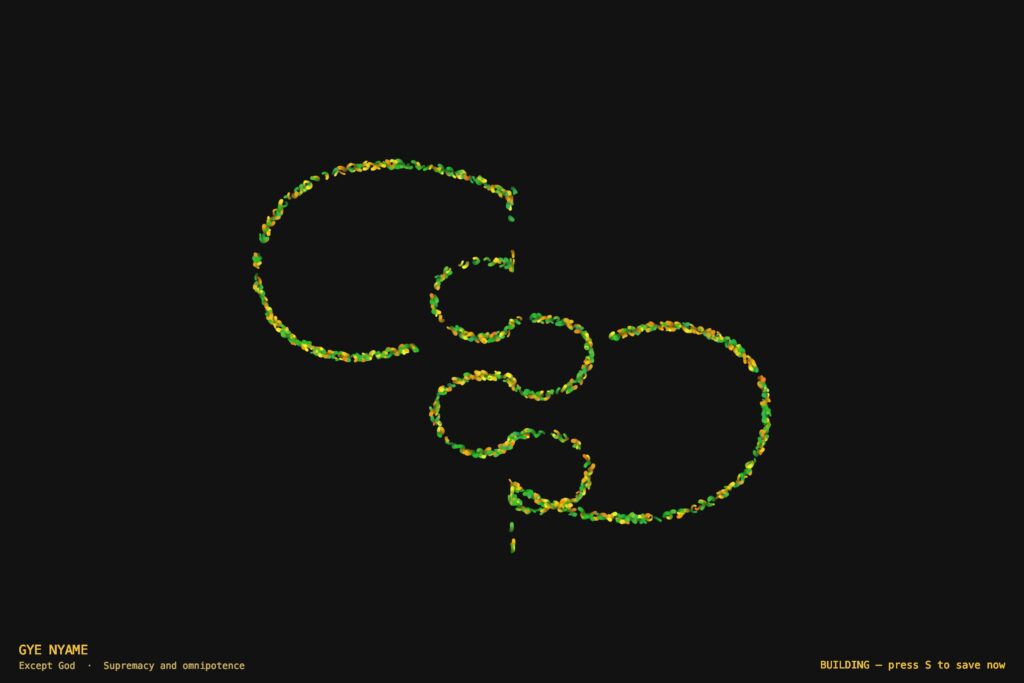
Output 2 — Gye Nyame. Gold and green particles tracing the alternating C-knob spine and the two diagonal fishhook arms — upper-left hooking down, lower-right hooking up.
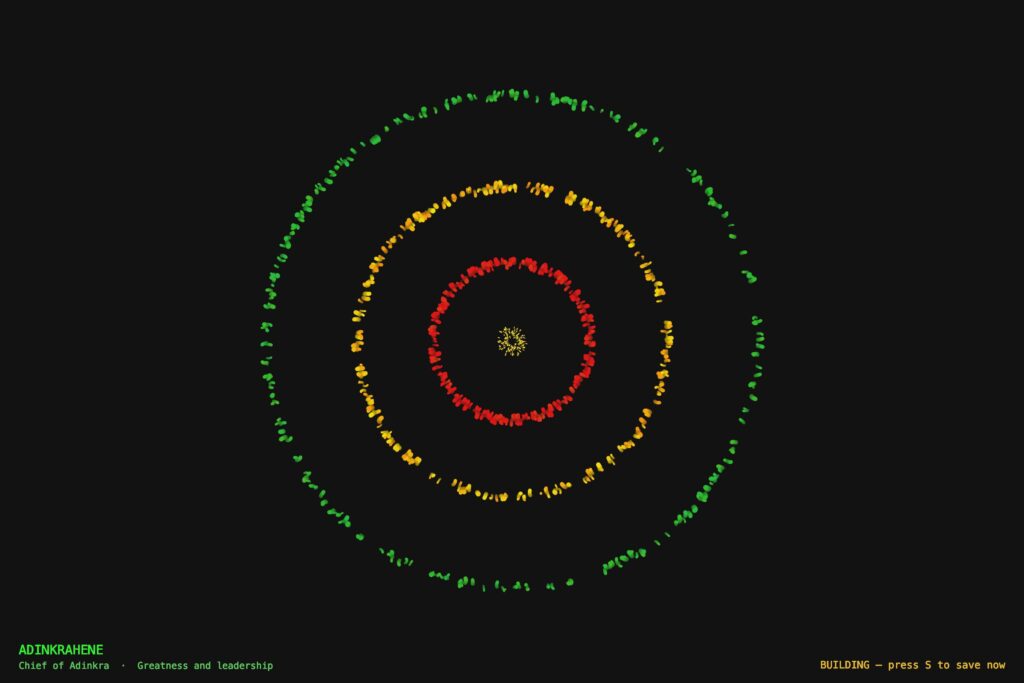
Output 3 — Adinkrahene. Three concentric rings in red (inner), gold (middle), and green (outer), mirroring the Ghanaian flag’s stripes. A radiator streak is visible crossing all three rings outward from the center.
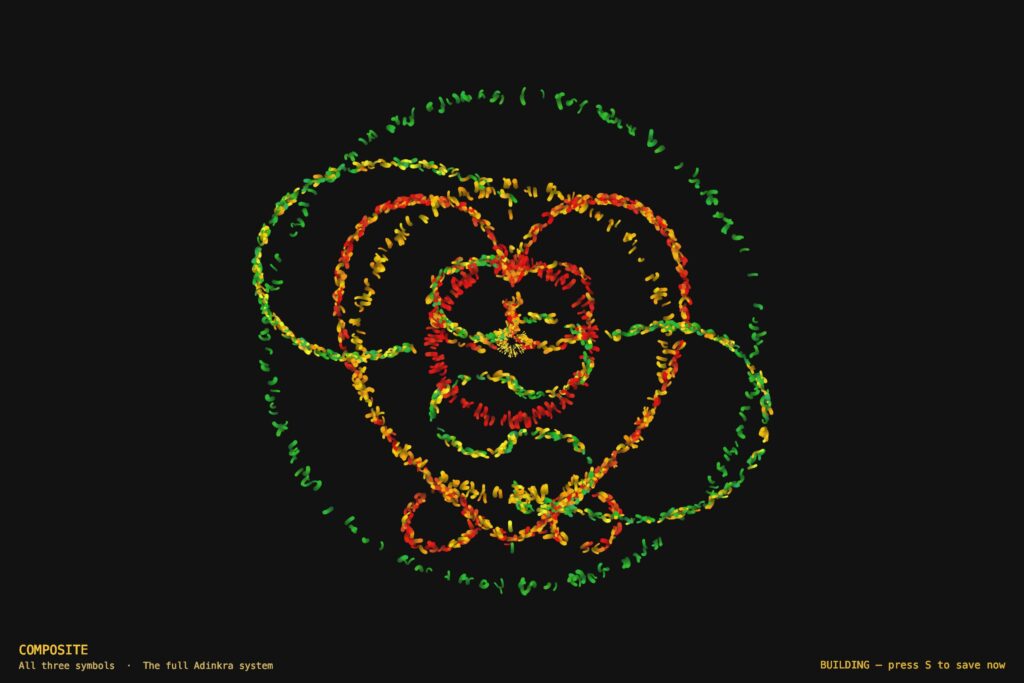
Output 4 — Composite Image.
Sketch
Video Documentation
The video below demonstrates all four modes of the system in sequence. Modes are switched live using the keyboard.
Reflection
What Changed From the Progress Version
The progress version worked mechanically but had no conceptual anchor. Four modes of maze navigation — functional, but nothing to say.
Rebuilding around Adinkra symbols gave the project a reason to exist. These symbols are not decorations. They are compressed philosophy from my own culture. Making them the invisible architecture of a particle system felt like engaging with that tradition rather than just referencing it.
What Worked
The invisible symbol approach is more legible than expected. After twenty to thirty seconds, the shape reads clearly from particle density and trail patterns alone — no drawn outline needed.
The flag color assignment has real logic behind it. Adinkrahene’s rings being red, gold, and green — mirroring the flag’s stripes radiating outward — is not arbitrary, which makes it easy to write about honestly.
The travelT motion system was the most important technical decision. Before it, particles jittered statically near the outline. After it, they flow continuously along the symbol in both directions. That change made the whole system feel alive.
The warmup ramp solved the screenshot problem cleanly. The first ten seconds of each mode are naturally the best window — no extra configuration, just press S.
What Was Hard
Getting the symbol geometry right took the longest. Both Sankofa and Gye Nyame are complex shapes that resist clean Bézier approximation. Several versions were discarded. The hardest part was not the math — it was building enough visual understanding of each symbol to know when the approximation was close enough.
Gye Nyame required understanding that its two diagonal arms are a 180-degree rotation of each other, not a mirror reflection. That asymmetry — the chirality — had to be correct in the coordinates before the symbol read as itself.
The closest-point lookup was a performance problem. Running Bézier math per particle per frame at 1,100 particles tanks the frame rate. The precomputed LUT — sampling the outline once at startup, doing a flat array search every frame — fixed it.
Plans for Future Improvement
Mouse interaction — clicking creates a temporary repulsion force, particles push away then return. Sankofa’s meaning becomes physically interactive.
Audio reactivity — microphone amplitude mapped to speedMult so the symbols respond to sound. The global speed multiplier is already in place; connecting an audio input would be a small change.
More symbols — Dwennimmen (strength and humility) and Funtunfunefu (democracy) are both geometrically interesting and personally meaningful. New LUT geometry, same motion system.
Mode transitions — a dissolve instead of a hard cut to black. Old particles fade out while new ones spawn in, suggesting the symbols share the same world.
References
Adinkra — Cultural Sources
Rattray, R. S. (1927). Religion and Art in Ashanti. Oxford: Clarendon Press.
Willis, W. B. (1998). The Adinkra Dictionary. The Pyramid Complex.
Adinkra Symbols of West Africa. adinkrasymbols.org
Eglash, R., Bennett, A., Lachney, M., & Bulley, E. Adinkra Spirals. csdt.org/culture/adinkra/spirals.html — geometric analysis of logarithmic spirals in Adinkra symbols.
Technical Resources
Shiffman, D. (2024). The Nature of Code, 2nd Edition. natureofcode.com
p5.js Reference Documentation. p5js.org/reference
The Coding Train — Daniel Shiffman. Introduction Videos I.2–I.4. thecodingtrain.com
Visual Inspirations
Ghanaian Kente cloth — the red, gold, green, and black palette comes directly from Kente patterns and the national flag.
AI Disclosure
AI tools (Claude, Anthropic) were used for debugging geometry and performance issues, identifying the LUT optimization, reviewing force application logic, and assisting with drafting this documentation. All creative decisions and final code were done by me.