
Project Overview
This project started from something very familiar to me. Bukhoor is not just something you look at, it is something you interact with. You light it, you wait, and then you blow on it. When you blow, it responds. The smoke becomes thicker, the coal reacts, and it feels alive. I wanted to recreate that exact behavior digitally.
So instead of drawing smoke, I built an interactive oud burner that reacts to the user’s breath through the microphone. When the user blows into it, the smoke becomes denser and more active. When there is silence, it calms down and almost disappears.The goal was not to simulate smoke perfectly, but to translate the experience of bukhoor into a responsive system.
Implementation Details
This project combines a few key ideas from class to build a system that behaves naturally. I focused on using the concepts where they actually mattered.
Key Concepts Applied
- Random + Noise
Used Perlin noise to create variation in: smoke turbulence, wind, background
This keeps the system from feeling mechanical.
- Vectors + Forces
Each particle moves using forces: upward force (smoke rising), horizontal wind, noise-based turbulence
This is what makes the smoke behave instead of just animate.
- Oscillation
Subtle sine movement adds: soft sway in smoke, slight pulsing in the system
It keeps everything alive even when idle.
- Particle Systems
Smoke is built from particles: particles grow and fade, particles continuously spawn and disappear
The smoke exists as a system, not a fixed drawing.
- Autonomous Agents + Flocking
Each particle reacts to nearby particles: avoids crowding, aligns slightly, stays grouped
This creates a continuous smoke flow instead of random dots.
- Fractals
Used in the background: recursive shapes, slow animation, adds depth without taking focus
Core Interaction (Bukhoor Logic)
Sound is treated as breath.
- silence → almost no smoke
- small sound → light smoke
- blowing → dense smoke
Video interaction
Embedded sketch
Milestones / Process
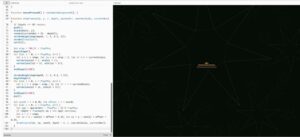
Step 1: Background and Fractals
I started with the background because I wanted the sketch to feel atmospheric before the bukhoor even reacts. I used a recursive fractal system to create repeated star-like shapes that slowly rotate and shift over time. and I also drew an oud
Step 2: Forces
I built a Movement + Noise system where particles respond to forces like gravity (upward movement) and wind. This made the motion feel physical.

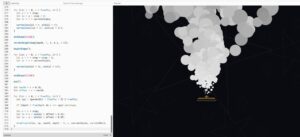
Step 3: Particle System
I replaced static drawing with particles that spawn, grow, and disappear. This is when the smoke started feeling alive.
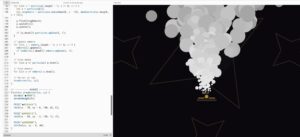
Step 4: Flocking
I introduced flocking so particles move together instead of randomly. This created a cohesive smoke form.
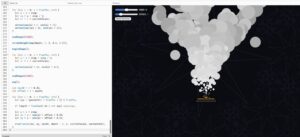
Step 5: Sliders
After the smoke system was working, I added sliders so the user could control the behavior more directly.
The main sliders are:
- Sensitivity: controls how strongly the microphone input affects the smoke
- Wind Direction: pushes the smoke left or right
- Smoke Speed / Morph: changes how fast the smoke rises, sways, and disappears
The morph slider was important because it makes the smoke feel less fixed. The user can slow it down for a softer bukhoor effect, or speed it up so the smoke becomes more energetic and animated.
Step 6: Refinement + User Feedback
Based on feedback, I made the smoke more animation-like instead of realistic:
- clearer shapes
- more exaggerated motion
- stronger response to input
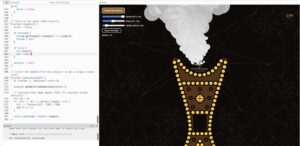
This made the interaction more obvious and satisfying. and I added the Mic interaction and the illustrated Bukhoor
Reflection
I am so soooooooo proud of how this project turned out, This project shifted how I think about making visuals.
At first, I focused on how smoke looks. But the project only started working when I focused on how it behaves.
The biggest improvement came from simplifying the smoke and making the interaction clearer. When someone naturally tries to blow into it without instructions, that is when the project succeeds.
The strongest part of the work is that it translates a real-world habit into a digital interaction in a way that feels intuitive.
Future Improvements
- move beyond circular particles into more dynamic smoke shapes
- add hand interaction instead of only sound
- make the coal react more physically
- connect the background to sound
- push the visual language further
References
Technical
- p5.js
- Web Audio API
- Flocking systems
Conceptual
- Bukhoor as an interactive and sensory experience
AI disclosure
AI was used to help refine the structure of the code and debug specific technical parts, especially around audio input and signal processing.
I used AI to better understand and implement the RMS (Root Mean Square) calculation used to detect microphone intensity:
analyzer.getByteTimeDomainData(dataArr);

let sum = 0;
for (let i = 0; i < dataArr.length; i++) {
  let v = (dataArr[i] - 128) / 128;
  sum += v * v;
}

return sqrt(sum / dataArr.length);
This part was important for making the system respond smoothly to sound instead of being too sensitive or unstable.
All creative decisions, including the concept of translating bukhoor into an interactive system, the visual direction, and how the interaction behaves (blowing = more smoke), were developed and implemented by me.
Honestly well done Batool, beyond technicality this concept hits very close to home, Bukhoor is such a central practice across the different cultures in the Arab world, so beautiful to see it translated in this way. We need more representation and your ideas never disappoint!
This project is so good Batool! Translating a familiar feeling like lighting bukhoor into a digital space is such a nice idea and you executed it really well. I love how you focused on how the smoke behaves instead of just how it looks because that makes the interaction feel much more natural. The microphone input mapped to the smoke density is a brilliant touch. Great job!