For the final project, I wanted to try something with WebGL for the first time. I’ve always been fascinated by how film producers make 3D space simulations for certain movie scenes, and I think a WebGL p5 sketch is a great way to do it.
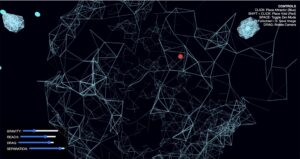
How the controls look like. The red dots are Cosmic Voids and the blue dots are Great Attractors
I made an interactive, 3D generative environment that simulates the Cosmic Web—the largest known structure in the universe. In this digital cosmos, you are not merely a spectator but the architect of galactic scaffolding. The project utilizes thousands of Dark Matter points that interact through complex gravitational laws, where the true sculpture emerges from the filaments woven between them.
The core intent of this project is to provide a tactile way to explore Large-Scale Structure and Deterministic Chaos. The environment is designed to be highly responsive, allowing users to lay out Space with universal constants in real-time.
How to Architect Your Universe:
Navigation:Click and Drag the background to rotate your perspective. The engine distinguishes between navigation and placement, so your universe won’t warp while you are just trying to find a better view.
Creation:Click anywhere in the 3D void to place a Great Attractor (indicated by a blue sphere). This creates a localized gravity well that pulls filaments into dense superclusters.
Manipulation:Shift + Click to place a Cosmic Void (indicated by a red sphere). These act as repulsors, pushing filaments away to create vast, empty regions of space.
Universal Constants: Use the Control Panel in the bottom left to modify the physics:
Gravity: Adjusts the intensity of the pull from Attractors.
Reach: Sets how far a filament can stretch to find a neighboring particle.
Drag: Controls the “friction” of space. Low drag creates a chaotic vacuum. High drag makes the universe feel fluid.
Separation: Sets a “personal space” for particles to prevent them from lagging into a single point.
System Controls: Press ‘F’ to toggle Fullscreen, ‘S’ to save a high-resolution PNG snapshot, and Space to enter Zen Mode—hiding all UI and helpers for a pure visual experience.
Implementation Details/Milestones
To maintain a high quality experience, the project moves away from standard drawing methods and employs professional-grade optimization:
Spatial Hash Grid: The universe is divided into 3D “buckets.” Instead of every particle checking every other particle O(N² ), each node only checks its immediate 3 * 3 * 3 neighborhood, reducing complexity to O(N).
// Spatial Hash Construction
let grid = new Map();
for (let p of matter) {
    // Convert 3D coordinates into a string key (the "bucket")
    let key = `${floor(p.pos.x / GRID_SIZE)}|${floor(p.pos.y / GRID_SIZE)}|${floor(p.pos.z / GRID_SIZE)}`;
    if (!grid.has(key)) grid.set(key, []);
    grid.get(key).push(p);
}
Vertex Batching: Rather than thousands of individual line() calls, Kinesis uses beginShape(LINES) to send all filament data to the GPU in a single “chunk,” drastically reducing the draw-call overhead.
beginShape(LINES); // Open one big batch for the GPU
for (let p of matter) {
    // ... search neighbors ...
    if (dSq < MAX_DIST_SQ) {
        stroke(190, 40, 100, alpha);
        vertex(p.pos.x, p.pos.y, p.pos.z); // Start of line
        vertex(other.pos.x, other.pos.y, other.pos.z); // End of line
    }
}
endShape(); // Close batch
Squared Distance Logic: To avoid expensive square-root calculations, distances are compared using the formula
d² = (x_1 – x_2)² + (y_1 – y_2)² + (z_1 – z_2)²
.
The primary technical challenge was overcoming the “Density Bottleneck”—the lag created when hundreds of particles converged into a single point.
Before Optimization O(N²): The sketch choked at 400 particles. Any attempt to create a “Great Attractor” resulted in a frame rate drop to 12 FPS as the CPU struggled with redundant distance checks.
After Optimization (O(N) + Culling): By implementing the Spatial Hash Grid and Proximity Culling (skipping lines between particles that are too close to be seen), the engine handles 1,200+ particles at a consistent 60 FPS, even during intense gravitational collapses.
Reflection & References
The inclusion of Zen Mode and the Architect’s UI transforms the project from a simple simulation into a dynamic tool for creative expression. The most rewarding aspect is the emergent behavior: the way filaments naturally reorganize themselves into “walls” and “voids” mirrors the actual structural evolution of our universe.
Inspiration: The Millennium Simulation Project; The Nature of Code by Daniel Shiffman.
Technical Foundations: p5.js WebGL and DOM documentation.
AI Disclosure: The optimized logic and some debugging efforts were developed using Gemini 3 Flash.
This project explores a hand-tracked 3D interactive environment where a topology grid and boids react to user gestures.
The core concept combines three ideas I enjoyed most during the course: simple rule-based systems, satisfying emergent movement, and 3D simulation.
The final direction uses open-palm and clenched-fist gestures to attract/repel boids while the hand also influences a dynamic topology surface.
The design goal was to keep the visual language minimal and angular: mesh-line hands, a dot-based topology map, and color-coded boid states.
Instead of using gestures to rotate the world, gestures directly affect behavior inside the world.
Inspiration
I was initially unsure where to start, so I researched interactive installations and reflected on previous class work.
The project direction became clearer after revisiting hand recognition from our ml5.js session and combining it with topology and boids.
Pulse Topology by Atelier Lozano-Hemmer inspired the topology-grid idea.
Pulse Island I by the same artist inspired a calmer movement pacing.
Gesture examples from the Hand-Tracked Particle Simulator helped frame interaction possibilities, but also clarified what not to do
(gesture as pure camera/object rotation felt less natural for this project).
Seeing virtual hands in 3D (similar to headset experiences) became an important target for immersion.
Milestone 1: ml5.js hand tracking in 3D (flat result)
First attempt used ml5.js with depth estimation to push landmarks in z-space.
While it partially worked for forward/back movement, rotation and depth consistency were limited.
Milestone 2: Switching to MediaPipe Hand Landmarker
I moved to MediaPipe Hand Landmarker for more reliable xyz output. This enabled more convincing 3D hand behavior while retaining similar landmark structure.
Milestone 3: Topology grid and shader optimization
The topology points are mapped to simplex noise in shader space. Height is mapped from noise values (-1 to 1), and brightness changes with height.
A shader implementation was required to resolve performance issues from CPU-heavy updates.
Milestone 4: Combining hand interaction and topology response
After integration, hand positions created indentation-like effects in the topology map (similar to pin-screen behavior).
Milestone 5: Adding boids interaction logic
Boids were integrated as a behavior system driven by gesture state and local interactions.
Final tuning focused on attract/repel responsiveness and state transitions.
Milestone 6: Hand Gesture recognition
For this milestone I focused on mapping hand poses into reliable interaction modes.
An open palm triggers attraction/follow behavior, while a clenched fist triggers repel/escape behavior.
The main challenge was keeping gesture classification stable frame-to-frame so boids did not rapidly flicker between states.
Milestone 7: Creating a design for the hand
I tried several visual designs for the hand and ultimately returned to a style close to the original skeleton, but built from 3D forms.
First, I attempted an outline-style hand, but I was not satisfied with the overall look.
Second, I tried ellipses with a billboard approach, but visibility and depth readability were weak.
Finally, I switched to spheres and cylinders with mesh lines. It is not perfect, but it gave the best balance of clarity and style among the three approaches, and it remains an area for future improvement.
Boids Behavior and State Machine
Wander (yellow): default movement state.
Follow (blue): triggered by open palm when boids are within interaction distance.
Escape (red): triggered by clenched fist; boids return to wander after enough distance.
Contagion behavior: wandering can spread to nearby boids after prolonged following.
Close-range behavior: boids can orbit around the hand during attraction.
Hand Recognition Pipeline
The project started with ml5.js but switched to MediaPipe for stronger 3D landmark behavior.
AI assistance was used for migration and integration details.
Topology Grid
Simplex noise drives surface displacement over time.
Point brightness changes according to displacement height.
Grid can be circular by default, with a boolean option for rectangular mode.
3D Rendering and Navigation
Rendering uses WEBGL canvas.
orbitControl() allows scene inspection and confirms true 3D behavior.
Code Highlights
Highlight 1: Orientation Gizmo Drawing
function drawOrientationGizmo(center, orientation) {
  const right = p5.Vector.mult(orientation.right, GIZMO_SCALE);
  const up = p5.Vector.mult(orientation.up, GIZMO_SCALE);
  const normal = p5.Vector.mult(orientation.normal, GIZMO_SCALE);

  // For some reason (unknown to man) when commenting this out the topology grid stops working
  // so instead I just made strokeWeight(0) and wont ask any more questions
  strokeWeight(0);
  stroke(255, 90, 90);
  line(center.x, center.y, center.z, center.x + right.x, center.y + right.y, center.z + right.z);
  stroke(90, 255, 120);
  line(center.x, center.y, center.z, center.x + up.x, center.y + up.y, center.z + up.z);
  stroke(90, 150, 255);
  line(center.x, center.y, center.z, center.x + normal.x, center.y + normal.y, center.z + normal.z);
}
This is a highlight for all the wrong reasons. So really, its more of a lowlight. When changing from ml5.js to MediaPipe Hand Landmarker I relied heavily on AI to switch for me given it was my first time. In doing so it created this function. All it does is shows 3 lines perpendicular to each other with colors for each axis x,y,z and its at the center of the hand. Why? Not sure, but I tried removing the function from the update loop and suddenly the topology grid would stop working. Weird I thought, I’ll try just commenting out the lines relating to drawing the lines but I had the same issue. I realized at this point that perhaps its due to the topology grid being rendered using a shader and I didn’t really understand how that worked. I thought to myself, I don’t know exaclty why it doesn’t work, and I don’t want to find out why, because I don’t have much time or patience to do so. Lazily, I set the strokeWeight to zero and moved on.
The boids and the hands are perhaps my favourite part of the simulation and in large part due to their interaction with each other. Central to their interaction is this state machine which determines whether a boid should wander, escape, or follow.
Reflection
I am very happy with the final result and how the interaction reads visually.
The topology-grid performance issue was resolved through shader-based optimization, while boids still have unresolved performance costs in denser scenarios.
One known bug remains: if the simulation starts while the palm is already open, boid state updates can behave unexpectedly until performing a clench-then-open reset.
AI Disclosure: AI assistance was used for shader-based topology optimization and migration from ml5.js hand tracking to MediaPipe Hand Landmarker integration.
During a class field trip to teamLab, I picked up a pencil drawing of a butterfly, colored it yellow, and slid it under a scanner. Seconds later it appeared on the floor, glowing and drifting between hundreds of other visitors’ creatures. Every other room at teamLab was something you walked through. This one was something you contributed to.
For Assignment 7, I tried to recreate that world in code. It looked alive. But it was passive. Nothing responded to the user. This project fixes that.
What It Became
The single butterfly becomes a flock of mixed creatures that chase the mouse, flock together, and trail light in night mode. The floor grows coral wherever the flock lingers and slowly recedes when they leave. The world shifts between warm dusk and deep night based on how spread out the flock is. And it listens through the microphone: a clap or any loud sound scatters the flock and darkens the world instantly.
How to Interact
Move the mouse to attract the flock. Left click to drop food. Right click to release a disturbance. Press S to scatter, C to calm, D to toggle night mode, and N to bloom coral at the mouse position. Three sliders in the top left control flock size, coral speed, and current strength.
Das crownplay casino tritt als ein relativ neuer Spieler auf dem Online-Casino-Markt auf und versucht, sich durch eine Vielzahl von Angeboten und einem ansprechenden Spielerlebnis von der Konkurrenz abzuheben. In dieser Analyse wird untersucht, wie vertrauenswürdig das Crownplay Casino wirklich ist, insbesondere in Bezug auf Sicherheit, Lizenzierung und das allgemeine Spielerlebnis.
Sicherheit und Lizenzierung
Die Vertrauenswürdigkeit eines Online-Casinos hängt maßgeblich von seiner Lizenzierung und den Sicherheitsmaßnahmen ab. Crownplay Casino arbeitet unter einer gültigen Glücksspiel-Lizenz, was bedeutet, dass es strengen regulatorischen Anforderungen unterliegt. Diese Lizenz sorgt dafür, dass die Plattform faire Spielpraktiken einhält und die Spielerrechte respektiert.
Zusätzlich verwendet das Casino moderne Verschlüsselungstechnologien, um die sensiblen Daten der Spieler zu schützen. Die Zufallszahlengeneratoren (RNG) werden regelmäßig überprüft, um sicherzustellen, dass alle Spiele fair sind. Es ist wichtig, dass Spieler in einer sicheren Umgebung spielen, und Crownplay scheint sich dieser Verpflichtung bewusst zu sein.
Bonusangebote und Spielerlebnisse
Crownplay Casino bietet eine Vielzahl von Bonusangeboten, die sowohl neuen als auch bestehenden Spielern zugutekommen. Dazu gehören Willkommensboni, Einzahlungsmatches sowie regelmäßige Promotions. Diese Angebote sind ein Anreiz, die Plattform auszuprobieren, jedoch sollten die Bedingungen für die Umsetzung sorgfältig gelesen werden.
Attraktive Willkommensboni für neue Spieler
Regelmäßige Promotions für Bestandskunden
Treueprogramme zur Belohnung aktiver Spieler
Transparente Bonusbedingungen
Hohe Gewinnchancen bei ausgewählten Spielen
Das Spielerlebnis wird durch eine benutzerfreundliche Oberfläche und ein ansprechendes Design ergänzt, das die Navigation einfach macht. Spieler können schnell zwischen verschiedenen Spielkategorien wechseln und die meisten Spiele in einem Mobilformat genießen.
Spielangebot und Anbieter
Das Spielangebot im Crownplay Casino ist vielfältig und umfasst Spielautomaten, Tischspiele und Live-Casino-Optionen. Die Zusammenarbeit mit renommierten Softwareanbietern gewährleistet, dass die Spiele von hohem Standard sind und ein qualitativ hochwertiges Spielerlebnis bieten. Spieler können sich auf regelmäßige Updates und neue Spiele freuen.
Spielkategorie
Beliebte Anbieter
Verfügbare Spiele
Slots
NetEnt, Microgaming
Über 500
Tischspiele
Evolution Gaming, Playtech
Mehr als 100
Live-Casino
Ezugi, Pragmatic Play
Über 30 Tischspiele
Kundensupport und Benutzererfahrungen
Der Kundenservice von Crownplay Casino ist ein weiterer Punkt, der zur Vertrauenswürdigkeit der Plattform beiträgt. Spieler können Unterstützung über verschiedene Kanäle erhalten, darunter Live-Chat, E-Mail und FAQ-Bereiche. Die Reaktionszeit des Supports ist in der Regel kurz, was positive Rückmeldungen von den Nutzern hervorruft. Responsive Design sorgt dafür, dass die Plattform sowohl auf Desktop- als auch auf mobilen Geräten gut funktioniert.
Häufig gestellte Fragen
Ist Crownplay Casino sicher? Ja, das Casino ist lizenziert und verwendet moderne Sicherheitstechnologien zum Schutz der Daten der Spieler.
Welche Bonusangebote stehen zur Verfügung? Das Casino bietet Willkommensboni, Einzahlungsboni und regelmäßige Promotions für Bestandskunden.
Wie ist der Kundenservice von Crownplay Casino? Der Kundenservice ist über mehrere Kanäle erreichbar und bietet zeitnahe Unterstützung.
I wanted to make something that felt like a real game but was wondering which topics we took in this class can make a nice game. Feeding Frenzy seemed like the perfect fit because the whole thing runs on flocking. The small fish school together for safety using separation, alignment, and cohesion. The predators use a seek force to hunt you. And the player is just another agent in the same system, subject to the same rules about size and proximity.
The core idea is a size hierarchy: you eat what’s smaller than you, you avoid what’s bigger than you. You start as a tiny glowing fish and work your way up through six schools of progressively larger fish. When you’re small the red predators hunt you. When you grow big enough they stop hunting and you can eat them too. The final state is you as the largest thing in the ocean, every group scattering at your approach.
I really liked how the emergent behavior from flocking makes this feel alive in a way that a lot of games don’t. The fishes are not deterministic, which gives the game a taste. They’re actually making decisions every frame based on separation, alignment, cohesion, and whether they sense you as a threat. When you approach a group of fishes and it splits apart around you it looks exactly like real fish behavior, and that’s because the math is the same math.
I also chose to put a proper main screen with three difficulty levels because I wanted the project to feel like a finished game. The three levels (HARD, MEDIUM, EASY) map to different player speeds, and on HARD the player speed is actually so slow that eating anything is almost impossible. Have fun trying to eat any fish before the red ones eat you up xD
How It Works
The whole project builds on three layers that I added one milestone at a time.
The foundation is the flocking system. Every boid in every school runs the same three rules: separate from neighbors that get too close, align with neighbors moving nearby, cohere toward the average position of the group. These three forces balance against each other every frame. When a threat is nearby a fourth force kicks in, a flee force that points directly away from the threat, and its weight overrides the cohesion and alignment so the group scatters instead of holding together. I really like how this means the schooling behavior and the panic behavior are the same system, just with different weights.
The second layer is the player and eating. The player uses a steering force toward whatever direction the keys are pressing, limited by a max speed and a max force. Eating detection is a simple distance check: if the player’s size is at least equal to the boid’s size minus 1, and the distance between them is within the combined radii, the boid gets eaten and the player grows.
The third layer is the tier progression and predators. I defined six fixed schools with sizes stepping from 3 up to 42. The player starts at size 14 and grows with each eat. A progress bar tracks how close the player is to the next tier unlock size. Predators use a seek force toward the player when they’re close enough and the player is still small enough to eat. Once the player reaches 75% of the predator’s size the predator stops hunting and the player can eat it instead.
Code I’m Particularly Proud Of
This is the section of the flee behavior I spent the most time getting right:
applyBehaviors(boids) {
  let playerBigger = player.sz > this.sz - 2;
  let fleeRad      = map(player.sz, 14, 80, player.sz * 7, player.sz * 3.5);
  let fleeForce    = playerBigger ? this.flee(player.pos, fleeRad) : createVector(0, 0);
  this.fleeing     = fleeForce.mag() > 0.01;

  let sep = this.separate(boids);
  let ali = this.align(boids);
  let coh = this.cohere(boids);

  sep.mult(1.8);
  ali.mult(this.fleeing ? 0.4 : 1.2);
  coh.mult(this.fleeing ? 0.25 : 1.0);
  fleeForce.mult(4.2);
  ...
}
The part I like is the fleeRad calculation. When the player is small, the flee radius is player.sz * 7 so fish start scattering from a good distance away. As the player grows the radius shrinks proportionally down to player.sz * 3.5. This means large fish don’t scatter from across the canvas, they only react when you’re actually close to them. Without this, once I was big the entire canvas would clear every time I moved anywhere, which made the late game unplayable. Shrinking the radius as you grow is what gives the final stages their completely different feel compared to the early ones.
Building It Up: Milestones & Challenges
Milestone 1: Flocking School with Mouse Threat
I started by just getting one school of fish working with the three flocking rules, using the mouse as the threat instead of a player fish. No eating, no game loop, just the behavior. I wanted to understand what the flee force actually looks like before adding anything on top of it.
This turned out to be more useful than I expected as a first step. I could just move the mouse around and watch how the group responded without any other variables in play. What I noticed immediately is that the school feels much more alive when it’s fleeing than when it’s just flocking normally. The tighter cohesion during calm states versus the complete scatter during panic is exactly the visual I wanted for the final game. I also tuned the flee force weight here. My first value was 2.0 and it barely looked like fleeing. Going to 4.2 made the scatter feel panicked and fast, which is what I wanted.
Milestone 2: Player Fish + Eating
Once the school behavior felt right I replaced the mouse threat with an actual player fish that I could steer with arrow keys. I added the eating detection and the size growth system. Still just one group at this point and no predators.
The most annoying thing to get right here was the eating radius. My first version used player.sz as the hit radius which sounds logical but in practice felt terrible because the visual glow extends well beyond the raw sz value and you’d visually overlap a fish but not eat it. I changed the check to player.sz * 1.1 + boid.sz * 0.9 which accounts for both bodies, and that immediately felt right. You eat a fish roughly when the visual bodies overlap.
I also added the trail system at this milestone. The trails were genuinely the most visually satisfying addition in the whole project. Without trails the fish feel like sprites moving on a flat screen. With trails the canvas feels like water that things are moving through. The teal-to-gold color shift on the player trail as they grow was something I added just to see what it looked like and I ended up loving it.
Milestone 3: Tiers, Predators, Full Ocean
I expanded from one school to six schools at fixed sizes, added the tier unlock progression, and added two predator fish that hunt the player when they’re small. I also did the full ocean visuals here: the persistent dark background with plankton particles drifting on a slow current, caustic light shafts from the surface, and bioluminescent color trails for every fish.
The predator logic was simpler to write than I expected because it’s just the same seek force the vehicles used in the steering assignment. The predator seeks the player when the player is small enough. The only new thing was adding the condition to stop seeking when the player grows large enough, and then adding the reverse check so the player can eat the predator when they’re big enough. The whole predator system is about 8 lines.
What took more time was the tier progression. My first version just checked if the player was bigger than a boid before allowing an eat, which worked but meant there was no sense of stages or levels. Defining the TIER_UNLOCK array of target sizes and showing the progress bar toward the next target immediately made the game feel structured. You always know what you’re working toward.
Challenge: Fish Running Away Too Fast at Large Sizes
The hardest gameplay problem I hit was in the late game. When the player grows large, the flee radius scales up with player.sz * 7, which means at size 50 the flee radius is 350px. Every school on the visible canvas scatters the moment I appear anywhere near them. I couldn’t catch anything.
The fix was the scaling flee radius I described earlier: map(player.sz, 14, 80, player.sz * 7, player.sz * 3.5). At large sizes the multiplier drops from 7 to 3.5, halving the effective detection range. Schools don’t react until I’m actually close to them. This changed the late game from frustrating to actually interesting, because at large sizes you have to carefully approach schools rather than just running into them.
I also had to tune the eating condition a few times. The original version was player.sz > boid.sz + 2 which meant the player had to be 2 units bigger. Combined with the fact that boids flee when the player is near their size, this created a window where the player was close enough to trigger the flee behavior but not close enough to actually eat them. I changed the condition to player.sz > boid.sz - 1 so the player can eat fish that are nearly the same size, which removed that frustrating gap.
Final Result & Video Documentation
Reflection
What I find most satisfying about this project is that everything interesting in it comes from the flocking system I started with in Milestone 1. The panic scatter when I approach a group of fishes, the way they reforms after I move away, the way the predator tracks me by adjusting direction every frame, the way eating feels physically right because the distances involved match the visual sizes of the fish. All of that is just separation, alignment, cohesion, seek, and flee, balanced against each other with different weights.
I also think the difficulty system is more interesting than it might look. On HARD the player speed is 2.2 which is barely faster than the boid maxSpeed of 2.8, so catching anything requires either cutting them off or cornering them against an edge. On EASY the player speed is 9.5 which makes you feel invincible. The game is the same, the behavior is the same, but a speed difference of less than 10 units changes the entire feel of the experience.
What I’d add next:
Sound: the eat burst should have a small pop or crunch and the predator should have an ambient low tone that gets louder when it’s close
Power-ups: a speed boost pickup that floats in the current, giving the player a brief burst of extra speed to catch a school that’s scattering away
More predator behavior: right now predators just seek. Adding a subtle cohesion force between predators would make them loosely coordinate, which would look spectacular and make the early game more tense
The most satisfying moment in the whole project was in milestone 3 when I didn’t have a win state implemented yet. Each time you play it you can go as big as you want until the sketch starts glitching.
References
Daniel Shiffman, The Nature of Code — flocking rules, seek/flee steering, applyForce / update pattern
Feeding Frenzy (2004 game by SpryFox/BigFishGames) — core size hierarchy concept
Course material on flocking, steering behaviors, and forces
AI Disclosure: Claude (Anthropic) assisted in idea forming, speed adjusting, coloring, and debugging.
Fractals are the one topic this semester I had basically zero context for going in. I knew the word in a vague pop-science way, but I had no idea you could generate plant-shaped organic structures from nothing but string substitution rules. That was genuinely surprising to me when I reading about it in our book Nature of Code out of curiosity to come up with an idea for this assignment.
The thing that really clicked for me when I read was the idea that you can describe a plant as a sentence. Not metaphorically, literally as a string of characters with grammar rules that expand it. You start with the single character X. You apply a rule once and get a longer string. Apply it five times and that string is tens of thousands of characters long, and when you walk it with a turtle interpreter and treat each character as a drawing instruction you get something that looks genuinely botanical. I did not draw the plant. I did not specify any branch curves or angles by hand. The structure just falls out of the grammar and I think that is really interesting.
So the sketch ended up with two modes. A recursive fractal tree where you can adjust depth and angle in real time with the keyboard and mouse, and an L-system plant that you grow generation by generation with the G key. Both show the same underlying idea, self-similarity and self-reference, but from totally different directions. The recursive tree is top-down: the rules are explicit in the code. The L-system is bottom-up: the visual structure emerges from a grammar I never directly draw.
The Code Behind It
The recursive tree is the more intuitive one to explain. The branch() function draws one line segment, then calls itself twice, once rotated left and once rotated right, with a shorter length each time. That is literally the whole thing. It stops when depth hits zero.
function branch(d, len, pal) {
  line(0, 0, 0, -len);
  translate(0, -len);

  if (d > 0) {
    push();
    rotate(treeAngle);
    branch(d - 1, len * treeLenFactor, pal);
    pop();

    push();
    rotate(-treeAngle);
    branch(d - 1, len * treeLenFactor, pal);
    pop();
  }
}
The push() and pop() around each recursive call are the part I want to highlight because they are load-bearing here, not just visual isolation. Every time you go down a branch you save the current position and rotation with push(), draw the sub-branch, then restore with pop(). Without those, after drawing the left sub-branch the turtle would be stranded at some leaf tip with no way back to the fork. The call stack combined with the matrix stack is what makes the recursion actually work spatially. I had to mess that up once before I fully understood why it works.
What I really like about this is how much control two numbers give you. treeAngle and treeLenFactor are the only two parameters that shape the entire tree, but the space they cover is huge. A narrow angle gives you a tall thin conifer, a wide angle gives you a spreading oak, and if you push treeLenFactor above 0.8 it starts producing these weird dense spirals that do not look like trees at all. I mapped treeAngle to mouse drag so you can sweep it in real time and watch the tree morph continuously. That part I really enjoyed tuning.
The L-system works differently. The grammar is just a JavaScript object:
Every generation I walk the entire sentence and replace each symbol with its expansion. The sentence starts as 'X' and by generation 5 it is around 50,000 characters. I then walk that sentence again as drawing instructions: F moves forward, + and - rotate, [ and ] push and pop the matrix stack. The plant shape is never stored anywhere explicitly, it gets assembled fresh by replaying the sentence, which is a strange way to think about drawing something but it works.
Milestones and Challenges
Milestone 1: Just Getting Recursion Working
I started with the most stripped down thing possible, just a recursive tree with white strokes on black, no color, no depth parameter, stopping when the branch length drops below 4px. The only interactive thing was adjusting the angle with arrow keys. The whole sketch was maybe 25 lines.
Here is Milestone 1:
This stage was about getting the coordinate system right before the recursion got deep enough to make bugs hard to trace. The tree was drawing upside down at first because I set up the translation at the bottom of the canvas but forgot to rotate the starting direction upward. Once I added rotate(-90) in the L-system render and just started from translate(width/2, height) pointing up in the recursive tree it clicked into place.
The other thing I had to get right was the push() and pop() pattern. I read about it in the chapter but I had to break it first to really understand it. I forgot the pop() on the left branch so the right branch started from wherever the left branch had ended, which gave me this diagonal zigzag that looked nothing like a tree. Once I wrapped both calls correctly the shape snapped into place immediately.
Milestone 2: Depth-Based Color and the L-System Plant
Once the tree was structurally solid I added two things at once: depth-based color interpolation on the recursive tree, and the L-system as a second mode.
For the color I wanted the trunk to read as warm brown and the tips to read as the accent color of the palette, with a smooth transition in between. I did this by manually lerping the three RGB channels since my palette stores them as arrays:
let r = lerp(pal.branch[0], pal.trunk[0], t);
let g = lerp(pal.branch[1], pal.trunk[1], t);
let b = lerp(pal.branch[2], pal.trunk[2], t);
Where t maps from 0 at the tips to 1 at the trunk. I think this was the change that made the sketch feel finished rather than just functional. Looking at the milestone 1 screenshot and then the colored version with depth is a pretty clear difference.
Challenge: The L-System Sentence Blowing Up at Generation 5
The hardest problem was performance on the L-system. The generate() function doubles the sentence length every generation because 'F' → 'FF' doubles every F in the string. By generation 4 the sentence is tens of thousands of characters and drawing it is fine. But I had a bug early on where I was calling generate() inside draw() instead of on a keypress, which meant it was trying to re-expand the sentence 60 times per second. By the time I noticed the tab had basically frozen and the sentence was somewhere around 50 million characters.
The fix was obvious after I saw it: move generate() entirely behind the keypress handler so it only runs once when you press G. But the lesson I took from it is that exponential growth from grammar rules is not abstract, it is immediate and it will kill your program without warning. Generation 4 is totally fine. Generation 7 would be several gigabytes of string data.
The Final Result
Two fractal modes in one sketch. Recursive tree with live mouse-drag angle control and keyboard depth adjustment. L-system plant that grows generation by generation up to gen 5. Four color palettes.
Controls (recursive tree):
arrow up/down – increase or decrease recursion depth
arrow left/right – adjust branch angle
drag mouse – sweep branch angle continuously
Controls (L-system):
G – grow one generation
R – reset to generation 0
Shared:
Space – toggle between modes
P – cycle color palette
H – hide UI
S – save frame
Reflection and Ideas for Future Work
The thing I keep thinking about is how simple the recursive tree code actually is. The branch() function is maybe 15 lines. But at depth 9 it has drawn 512 tip segments plus all the intermediate ones, and the result looks like a real tree. That ratio between code complexity and visual complexity feels different from the other techniques this semester, and I think it is because recursion is the right language for describing things that are naturally self-similar. Trees branch. Recursion branches. They match.
The L-system surprised me more though. With the recursive tree you can look at the code and trace the structure, you can see the two recursive calls and know they will produce a Y-shape at every node. With the L-system the sentence at generation 4 is 30,000 symbols and there is no way to read it and know what shape it will draw. The shape is legible in the output but completely opaque in the representation. I find that fascinating and also kind of unsettling in a good way.
What I learned:
push() and pop() are not just for visual isolation. They are structurally necessary when you are doing recursive drawing because the matrix stack is what makes spatial recursion possible.
Exponential growth from grammar rules is very real and dangerous if you are not careful about where you call the expand function. (feel free to try to change the sentence in the initLSystem() function and see the output yourself)
Two numbers fully parameterize a fractal tree and the range of shapes they cover is enormous, from a conifer to an oak to something that looks nothing like a tree at all.
L-systems produce organic structure from combinatorial substitution rules, which makes them feel so close to how biology actually works.
What I would add next:
3D turtle graphics: move to WEBGL and rotate the turtle in 3D space to grow proper 3D branching structures instead of flat 2D ones.
When I started reading through what matter.js actually does well I kept coming back to the same thing: it’s a rigid body physics engine, and the most satisfying thing you can do with one is watch things fall and bounce. That sounds simple but I think there’s something genuinely compelling about getting physical simulation right visually. The randomness of a ball path through a peg field is the kind of thing you can watch for a long time.
The reference that stuck in my head was the Galton board, those wooden statistical demonstration devices where you drop balls through rows of pegs and they collect into a bell curve at the bottom. What I really like about it is that the pattern emerging at the bottom is a direct consequence of physics, not something you program explicitly. The bell curve isn’t in the code, it falls out of the geometry. That kind of emergent result is exactly what I was interested in building toward.
The sketch is a pachinko-style peg board: balls spawn at the top, fall through seven alternating rows of pegs, and collect into nine buckets at the bottom. Wind force can be pushed left or right with the arrow keys so the distribution shifts over time. The pegs change color the more times they get hit, starting at magenta and shifting toward lime green, which ends up acting as a live heatmap of ball traffic. Clicking anywhere drops a burst of twelve balls at once.
How the Matter.js Side Works
Forces are applied every frame in applyForces(). Every live ball gets a horizontal nudge via Body.applyForce() using the current wind value. Gravity is live-editable with the up and down arrow keys and writes directly to engine.gravity.y each draw cycle, so you can feel the difference between 0.1 and 3.0 .
Collision events are set up with Events.on(engine, 'collisionStart', ...). Two things happen on every collision: pegs get a glowTimer value set to 14 which drives the flash animation, and their hitCount increments so the color can shift over time. Balls also get a tiny random horizontal force on peg impact, which adds unpredictability to each bounce so paths never feel mechanical.
Events.on(engine, 'collisionStart', function(event) {
  for (let pair of event.pairs) {
    let a = pair.bodyA;
    let b = pair.bodyB;

    if (a.label === 'peg') { a.glowTimer = 14; a.hitCount++; }
    if (b.label === 'peg') { b.glowTimer = 14; b.hitCount++; }

    if (a.label === 'ball' && b.label === 'peg') {
      Body.applyForce(a, a.position, { x: random(-0.0008, 0.0008), y: 0 });
    }
    if (b.label === 'ball' && a.label === 'peg') {
      Body.applyForce(b, b.position, { x: random(-0.0008, 0.0008), y: 0 });
    }
  }
});
I like this block because it handles three completely different concerns from the same event listener: visual feedback, statistical tracking, and physics perturbation. The hitCount accumulates over the whole run so the center pegs that get hit most go lime green first while the outer ones stay magenta, which tells you the actual distribution without needing any chart.
Building It Up: Milestones & Challenges
Milestone 1: Pegs, Balls, Physics
The first step was getting the basic setup running: engine, world, static peg bodies, dynamic ball bodies, and the p5 draw loop calling Engine.update(). No collision events, no forces, no visual polish. Just confirming that matter.js and p5 play nicely together and that ball paths through the peg rows look physically believable.
Getting the staggered peg layout right was the first real problem to solve. The rows need to alternate so that every gap in one row has a peg directly below it in the next, which is what forces balls to deflect at every level rather than falling cleanly through. I spent time getting the startX calculation right so the grid stays centered regardless of column count, and tuning the spacing so the balls are large enough to look satisfying but not so large they jam between pegs.
Restitution also matters a lot more than I expected. The default is 0, so balls just thud through the pegs with no bounce and pile up directly below the spawn point. Setting it to 0.7 gave enough bounce to spread the paths out properly.
Milestone 2: Collision Events and Wind
With the base working I added the collision event listener and the wind force. The collision detection in matter.js was straightforward, but making the peg flash readable took some iteration. A single-frame color change was too subtle to notice. Storing a glowTimer counter that counts down from 14 and drives both the color and a slight radius increase made it much more visible.
Wind was the trickiest thing to tune in the whole sketch. Initial values around 0.03 sound small but in matter.js force units they were enormous and balls would fly sideways off the canvas immediately. Getting down to the 0.0005 per-keypress step size took a few rounds of testing before it read as a gentle nudge rather than a gale.
Challenge: Getting Balls to Actually Collect
The bucket and floor setup took more work to get right than I expected. Matter.js bodies collide based on their center position plus radius, so a ground body that looks visually correct can still let fast-moving balls tunnel through it if the physics body isn’t thick enough. I made the ground body significantly taller than it visually appears and positioned its center well below the canvas edge so fast balls always hit it. The bucket dividers needed their Y position calculated precisely to sit flush against the floor without a gap balls could slip through.
There was also a collisionFilter I had on the ball bodies that was incorrectly masking out collisions with all static bodies, meaning balls were passing through both pegs and the ground without interacting. Removing it fixed everything at once.
The Final Result
Balls spawn continuously at the top, fall through seven alternating rows of pegs, and collect in nine buckets at the bottom. The peg color shifts from magenta to lime green based on cumulative hit count. Arrow keys control wind and gravity. Click anywhere to burst twelve balls at the cursor.
The thing I kept watching was the bucket distribution. When wind is near zero it builds into a rough bell curve exactly the way Galton described, but as wind increases the whole distribution slides sideways and the center buckets start emptying. When the wind reverses there’s a brief moment where the distribution goes almost flat across all nine buckets before the new bell curve forms on the other side. None of that is programmed, it just comes out of the physics.
The hitCount heatmap on the pegs is my favorite visual element in the whole sketch. It always ends up looking the same: the center columns go lime first, then it falls off toward the edges. The physics is confirming the probability distribution in real time and you can see it happening across the peg grid.
What I’d add next:
Different ball sizes: mixing radii would create more varied paths since larger balls interact with the peg geometry differently
Timed wind gusts: sharp short bursts instead of a manual input would create more dramatic distribution swings automatically
Oscillating pegs: if pegs moved slowly on the horizontal axis, the board would never settle into a predictable pattern
Cellular automata occupy a strange position in computation. The rules are embarrassingly simple. A cell looks at its neighbors and decides its next state based on a fixed table. The complexity is emergent in the fullest sense: it was never programmed in, it arrived on its own.
But before all’at, I got inspired to make this project by looking at the world
map and imaging it made in Cellular Automata. So after brainstorming I decided to make an interactive canvas for drawing maps and terraforming them with painting, erasing, and natural disasters. After talking to the professor, he said that this “game” doesn’t really have much of a goal. So I will take you on a journey of how I made a game that I would actually enjoy playing.
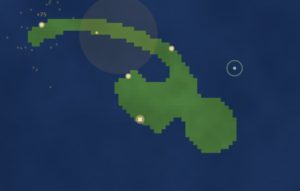
The specific rule set this project uses is B5678/S45678. A dead cell with five or more live neighbors is born. A live cell with four or more live neighbors survives. What this produces, when run on a noisy random seed, is cave systems and islands. The rule set naturally fills voids and thins peninsulas. Run it long enough on a field of random noise and it self-organizes into something that looks geographically plausible, with rounded coastlines and interior lakes. This particular CA flavor has a bias toward landmass, which makes it useful for seeding a world.
The rule is simple: if a pixel is opaque enough (alpha above 128) and dark enough (red channel below 80), it becomes a wall, marked as 1. Everything else becomes open space, marked as 0. The result is a grid that already carries the silhouette and rough geography of the original image, before a single CA rule has fired.
Birth (B5678): A floor cell turns into a wall if it has 5, 6, 7, or 8 neighboring wall cells.
Survival (S45678): A wall cell remains a wall if it has 4, 5, 6, 7, or 8 neighboring wall cells.
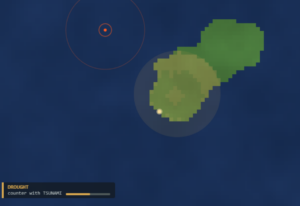
The crises, Drought and Famine check neighbors and spread probabilistically to adjacent land cells on a timer. Drought uses 8-connectivity at 25% chance per tick, famine uses 4-connectivity at 20%. They follow a simplified CA-adjacent logic, but without the strict synchronous neighbor-count birth/survival table. Plague skips the grid entirely and spreads settlement-to-settlement by distance threshold.
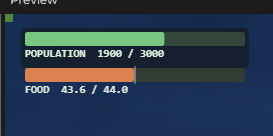
The food system runs its own parallel logic on top of the terrain. Every fertile land cell produces a small food output per frame, and every settlement consumes based on its tier. The ratio between those two quantities is the only metric that matters for whether civilizations grow or collapse. Crises work as a third layer: drought and famine spread cell-to-cell via their own CA-like rules, plague spreads settlement-to-settlement. The world is three overlapping automata running simultaneously, each blind to the others but producing emergent pressures that the player has to navigate.
What Inspired This
The immediate ancestor of this project is a semester of p5.js work that kept returning to the same question: what makes a system feel alive rather than just animated? GALACTIC answered it through particle pressure and charge. DRIFT answered it through steering behaviors and population dynamics. TERRA pushed that question further.
I got stuck on a specific image. In DRIFT, the prey species would sometimes form tight clusters near the food sources, and the predators would circle the periphery. I hadn’t scripted that behavior. It arrived from the interaction of three simple rules: seek food, flee predators, maintain separation. That image of emergent territorial behavior kept sitting in my head after I submitted the project.
The civilizational layer came from reading about stratified populations for my nationalism course. We were studying how national identity forms not as a top-down imposition but as something that accumulates at the edges of infrastructure and shared resource pressure. A hamlet near water is not a hamlet by design; it’s a hamlet because water access makes survival viable there. The settlement placement logic in TERRA works exactly that way. Settlements only spawn on coastal land where sea access meets fertile soil.
The two-mode structure, Steward and Sandbox, came from thinking about what different relationships to a world feel like. In Steward mode the player is a greek god with a budget. Why green you might ask? I return to this in almost all of my blog posts; autonomy, agency, simply because I can. In Sandbox mode the player is a pure demolition artist. The same underlying terrain engine serves both uses, which meant the CA and tool systems had to be agnostic about intent.
The Plan
I sketched the architecture in three layers before improving upon the previous code i had from draft 2. Terrain was the base: a 2D grid of 1s and 0s, updated by the CA rule every eight frames. The parallel grids sat on top of terrain: fertility, crisis state, and crisis age. These are separate arrays that reference the same coordinate space. Settlements were a list of objects that sample both layers on every update tick.
The player-facing tools needed to be implemented as targeted disruptions to this system. Earthquake needed to cure plague along a beam path. Tsunami needed to clear drought along an expanding ring. Volcano needed to destroy terrain, clear famine, and introduce high-fertility land as new volcanic soil hardened. Each tool was designed as a counter to exactly one crisis type, which meant the game had an answer to every problem if you positioned it correctly.
The UI plan was minimal. A mode bar at the top center, a HUD at the top corners for steward mode, a crisis panel at the bottom left for active crises, and a custom cursor that previewed each tool’s area of effect as a ghost overlay before firing.
I also planned the feedback particles early. Founding a hamlet gets a green sparkle. A tier upgrade gets a gold burst. A plague cure gets a green label. A settlement abandonment gets grey smoke. These are the only way the player understands what is happening inside the sim at any given moment.
Step-by-Step:
Milestone 1: Grid and CA
The first thing I got working was the CA step itself. Build a grid, apply the B5678/S45678 rule, render it. This took a day. The trickiest part was the boundary condition. I decided out-of-bounds cells count as land, which biases the CA inward and prevents the edges from eroding to water, which would’ve cut off coastal settlement placement near the canvas border.
Milestone 2: Terrain Generation
Two approaches: image-sampling for Sandbox mode, procedural island for Steward mode. The image sampler reads pixel brightness and opacity to classify land vs water. The procedural island blends a radial gradient with Perlin noise at a 70/50 split and thresholds the combined value at 0.55. Four CA smoothing passes run after generation to round the jagged initial shape into something that feels geographically plausible. Each game generates a different island because noiseSeed() randomizes on startup.
Milestone 3: Settlements
Coastal detection required a four-connectivity check: is this cell land, and does it have at least one adjacent water neighbor? The spawn function samples random grid positions, checks coastality, checks minimum distance from existing settlements, checks that no crisis is active on the tile, and places a hamlet if all conditions pass. The spawn gating on food ratio was a late addition that I’m glad I made. Without it, settlements spawn into starvation immediately if the map is small.
Milestone 4: Food and Crises
The food system was straightforward once the fertility grid was in place. Crisis spreading was harder. Drought uses eight-connectivity spread with a 25% probability per tick. Famine uses four-connectivity with 20% probability (slower and more directional, mimicking how supply disruptions travel along routes). Plague is entirely settlement-to-settlement with a distance threshold and an immunity window to prevent instant re-infection after cure. Getting these three rates balanced so each crisis was dangerous but counterable took a lot of manual tuning.
Here’s a highlight of code i am proud of:
for (let j = 0; j < rows; j++) {
  for (let i = 0; i < cols; i++) {
    if (crisisGrid[j][i] === 1) {
      crisisAge[j][i]++;
      if (crisisAge[j][i] >= 2) {
        for (let dj = -1; dj <= 1; dj++) {
          for (let di = -1; di <= 1; di++) {
            if (di === 0 && dj === 0) continue;
            let nx = i + di, ny = j + dj;
            if (inBounds(nx, ny) && grid[ny][nx] === 1 && crisisGrid[ny][nx] === 0) {
              if (random() < 0.25) toAdd.push([nx, ny]);
            }
          }
        }
      }
    }
  }
}
The crisisAge check is doing important work here. A freshly seeded drought tile cannot spread on its first tick. It has to mature for at least two spread intervals before it can infect neighbors. Without that gate, the initial seed cluster would explode outward in one frame and the player would have no reaction window at all. The 25% probability per neighbor per tick means spread is visible but not instant. You can watch the tan discoloration creep across the land in real time, which is the whole point.
Famine uses the same structure but with 4-connectivity only (no diagonals) and a 20% probability, making it slower and more directional. Plague skips the grid entirely. It checks settlement-to-settlement distance and seeds infection directly on nearby objects.
Here’s an old picture of how crises were, this is before I implemented them spreading and stuff.
Milestone 5: Disaster Tools
Earthquake beams move at 0.6 cells per frame along four cardinal directions. At every integer cell the beam tip crosses, it checks for settlements within one grid cell and cures their plague while granting 600 frames of immunity. The tsunami ring expands outward and samples the ring boundary at angular increments, clearing drought on any land cell it touches. The volcano runs a 180-frame timer, erodes a central crater, then stochastically solidifies outer cells as high-fertility land at 6% per frame per cell.
Milestone 6: Steward Mode Full Pass
I wired the energy system, the crisis spawning scheduler, the win condition, and the toast/floating label feedback. The steward mode tutorial runs once per session and front-loads the counter-tool pairings: tsunami clears drought, earthquake breaks plague, volcano ends famine. The crisis panel at the bottom left updates live and tells the player exactly which tool to use. I did not want the player to guess.
Challenges and Struggles
The hardest single problem was making the CA not eat settlements. The CA rule does not know that a given land cell has a house on it. If the terrain naturally converges toward a rule that kills that cell, the settlement disappears from the grid and the next frame the update function finds a settlement sitting on water and removes it. The fix is lockSettlements: after each CA step, the function iterates all settlement grid positions and forces them back to 1. This keeps terrain alive underneath existing settlements while still allowing CA to shape the rest of the map.
The second big struggle was food balance. In early versions, the food ratio crashed to zero almost immediately because a handful of settlements consumed more than the entire island produced. I had to tune FOOD_PER_LAND and TIER_FOOD_NEED in tandem over many test runs. The values in the final version feel natural, but they represent maybe three hours of iterative tuning that is totally invisible to anyone playing the game.
Crisis scaling gave me real trouble too. Early playtests had crises that felt either trivial or instantly fatal. The damage accumulation system (30 points to trigger a tier loss or abandonment) came from thinking about health bars in a different way. Instead of instantaneous damage, crises chip away slowly. Drought does 0.04 per frame. A full drought tile on a hamlet takes about 12 seconds to force abandonment, which is long enough to respond. Getting that number wrong in either direction completely breaks the game feel.
The cursor preview system was finicky. The ghost overlay for each tool uses low-opacity strokes to show the area of effect before the player fires. The earthquake preview draws four lines at the actual beam length. The tsunami preview draws concentric ellipses at the actual ring radii. This sounds simple but it required the preview to use the same parameters as the actual tool, which meant I had to keep those values in sync. When I changed a ring’s max radius I had to remember to update the preview too. I missed this twice.
Reflection and What Comes Next
The thing I’m most satisfied with is the emergent world behavior in Steward mode. I did not script the way crises compound. A drought reduces food production, which slows growth, which makes settlements more fragile when famine hits next. I built three independent systems and their interaction produced a cascade logic that feels scripted but isn’t.
What I want to improve: the crisis visuals feel functional but not beautiful. The drought overlay is a warm tan pulse. Famine is a grey-brown desaturation. These communicate but they don’t carry atmosphere. I want to give drought a particle system, dry cracking particles drifting off land tiles. I want famine to dim the overall palette in the affected region. Plague should feel more visceral; right now the purple ring around a settlement is subtle.
The progression in Steward mode also flattens toward the end. Once you hit three or four cities you have so much food surplus and energy regeneration that crises stop being threatening. A late-game difficulty ramp, faster crisis intervals, compound crises, or a catastrophic endgame event, would fix this.
The biggest gap in the project is sound. The CA is a visual medium by default but each of these events, the founding sparkle, the tier burst, the earthquake beam, have clear sonic signatures that are missing. A procedurally pitched tone that scales with energy level during tsunami expansion would make the game feel dramatically more alive. That’s the first thing I’d add.
References
Inspirations
Conway’s Game of Life and its B/S rule notation — the conceptual ancestor of the B5678/S45678 terrain rule used here
Kanchan Chandra’s “The Age of New Nationalisms” JTerm course at NYUAD — specifically the framework around stratified resource access as the material basis for collective identity formation
Claude (Anthropic) assisted with mathematical tuning of several system parameters, particularly the food balance constants (FOOD_PER_LAND, TIER_FOOD_NEED), the crisis damage thresholds, and the probability values for drought and famine spread. I used it iteratively alongside manual playtesting rather than as a one-shot solution. All system architecture, rule design, and structural decisions were my own. Also, UI. I am terrible with UI. AI carried me mostly here and I believe this particular usage is OK because UI design was not a part of our class.
This project explores body-based interaction through computer vision, where the user’s hands become controllers for two physically simulated characters. Using hand tracking, each finger is mapped to different limbs of the stickmen, allowing users to control movement in real time. The game is made out of 3 mini games that users can enjoy with their friends. The minigames include: basketball, football, and fencing. The goal of the game was to put the users in “shoes” or in this case maybe in hands of the puppet masters, controlling the stickmen and competing against each other in various sports.
Some inspiration was taken from other physics based video games such as Human Fall Flat. The key concept of that video game and the one I made is the physics engine. Human Fall Flat is heavily reliant on physics engine for the control of the characters which makes the game hard, but intentionally so. Similar to that my game is also meant to challenge players in a way. The movement is intentionally hard to master but I feel like that is what makes the game fun and what brings out the competitiveness in the players. But I also believe there is a thin line between fun challenging game and the game that is just broken and unplayable because of its difficulty. So through testing and continues optimization the goal was to create something that is challenging enough to intrigue, but not challenging enough to scare players, but I will talk more about this later.
The core concept is to transform the human body into a direct input system, removing traditional controllers and instead using gesture-based interaction. The project focuses on making digital movement feel physical by combining ml5.js hand tracking with Matter.js physics simulation.
Process
The development of this project began as an exploration of how hand tracking could function as a primary input method for controlling a digital system. Rather than relying on traditional interfaces such as keyboards or controllers, the goal was to create an experience where the user’s own body, specifically their hands, became the mechanism through which interaction occurs. So at the very beginning of the project the goal was first to get hand tracking to work and test it out to see how difficult it is to implement and how it behaves.
(I believe WordPress doesn’t have camera access and thus the sketch appears blank, to view please open the sketch in another tab and allow camera usage)
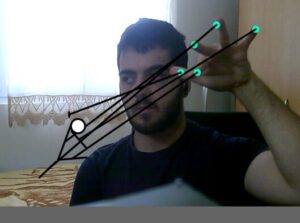
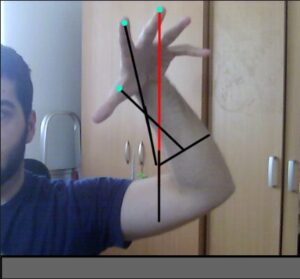
I spent time observing how accurately the model could track fingers, how stable the tracking was under different lighting conditions, and how many hands could be detected simultaneously. These early tests revealed that while the tracking was generally responsive, it could fluctuate slightly depending on hand orientation and speed. This meant that any interaction system built on top of it would need to account for noise and instability.
Once I had gotten hand tracking set up and I was confident in it it was time for the stickman and the floor. To build the stickman, I used Matter.js to create a set of rigid bodies representing the head, torso, arms, and legs. These parts were connected using constraints in order to simulate joints. At this stage, the system was entirely physics-driven. The intention was to create a realistic representation of a body, where movement would emerge naturally from forces and connections rather than direct manipulation. Once the structure was in place, I attempted to control the limbs by moving the constraint anchor points based on the position of the user’s fingers.
This approach, while conceptually appealing, introduced significant problems in practice. The limbs became unstable, often oscillating or reacting unpredictably to small changes in input. Because the physics engine was constantly resolving forces, even minor inaccuracies in hand tracking resulted in exaggerated or chaotic movement. The limbs would move to their own will and there was almost nothing I could try to control them. My debugging attempt consisted of commenting out all fingers except for the thumb that controls the right hand and the middle finger that controlled the body and trying go get just one arm to behave normally. I quickly discovered that no matter what I did I couldn’t get the hand to work properly, the matter.js engine although powerful did have issue when multiple bodies were too close to one another which I also noticed when working on Assignment 10.
Thus a decision was made. It was time to go back to the drawing board and redo the whole design.
I decided to recreate the world but this time I only added the floor, gravity and one stick to the ground. The goal was to control its y axis with my thumb only and thus test out my new method which was mapping the movement instead of using constraints. The proved to be much more reliable than the old method which was more realistic. But at this point in development I decided that I will sacrifice some realism for better control and more enjoyable experience.
After successfully testing out the new movement on one stick I added another vertical one for torso and another one to represent the other arm. The new movement worked great with the rotation of the arms and the movement of the body and once I was happy with everything it was time to transfer it to the original stickman. Each finger was mapped to a specific body part, and its vertical position was translated into a target angle using the map() function. These angles were then applied to the corresponding bodies using Matter.Body.setAngle(). To ensure smooth transitions, I used linear interpolation (lerp()), which allowed the limbs to gradually move toward their target positions rather than snapping instantly. Additionally, angular velocity was reset on each frame to prevent the physics engine from introducing unwanted rotational forces.
I also experimented with adding more complexity to the system, including additional joints such as elbows, in an effort to increase realism. However, this made the gameplay much much harder and more complicated. Controlling multiple joints with limited and noisy input proved to be extremely difficult, and the system became confusing rather than intuitive. So this was another idea that unfortunately had to be scrapped.
Once the interaction system was functioning reliably, I began developing different modes to explore how the characters could interact within a physics environment. The first mode implemented was basketball, where a ball interacts with the stickmen’s limbs and can be directed into a hoop. This required implementing collision detection and translating limb velocity into force applied to the ball. An immediate issue I faced was the ball slowing down and getting stuck on the ball if it is not bounced and since there was no easy way to have the stickman lift the ball I made the ball bounce by itself if it was slowing down.
function updateBasketball() {
  // if ball is near ground and moving slow bounce it
  if (ball.position.y > height - 60 && Math.abs(ball.velocity.y) < 6) {
    Matter.Body.setVelocity(ball, {
      x: ball.velocity.x + random(-0.5, 0.5),
      y: -12,
    });
  }
}
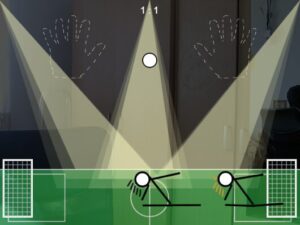
The football mode followed a similar structure but introduced goals on either side of the screen and required directional control of the ball. The fencing mode was more focused on direct interaction between the players, involving swords attached to the arms and collision detection to determine scoring. At this stage of development the fencing code is looking kind of empty because I hadn’t added multiplayer yet and there wasn’t anything to do with the sword with one player realistically.
During the implementation of these modes, collision handling became a recurring challenge. Matter.js generates multiple collision events for a single contact, which caused scoring to trigger multiple times unintentionally. The final solution involved introducing cooldown timers and state flags, ensuring that each scoring event could only occur once within a short time window. This approach stabilized the scoring system across all modes.
With everything in place, I expanded the project to support two players. I sorted the detected hands based on their horizontal position on the screen. The leftmost hand was assigned to one stickman, and the rightmost hand to the other. This ensured that each player consistently controlled the correct character. However, an issue arose when using left hands instead of right hands. The mapping logic, which had been designed for right-hand input, caused controls to appear mirrored and unplayable when a left hand was used.
To resolve this, I incorporated the handedness property provided by ml5 and adjusted the mapping accordingly. By reversing the control logic for left hands, I was able to maintain consistent and intuitive behavior regardless of which hand was used.
I also focused on improving the visual design of the project. Initially, the system was functional but visually minimal. I introduced distinct environments for each mode, including a basketball court, a football field, and a fencing strip, to provide context and variation. Additionally, I implemented a lighting system consisting of animated spotlight cones originating from the top of the screen. These lights are slightly angled and move subtly over time, adding depth and atmosphere without interfering with gameplay. I also tested implementing crowd stands and a crowd in the background around where the hands should be positioned, but I found this to be too distracting for the players and decided to continue without it.
In talks with the professor we concluded that there should be a way to show the users that they are supposed to use their hands to control the stickmen and to begin they should put their palms in front of the screen. To address this I added visual guides in the form of hand outline images. These guides appear when no hands are detected. I also implemented a pulsing scale animation, which made the guides feel more alive and noticeable without being distracting. This, I believe, significantly improved the clarity of the interaction.
Another thing I wanted to implement was a visual element that clearly demonstrates the presence of physics in the system since the body movement is more reliant on mapping instead of constraints and physics. I experimented with adding clothing to the characters using chains of connected bodies, but this resulted in shapes that resembled capes and did not integrate well with the overall design. The movement was also visually confusing. I then shifted to implementing a hair system, where small segments are connected to the head using constraints. This approach was more successful, as the hair responded naturally to movement and provided a subtle but clear indication of physics at work. It also allowed for differentiation between characters through variations in color.
All this lead to the finish product. I liked writing this progress report as it gave me a chance to go back and explore all the different mechanics and how they were developed. It was honestly so interesting to see how the code changes depending on the “generation” of the project and how the playability and the overall feel of the game improves over time. I hope you enjoyed reading the process reflection as much as I did writing it :).
Video
Reflection and Future Improvements
Honestly I really enjoyed working on this project. Even though it was a lot of hard work and a lot more debugging and just constantly thinking about features, how to implement them and how to fix bugs I really enjoyed the whole process.
I learned a lot not only about programing in JavaScript and using ml5.js and matter.js, I learned so much about project development. Not being able to use constraints for movement and having to go with mapping taught me how not everything will always go with the plan but it is important to be able to adapt. If I could go back in time I would definitely write comments in the code more as I am writing it. I have this really bad habit of just being in the “zone” while coding and not writing any comments but I always end up going back and commenting everything after I am done with a certain feature or bug fix. Although this works with smaller projects, bigger projects like this taught me that it is important I change this habit.
In the future I would love to continue working on this project. Adding sound would be, in my opinion, the next logical step and feature to add. I would also love to add more different modes and maybe explore a different way to add clothing or some more design to the characters. But overall I am really happy with how the final project turned out.
Luminous Silence is an exploration of the emergent, unspoken connections between the human form and the natural world. It envisions the body not as a separate entity from nature, but as a living doorway, a threshold between the visible and the hidden, the silent and the voiced.
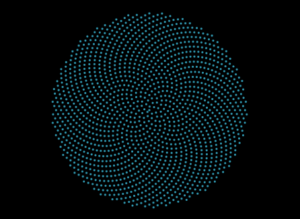
In this interactive ecosystem, your hand becomes a seed. Your breath transforms into weather. The screen before you ceases to be a mere digital display and awakens as a nocturnal garden, blooming and reacting as though it possesses its own quiet intelligence. Rooted in the geometric perfection of phyllotaxis, the spiral growth patterns found in sunflowers and pinecones , the visual landscape presents an initial state of cosmic, botanical order. However, this order is fragile and alive. As you introduce your hand, the spiral is disrupted, awakened, and reconfigured.
By employing principles inspired by cellular automata, the artwork simulates a living organism. Each “seed” or point of light within the spiral governs its own state based on localized, rule-based interactions with its environment. Just as cells in an automaton live, die, or illuminate based on their neighbors, the particles here cascade with bioluminescent light, reacting to the ambient noise of the room and the physical proximity of the viewer. Nothing is fixed. Everything exists in a perpetual state of sensing, dissolving, blooming, and remembering.
This is not a landscape meant to be controlled; it is a listening intelligence. The emotional resonance of the piece lies in its awe, fragility, and mystery, akin to standing beside a dark, restless ocean at night, witnessing the water ignite with bioluminescent plankton only where the surface is disturbed.
Implementation Details & The Creative Process
The journey of building Luminous Silence was an exercise in layering complexities. The goal was to move from static mathematical geometry to a fluid, responsive, and “breathing” system. I chose p5.js for the visual rendering and ml5.js for the machine learning hand-tracking capabilities.
The creative process was divided into distinct evolutionary milestones, ensuring that the gap between raw mathematics and poetic interaction was bridged gradually.
Milestone 1: The Seed (Establishing Cosmic Order)
The first step was to build the foundation of the visual language: the phyllotaxis spiral. I needed to ensure the math was sound before introducing any chaos. This milestone focused purely on calculating the golden angle (137.5 degrees) and plotting the seeds to create the signature sunflower pattern.
Milestone 2: The Breath (Cellular Automata & Audio Reactivity)
Once the spiral was established, it needed life. I introduced audio input to allow the user’s voice and breath to unravel the spiral. Furthermore, I integrated localized rule sets inspired by cellular automata. By utilizing Perlin noise to dictate the phase and size of each particle, the seeds began to pulse organically, as if passing states of light back and forth among neighbors.
Milestone 3: The Portal (Physical Intersection)
The final milestone before integrating the webcam pixel-sampling was the physical portal. Using ml5.handPose, the system maps the user’s palm. The code calculates the distance between every single seed and the user’s hand. When the hand breaches a certain radius, a localized “burst” or spatial distortion occurs, pushing the seeds away while increasing their brightness, acting as the living doorway between the user and the digital organism.
Video Documentation
The accompanying video documentation captures the intimate choreography between human and machine. It begins in pure darkness, save for the pulsing instruction screen. As the user raises their hand, the video highlights the immediate, fluid transition: the sudden materialization of the botanical galaxy.
Key moments highlighted in the video include:
The Awakening: The initial distortion of the spiral as the user’s hand enters the frame, showing the “portal” effect where the hand clears a space among the seeds.
The Whisper: The user speaking into the microphone, demonstrating the audio-reactive expansion and color shift (neon mode) of the cellular particles.
The Touch: The user clicking the screen to alter the ecosystem’s hue, showing the transition from deep oceanic blues to vibrant, unearthly colors.
Final Sketch
Reflection
Luminous Silence succeeds in stepping away from the paradigm of “technology as a tool” and moves toward “technology as an entity.” The user experience feels profoundly intimate. By obscuring the raw camera feed and only revealing it through the scattered, glowing seeds, users report a feeling of looking into a magic mirror, one that reflects their energy and silhouette rather than their physical details.
The integration of the cellular automata logic,where the glow ripples through the system rather than flashing uniformly , was vital in achieving the feeling of a living organism. It evokes fragility; if the user drops their hand and falls silent, the piece returns to its quiet, resting geometric state, waiting in the dark.
Future Improvements: In future iterations, I would like to expand the sensory inputs. Integrating fluid dynamics could allow the seeds to drift like actual spores in water rather than snapping back to their rigid spiral paths. Furthermore, implementing a multi-user interaction where two hands create overlapping, conflicting cellular rules could beautifully illustrate the tension and harmony of shared ecosystems.
References & Inspirations
Artistic & Conceptual:
Bioluminescent Organisms: Deep-sea life and glowing fungi inspired the stark contrast of bright light emerging from absolute darkness.
Botanical Geometry: The mathematical precision of sunflower seeds (phyllotaxis) serves as the structural backbone of the piece.
Generative Systems: The concept of cellular automata (pioneered by John von Neumann and John Conway) inspired the localized, emergent behavior of the particles.
Spiritual Interaction Design: Designing the interaction to feel less like a software interface and more like a meditative invocation or a digital shrine.
Technical Resources:
p5.js Library: For canvas manipulation, noise generation, and audio input processing.
ml5.js Library: Utilizing the pre-trained handPose model for real-time skeletal tracking.
The Nature of Code by Daniel Shiffman – Specifically the chapters covering autonomous agents, noise, and cellular automata.