Concept: I create a visual pattern where multiple objects (movers) move around invisible attractors. These attractors will exert forces on the movers, and I also incorporate additional forces to add turbulence and repulsion, creating an interesting and dynamic design.
References and Inspiration: I’ll draw inspiration from generative art and particle simulations.
Variable and Function Naming: embedded in notations
Reflection and Future Improvements:adding arrows and more shape
In this assignment, I wanted to experiment with mostly three kinds of phenomenons: gravitational attraction, turbulence and repulsion. To perform these experiments, I decided on auto-generating movers one at a time until it reaches a maximum threshold (then repeating this step), and placing a few attractors in place.
These attractors have a certain maximum displacement that they can move around with. This is to imitate how attractors in the universe also move by themselves. Movers are attracted to these attractors in place, which change the positions of each mover. But it is also important to remember that there is, in fact, a competition between these attractors. Movers move towards the one that can attract with more force.
When movers are near to each other, they are joined through a line. This resembles a communication channel between two movers in the universe. When they are very near to the attractors, they are sucked in.
This imitation of phenomenons creates a unique generative pattern as seen in the sketch.
Here are a few snippets that I’m particularly happy with:
Attractor.attract()
// gravitational attraction force to a mover
attract(mover) {
  let force = p5.Vector.sub(this.position, mover.position);

  let distance = force.mag();
  distance = constrain(distance, 5, 25); // constrain the distance

  let strength = 50 / (distance * distance); // attraction strength based on distance

  force.setMag(strength);
  mover.applyForce(force);
}
Turbulence and Repulsion
// apply forces to movers and display them
for (let mover of movers) {
  for (let attractor of attractors) {
    attractor.attract(mover);
  }

  // turbulence and repulsion forces
  let turbulence = createVector(random(-0.1, 0.1), random(-0.1, 0.1));
  mover.applyForce(turbulence);

  for (let otherMover of movers) {
    if (mover !== otherMover) {
      let repulsion = p5.Vector.sub(mover.position, otherMover.position);
      let distance = repulsion.mag();
      distance = constrain(distance, 5, 25);
      repulsion.setMag(-1 / (distance * distance));
      mover.applyForce(repulsion);
    }
  }

  mover.update();
  mover.display();
}
Future Improvements
I would love to add the drag force to imitate the asteroid belt. More like how certain things may hinder the movements in the universe.
In this assignment, I wanted to generate some minimalist patterns using the interaction force between the attractor and multiple movers. I wanted to keep the visual style simple and reduce the user interaction to focus more on the final patterns that the movement of the objects will be able to create. The parameters that I’ve tried adjusting include the gravitational constant G, the mass of the attractor and the mover, the starting position and velocity of the objects, and the way of calculating the force between the attractor and the movers.
Codes:
I tried to write several p5js sketches that share the same classes and parameters but are slightly different in force functions and the logic behind them.
01
The first one places a line or grid of movers that have no initial velocity. However, the attractor has been set with a constant speed to keep it moving in a straight line, so that it can lead the direction of the movers to a certain extent, based on its own mass, moving speed, and distance from the movers. I created several versions.
02
In the second set of sketches, I changed the movement of the attractor to a circular pattern and placed the movers in a circle to see what would happen. And I discovered something interesting.
When the attractor is moving rather slowly (move by an angle of frameRate/500 every frame), we can see that it places a strong force to the moving direction of the movers. It’s like macaroni.
If we increase the moving rate of the attractor (frameRate/100), we can see that the movers are not heading in the same direction. It’s because the attractor has already changed its position before it puts enough force to the mover to move towards a certain direction.
When the attractor is moving very fast (frameRate/1), you can actually find that its directional impact on the movers is more even. In other words, it’s moving like a centrifugal machine and due to its more rapid change of position, its force on the movers in every direction is evenly distributed. When it is moving extremely fast, we can actually say that it puts no force on the movers at all. This makes me rethink of how the impact of force can change with a change in time scale!
03
In the last experiment, I attempted to create a combination of the gravitational acceleration and the vector acceleration. So what’s the difference between the two?
The gravitational acceleration is calculated through Newton’s second law, which is a rather complicated formula. However, vector acceleration is simply applying the subtraction of the position of the attractor and the position of the mover as a force. I discovered this because I was trying to create a flower-like pattern with the gravitational force but I could never succeed. Later I found out that we can only achieve this through applying the vector force.
Here is the comparison of these two kind of forces. In these two sketches, only the force calculation formula has been changed. (basically one line of code)
Vector force:
Gravitational force:
And then I wrote both of the functions and applied the two forces to the same mover. This is what I got. Look at the movement and you can find there’s a twist each time when the mover is near the attractor. It’s done by the gravitational force.
Then I tried to make the attractor move and also adjusted some parameters. And I got these patterns:
Future direction:
I think the next step can be manipulating more movers instead of a single mover. I can also make more interactive sketches. It’s also a good idea to add a fraction or a force that will push away the mover when it’s too close to the attractor.
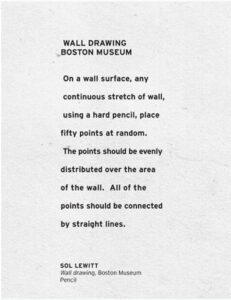
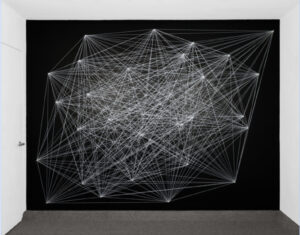
When we got this assignment to work with forces, I wanted to make a screen saver. There are many screensaver designs out there, but the one I coded was inspired by Sol Lewitt’s art piece Wall Drawings (see fig 1).
Lewitt just gave instructions to Boston museum for this art piece and this is what was made. I was very intrigued by this idea and wondered if this could be combined with our decoding nature class. What is these 50 points were not stationary, but moving with mutual forces of attraction between them? Let’s try it out!
TECHNICAL DESIGN
I started with coding just 5 points (50 seemed to be too much for my laptop to handle). These 5 were movers. For the behavior of the screensaver, I added 4 invisible attractors too, in a diamond shape in the center of the canvas. These simulate the moving of the whole design as a whole throughout the canvas. Then remember how a screen saver bounces off the edges? Hence I added the check edges function too.
I am grateful for Daniel Shiffman for his tutorial on Forces linked here . His code in the tutorial was taken as a starting point and built upon.
P5 SKETCH
CODE
// Thanks to:
// Mutual Attract // The Nature of Code
// https://www.youtube.com/watch?v=fML1KpvvQTc&list=PLRqwX-V7Uu6aFlwukCmDf0-1-uSR7mklK&index=18

let j = 0;

let movers = [];
let attractor = [];
let num_m = 5; // number of movers
let num_a = 4; // number of attractors

function setup() {
  createCanvas(600, 600);

  // frameRate(30);

  for (let i = 0; i < num_m; i++) {
    let m = random(10, 15);
    movers[i] = new Mover(225+50*i, 225+i*50, i*PI/2, -1*i*PI/2, m);
  }

  attractor[0] = new Mover(300, 200, 0, 5, 10);
  attractor[1] = new Mover(200, 300, 0, -5, 10);
  attractor[2] = new Mover(400, 300, -5, 0, 10);
  attractor[3] = new Mover(300, 400, 5, 0, 10);
  background(0);
}

function draw() {
  background(0, 20);

  for (let mover of movers) {
    for (let i = 0; i < num_a; i++) {
      attractor[i].attract(mover);
    }
    beginShape();
    for (let other of movers) {
      if (mover !== other) {
        mover.attract(other);
        // stroke(255);
        // color = p5.Vector.random2D();
        // stroke(int(color.x), int(color.y)%255+1, 0);
        // stroke(255-(j%256), 0, 255,j%256); // (j+55)%255
        stroke(255-(j%256), 255,j%256, j);
        // print(int(color.x*255));
        line(mover.pos.x, mover.pos.y, other.pos.x, other.pos.y);
        // vertex(other.pos.x, other.pos.y);
        // vertex(mover.pos.x, mover.pos.y);
        j++;
      }
    }
    endShape();
  }

  for (let mover of movers) {
    mover.update();
  }
}
class Mover {
  constructor(x, y, vx, vy, m) {
    this.pos = createVector(x, y);
    this.vel = createVector(vx, vy);
    this.acc = createVector(0, 0);
    this.mass = m;
    this.r = sqrt(this.mass) * 2;
  }

  applyForce(force) {
    let f = p5.Vector.div(force, this.mass);
    this.acc.add(f);
  }

  attract(mover) {
    let force = p5.Vector.sub(this.pos, mover.pos);
    let distanceSq = constrain(force.magSq(), 100, 1000);
    let G = 1;
    let strength = (G * (this.mass * mover.mass)) / distanceSq;
    force.setMag(strength);
    mover.applyForce(force);
  }

  update() {
    this.vel.add(this.acc);
    this.pos.add(this.vel);
    this.acc.set(0, 0);
    this.checkEdges();
  }

  show() {
    stroke(255);
    fill(255, 100);
    ellipse(this.pos.x, this.pos.y, this.r * 2);
  }

  checkEdges() {
    translate(0, 0);
    if (this.pos.y + this.r >= height) {
      this.pos.y = height - this.r;
      this.vel.y *= -1;
    }
    if (this.pos.y - this.r <= 0) {
      this.pos.y = this.r;
      this.vel.y *= -1;
    }
    if (this.pos.x + this.r >= width) {
      this.pos.x = width - this.r;
      this.vel.x *= -1;
    }
    if (this.pos.x - this.r <= 0) {
      this.pos.x = this.r;
      this.vel.x *= -1;
    }
  }
}
WORKING VIDEO
FURTHER IMPROVEMENTS
With the same concept of screensaver designs, I could play along with the different properties of forces to create different designs and behaviors. I already did alter the mass, distance and G values for the desired result above, but there could be other things to factor in. I did not put in friction for a reason as I want it to be endless and not stop as it a screensaver, it keeps running in the background. However, drag force could be something to play around with to alter the speed of the design. Currently I am controlling the speed with the frameRate() property.
I also only made 5 points and not 50 because that was a lot of computation for my laptop. Maybe there is an efficient way of working with a large number of points which I could look into in the future.
My inspiration was also from my last assignment. I mentioned how I really wanted to implement something in the future for that code to have the bee be attracted to something but in this example, I wanted it to repel strongly this time. I wanted the repel force to be really strong in this case and still have the flow look natural – I hope to include these concepts in my final project.
Here are some images from me playing around with the number of movers and the multiplier force.
In this image, I made the movers towards the South East.
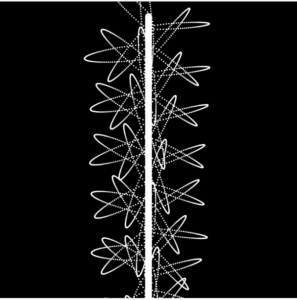
In this image, I made it go up to the North East but because all areas of the canvas are covered, it looks more natural but the repelent force from the mouse coordinates is not visible enough.
In this image, I made the repel force stronger and we can visibly see that in this image.
I was proud of the following code because these parts of code are what made the randomness yes repel force visible. It took me a while to understand why the repel force was not that visible so when I figured out why, it made a lot more sense.
if (dMouse < 100) {
        let force = p5.Vector.sub(mover.position, mouseAttractor);
        force.normalize();
        force.div(dMouse);
        force.mult(120);       //repel force multiplier
        repulsion.add(force);
      }
I also wanted to learn more about time management within p5.js so I made the screen stop after 8 seconds resulting in a still image that looks completely natural.
// time calculation
  let elapsedTime = millis() - startTime;

  // check 15 secs
  if (elapsedTime < 8000) ...
How can I improve
I want to apply it to a real life situation such as a solar system or the movements of electrons in atoms. I also want the movers to come back naturally instead of having to wrap around the screen.
For this week’s assignment, I was inspired by the Planar Choreographies, especially this simulation: https://personalpages.manchester.ac.uk/staff/j.montaldi/Choreographies/
The concept of planar symmetry was utterly new to me, however, I found it really fascinating (and a bit addictive even). Here is my own attempt and my sketch:
Apparently, what turned out of the sketch is a system of particles with mutual gravitational attraction. This type of system is chaotic and sensitive to initial conditions, that is why I set all the parameters manually in the code (the positions and velocities of movers and attractors). Even small changes in the starting positions or velocities of the particles lead to significant differences in the long-term behavior of the system. That is how I got to learn that the sensitivity to initial conditions is a characteristic of chaotic systems.
What seemed really interesting to me is that in the beginning the system appears organized, or in more official terms – symmetrical. However, after a while, the system becomes imbalanced and progresses to develop more chaotic qualities. The reason for that is the design of the system. As time progresses, the particles continuously influence each other due to gravity. Small disruptions in their positions or velocities accumulate over time and lead to significant deviations from the initial state.
An additional upgrade that I added was the force of repulsion. Here is how I implemented it in code:
for (let other of movers) {
      // Checking if the current 'mover' (outer loop) is different from the       current 'other' (inner loop)
      if (mover !== other) {
        // Calculating the vector pointing from 'other' to 'mover' and its           distance
        let repulsion = p5.Vector.sub(mover.pos, other.pos);
        let distance = repulsion.mag();
        // Defining a minimum distance for repulsion and a maximum repulsion           force
        let minDistance = 50;
        let maxForce = 0.5;

        // Apply repulsion force if particles are too close
        if (distance < minDistance) {
          repulsion.setMag(map(distance, 0, minDistance, 0, maxForce));
          mover.applyForce(repulsion);
        }
        mover.attract(other);
To calculate the repulsion force, I subtracted the position of ‘other’ from the ‘mover’ to obtain a vector pointing from ‘other’ to ‘mover’, and then computed the distance between them. I then set a minimum distance that determines when repulsion should occur and a maximum repulsion force to control the strength of the repulsion effect.If the distance between ‘mover’ and ‘other’ falls below the specified minimum distance, I mapped the repulsion force by scaling the ‘repulsion’ vector based on the distance and the maximum force. This ensures that particles t experience a repulsive force based on the distance at which they encounter each other. Finally, I applied this repulsion force to the ‘mover. This force counteracts the gravitational attraction, preventing particles from getting too close and adding a repulsive behavior to the simulation.
For further improvements, I would be interested to experiment with more movers and attractors placed in various positions. It would be exciting to attempt to create a more stable choreography, make it appear 3D or perhaps to add some additional visual effects, like color changes or to play around with connecting lines.
The “2D Simulation of 3D Object with Attractors and Movers” is a P5.js project that explores the behavior of a simulated 3D object within a 2D plane. The core concept involves creating an illusion of three-dimensionality through the interaction of attractors and movers in a confined space. Here’s how the concept breaks down:
Attractors: The project begins by introducing invisible attractors, positioned at the four vertices of a square. These attractors act as gravitational centers, exerting forces on nearby objects.
Movers: Movers are dynamic entities with mass and radius. They are introduced into the scene and interact with the attractors and each other. The movers are attracted to the invisible attractors, simulating gravitational forces. Additionally, movers attract each other, contributing to the complex dynamics of the simulation.
Initial Direction: To establish an organized start, the movers’ initial velocity vectors are set to be perpendicular to their position vectors. This arrangement ensures that all movers begin moving in the same direction.
Visual Illusion: The project employs lines connecting each pair of movers, creating a visual effect resembling a rotating 3D object. This illusion is achieved in a 2D plane, as P5.js primarily supports 2D graphics.
Boundary Constraints: To introduce chaos and turbulence into the simulation, movers are constrained by the boundaries of the canvas. When a mover reaches the boundary, it reverses its velocity, contributing to the overall dynamics and eventual chaos of the system.
Inspiration
The inspiration for this project likely draws from the desire to replicate the complex and chaotic movements of objects in a 3D space using the capabilities of P5.js, a 2D graphics library. The concept of simulating gravity and interactions between objects is a common theme in physics simulations and computational art.
The project successfully achieves its goal of creating a visually intriguing simulation of a 3D object’s behavior within a 2D plane. It demonstrates the dynamic interplay between attractors and movers and how this interaction can lead to chaotic and unpredictable motion.
Ideas for Future Work or Improvements
Enhanced Visualization: Exploring ways to improve the visual representation of the rotating 3D object. This could involve using different shapes or rendering techniques to make the illusion more convincing.
User Interaction: Adding user controls to manipulate the attractors or introduce new movers during runtime, allowing users to interact with and influence the simulation.
Realistic Physics: Experimenting with more advanced physics simulations, such as introducing damping, or elastic collisions between movers.
Performance Optimization: Optimizing the code to handle a larger number of movers and attractors without sacrificing performance. Techniques like quad trees for collision detection can be beneficial.
For this assignment I focused on making changes and tweaking the last sketch you showed us in class; the one with many white translucent movers orbiting aroung a pink attractor. I also had an image in mind I wanted to recreate. I wanted to make a retro serene generative art screensaver, that progressively get more complex. Below is my inspirations.
The first things I did was change the design of the movers. I found myself experimenting will all sorts of shapes and dimensions, but finally settled on lines connecting the movers to attractor. I really liked the simplistic, yet instrictate designs being formed over time. I also continuously played around with constants and variables to emulate the calm atmosphere I desired.
After settling on an aesthetic I was happy with I moved on to applying turbulence to the attractor. I wanted to do this since any force applied to the attractor will in turn affect the movers as well because of the way they are coded. This way, the turbulence would make a profound effect on the whole sketch. I coded the turbulence to be random vectors that would affect the attractor at all times, hence making the attractor similar to the walkers we made in earlier classes.
let turbulence = p5.Vector.random2D();
  turbulence.mult(0.15);
  attractor.applyForce(turbulence);
  attractor.update();
  attractor.checkEdges();
The above code is what creates the turbulence for the attractor.
I also wanted to add a level of interactivity to the sketch. To achieve this, I made sure the attractor would teleport to the mouse coordinates with every mouse click.
Lastly, I added check controls to make sure the attractor remains in the canvas.
Below is my final design
I also made a more color version below
Challenges:
I wanted to create a design that incorporated more depth, to give it a 3D look. But I wasn’t make increase the complexity of the sketch in time.
This project is titled Hungry Ants. It represents the collaborative quality that ants exhibit in nature, especially when there’s food around. It illustrates the teamwork ants undergo towards the common goal of satiability! On the mouse cursor, there’s a yellow circle which represents the targeted piece of food (a block of cheese, perhaps). A group of ants appear as soon as the program is run and they all rush towards the food. The user is free to move the cursor/food around which the ants would follow. The army of ants will keep moving until they reach their target, after which they’ll stop to enjoy their meal. Click here for the inspiration behind this project.
A highlight of some code that you’re particularly proud of
update() {
    let food = createVector(mouseX, mouseY);
    let foodDirection = p5.Vector.sub(food, this.position);
    let distanceToFood = foodDirection.mag();


    // if the ants reach/are close to the food, they stop
    if (distanceToFood < 18) {
      this.velocity.x=0;
      this.velocity.y=0;
      this.acceleration.x=0;
      this.acceleration.y=0;
    }

    //if not, they keep following the food/mouse
    else {
      foodDirection.normalize();
      foodDirection.mult(0.01);
      this.acceleration = foodDirection;
      this.velocity.add(this.acceleration);
      this.velocity.limit(1.5);
      this.position.add(this.velocity);
    }
  }
This is the update method of the Ant class. I’m particularly proud of the distanceToFood calculation and the conditional statement following it to cause the ants to stop once they reach the food.
Embedded sketch
Link to Sketch: https://editor.p5js.org/ahm9979/sketches/sQgG7I0Ir
Reflection and ideas for future work or improvements
– It would’ve been cool to have the piece of food to shrink the more time the ants spend on it. Then, another piece of food would regenerate and the process would repeat
– It was very convenient discovering the arrays method of creating a group of objects. It would’ve been time-consuming if I had to create each ant manually as a separate object of the Ant class.
– I don’t like how clumped up the ants look once they stop for the food. Even after the food moves again, the ants move in their clump to follow it. It would look better if they separated again without having the run the program from the beginning.
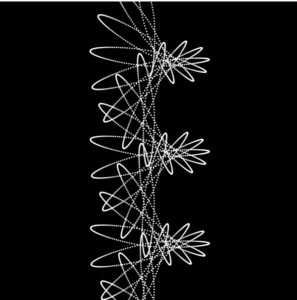
While looking through the examples that we went over class, I was reminded of how planets orbit in the space, which has always been something I was interested in. So I thought it’d be fun to trace the lines of the orbit without showing the actual attractor (in this case this would be the planet), so that they will look almost like flowers that bloomed in space. I got inspired by the Korean traditional flower patterns, which is shown below, and wanted to recreate something similar to it but in a much simpler outline and with a space background.
Process/Highlight
Taking professor Aya’s advice, I first made sure to watch these two tutorials (1, 2) from the Coding Train before beginning my project, during which I learned a few core rules such as:
establishing universal gravitational constant (written as G in the code), which is a property of attractor itself. It’s a way to tune the world to have stronger/weaker gravitational attraction forces.
you need direction (vector, use sub() function) and magnitude when calculating the force.
Keeping these information in mind, the vision that I had was creating a total of 3-5 different flower patterns that were different in sizes, so I created a total of 3 individual attractors and movers and varied elements such as ellipse and this.vel.mult(); for each attractor and mover. I also varied the colors for each of them in order to make the canvas more vibrant.
Something that I had trouble with for a while was adjusting/movign the position of the mover3, but after trying out various combinations of numbers, I realized that I needed to edit this part of the code in order to move the position of the mover:
Then I just hid all the attractor.show(); functions in order to make them invisible, and changed the colors and transparency of each mover and added a background image. I also added Daniel’s particle code so that it will act like stars in the background. I tried running it multiple times for variation, and I got 3-4 different versions.
Here’s the final sketch.
Reflection
Some possible rooms for improvement are:
setting the sketch so that it will stop drawing once it hits a certain number of repetition so that the movers’ traces won’t look so clumped together in the end.
limiting the freedom of randomized designs (sometimes the movers were moving in an unruly way so the pattern looked a little off).
I also couldn’t figure out how to add turbulance/resistance with the particles, because my original idea was to have the particles repel away from the movers. This is also something I’d like to work on next time.
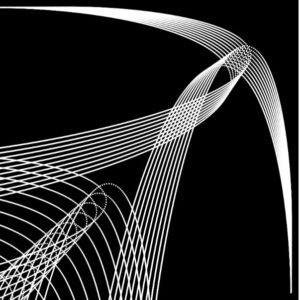
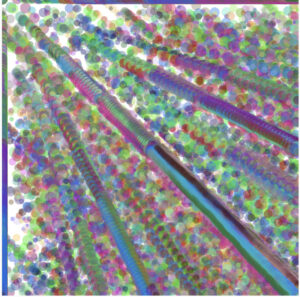 In this image, I made the movers towards the South East.
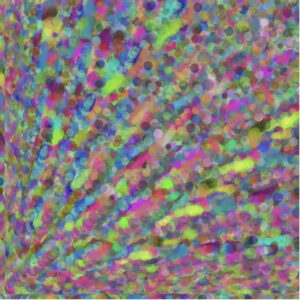 In this image, I made it go up to the North East but because all areas of the canvas are covered, it looks more natural but the repelent force from the mouse coordinates is not visible enough.
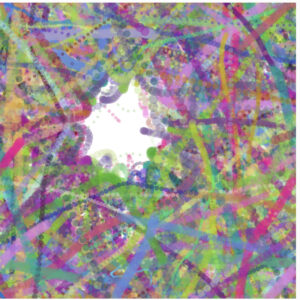 In this image, I made the repel force stronger and we can visibly see that in this image.